Quickstart checklist
This is your cheat-sheet. If you've read the other Getting Started pages, this is the five-second recap of everything that matters. Tick the boxes, and you're officially ready to build. Each item links to the deeper page if you want more.
You are ready when…
- You can get into Hideout (free, no download), from Discord or a link in any browser.
- You've created a world: picked a template, named it, and you're standing inside it. → Create your first world
- You know how to move and chat: W A S D to walk (or the on-screen joystick on mobile), type to chat. → The interface
- You can find Build Mode, the Edit button on the HUD. → Building Worlds
- You can find the Scripts editor: World settings → Advanced → Scripting. → The interface
- You know "draft vs. live": scripts auto-save as drafts, and players only see changes after you Publish.
That's the whole foundation. Everything else builds on top of it.
The 60-second cheat-sheet
Keep this handy. It's every "how do I…?" a new creator asks, in one table:
| I want to… | Do this |
|---|---|
| Make a new world | World Browser → Create tab |
| Rename my world | World settings → General (up to 30 characters) |
| Decide who can enter | World settings → Access (Private / Friends only / Public) |
| Decorate / place objects | Tap Edit on the HUD |
| Rotate an object | Select it, press R |
| Delete an object | Select it, press Delete |
| Change the lighting | World settings → Appearance → Time of day |
| Make my world react to players | World settings → Advanced → Scripting |
| Let players copy my world | World settings → Access → Allow remixing |
Good to know (don't get caught out)
A few facts that trip up brand-new creators:
- "Unlisted" is not "private." Hiding your world from Explore only stops it being listed. People with the link can still walk in. To actually keep people out, set the Access policy.
- You get 3 worlds. A regular account owns up to 3 created worlds at once. (Your apartment doesn't count.)
- Scripts need a trigger. A behavior with no "when this happens" block never runs.
Every script starts with a trigger like
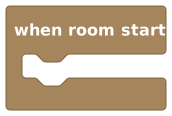 .
. - Drafts aren't live. If your changes don't show up for friends, you probably haven't pressed Publish yet.
- Floors and walls count as objects. Tiling a giant floor eats into your 8,000-object budget surprisingly fast.
Your first three missions
Want a tiny to-do list to actually do something? Try these, in order. Each one teaches a core skill and takes only a few minutes.
Decorate one corner
Enter Build Mode and furnish a single corner of your world: a rug, a couple of chairs, a rug. Don't do the whole place, just one nice corner. You'll learn placing, moving, and rotating. → Building Worlds
Make it say hello
Open the Scripts editor and build the classic first script: greet every player the moment they arrive. → Hello, World
Set the mood
Pop into World settings → Appearance and drag the Time of day slider. Watch your world go from bright midday to spooky midnight. → Building Worlds
Done all three? You've created, built, and scripted. That's the whole loop. From here, it's bigger and better versions of the same three moves.
Where to go next
The complete guide to Build Mode: every object type, signs, teleporters, and the rules of the grid.
Learn scriptingMake your world react and play. Start from zero, no coding needed, ever.
Scripting conceptsThe core ideas behind blocks: triggers, variables, scopes, and more.
Start hereStep-by-step first scripts: say hello, open a door, keep score.