What is Hideout?
Hideout is a cosy, pixel-art massively multiplayer game that runs right inside Discord and in any web browser. No download, no install, and it's totally free. You and your friends hang out in online worlds, and anyone can build those worlds. No coding. No gatekeeping. If you can drag and drop, you can make one. This page is the five-minute tour. By the end you'll know what Hideout is, what a "world" actually is, and the three things you're about to learn.
Think of Hideout as a giant box of LEGO that lots of people can play in at the same time. You make a space, fill it with stuff, and invite people in. They walk around as little pixel characters, chat, and play with whatever you built. It all happens live, in the browser, with your friends in the same world at the same time.
You reach Hideout two ways, and both are free: open it as an activity inside Discord, or open a link in any web browser. Nothing to download or install. The big promise is simple: anyone can build anything here, with no code at all.
The thing you build is called a world. A world is one online space you can walk around in, decorate, and make interactive. You'll also hear it called a room in a few places. Same thing, different name. Throughout these docs we'll say world.
In the code, a world is literally a "room" (the database table is even called
rooms). That's why a couple of menus say "room" instead of "world." It's harmless.
They mean the same space.
What can you build?
Pretty much anything that fits in a shared space. People make multiplayer games, social hangout spaces, all kinds of experiences, and even little cinematic movies. Here are the three big shapes most worlds take:
A cosy place to chill with friends: a Stardew Valley-style farm, a clubhouse, your furniture, your vibe, your rules. Great first project.
A gameTag, obstacle courses, round-based party games, quizzes, escape rooms. Anything with rules, a score, and a winner.
An experienceShops, galleries, guided tours, little story scenes and cutscenes with talking characters (NPCs).
None of these are locked categories. They're starting ideas. A hangout can grow a minigame. A shop can have a chatty shopkeeper. You decide.
You do not need to code
This is the part people don't believe at first, so let's be clear:
You do not need to know how to program. You make the interactive parts of a world by snapping together visual blocks: digital LEGO bricks that read in plain English. A block might say "when a player joins, say hello." You drag it in, fill in the blanks, and it works. That's it.
The blocks live in the Scripts editor. The first time we mention a block, we'll show you a picture of it. Like this one, which runs the moment your world starts up:
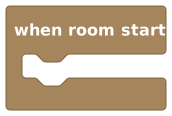 A block. You snap these together. No typing code, ever.
The three things you'll learn
Everything in these docs builds toward three skills. In order:
Make a world
Pick a starter template (a pre-built starting point) and you instantly have a space to build in. You'll do this in about a minute on the next page.
Build it in Build Mode
Turn on Build Mode (build mode) and drag and drop objects, furniture, signs, teleporters, and more, Sims-style. This is the decorating part.
Bring it to life with scripting
Open the Scripts editor and snap blocks together so your world reacts. It greets people, opens doors, keeps score, runs a game. No typing code.
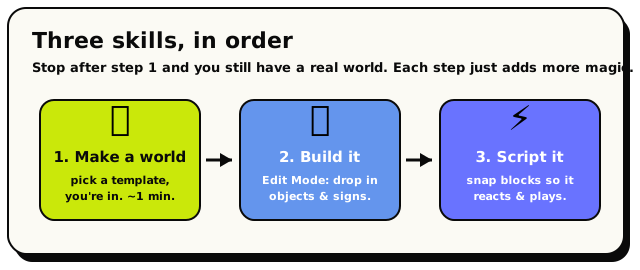 The whole path: make a world, build it out, then bring it to life. Each step is optional.
You can stop after step 1 and still have a real world your friends can visit. Each step adds more. And here's the comforting bit:
Nothing you pick is permanent. The name, the template, who can enter, every object: all of it is editable at any time. There's no "wrong" first move, so start.
What's next?
A quick hands-on walkthrough. From zero to standing inside your own world in about a minute.
Tour the interfaceGet your bearings: moving around, chat, the HUD, and where to find Build Mode and the Scripts editor.
Quickstart checklistThe one-page cheat-sheet of everything a new creator needs to know.