How Blocks Fit Together
You've already snapped blocks together, so you know it works. This page explains why it works: the four block shapes, how plugs fit into sockets, what the colours are telling you, and why a "player" slot will only ever accept a player. Once this clicks, you can read and build any script in Hideout, and the whole Block Reference suddenly makes sense.
Shapes have meaning
In the editor, the shape of a block tells you what it does and where it's allowed to go, exactly like real jigsaw pieces only fit certain neighbours. There are four shapes. Learn these four and you can read any script.
| Shape | Looks like | Job | Plain-English name |
|---|---|---|---|
| Event | a rounded cap on top | Starts a script when something happens | "When this happens…" |
| Action | a brick with a bump and a notch | Does one step | "Do this." |
| Value | a rounded plug | Hands back a value (a number, a player…) | "…this value." |
| Yes/No | a pointy hexagon plug | Hands back a yes/no answer | "…is this true?" |
The mental model that ties them together: a script is a recipe. The hat is the heading. The stack blocks are the numbered steps. Value and boolean blocks are the ingredients you slot into a step.
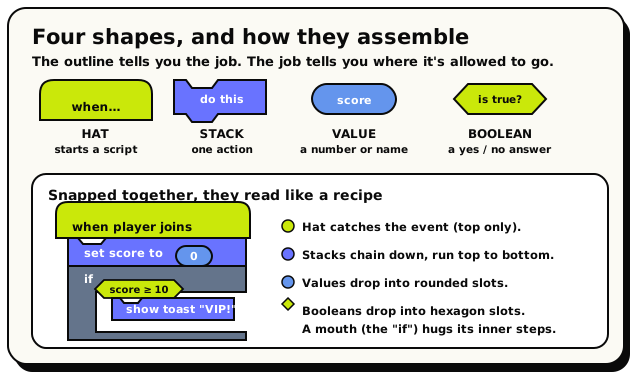 The four shapes on their own (top), then snapped into a real script (bottom): a hat catches the event, stacks chain below it, and values and booleans drop into the slots.
This is the same block grammar Scratch uses, the tool millions of people learn to code with. Scratch calls its top blocks "hat blocks" too, and its steps "stack blocks." If you've built anything in Scratch, Blockly, or MakeCode, you're not learning a new system here, just a new set of blocks for your Hideout world.
Event Hat blocks: "when this happens"
A hat block is the only kind that can sit at the very top of a script. It has no notch on top, so nothing can connect above it, because nothing comes before "when X happens." Hats are how scripts start.
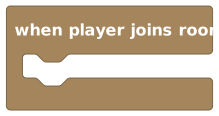 A hat block. Notice the rounded cap on top: nothing snaps above it.
Think of a hat as the title of a to-do list: "WHEN A PLAYER JOINS:" and then a list of things to do, indented underneath.
Action Stack blocks: "do this"
Stack blocks are the steps. They have a bump on top and a notch on the bottom, so they chain into a vertical column, like LEGO bricks stacked in a tower. The world runs them in order, top to bottom.
 A stack block. Bump on top, notch on the bottom, so it links into the column above and below it.
Some stack blocks have a mouth, a C-shaped opening that wraps around other stack blocks. Those are the loops and the "if" block. The C-shape literally hugs the steps that belong inside it.
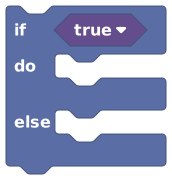 An 'if' block. The C-shaped mouth wraps around the blocks that should run when the condition is true.
Value Value blocks: "give me this value"
A value block doesn't join the vertical stack. Instead it has a plug (a rounded tab) that fits into a matching socket (a rounded hole) on another block. It reports a value: a number, some text, a player, an object, and so on.
 A value block. The rounded plug on its left fits into a rounded socket on another block.
Think of a value block as a question you can ask at any moment that always comes back with an answer: "where is the door?", "how many players are here?". You drop the question into a slot, and the answer flows in when the script runs.
Yes/No Boolean blocks: "is this true?"
A boolean block is a special value block whose answer is always yes or no (true or false). It's drawn as a pointy hexagon so you can spot it instantly, and it only fits into hexagon-shaped sockets, mostly the condition slot on an "if" block.
 A boolean block (a comparison). The pointy hexagon shape means 'this answers yes or no'.
A boolean is a light-switch reading: on or off, never "maybe." The hexagon shape is the editor's promise that you can only put yes/no things where a yes/no answer is needed.
Plugs & sockets: how blocks connect
Every place a value goes is a socket, a hole shaped to accept a certain kind of plug. Look at a finished sentence and you can see it:
 has a socket for a number, and you plug a
number value (like ) straight into it. The block
reads "wait 1 seconds." Snap a different number value in and it waits that long instead.
has a socket for a number, and you plug a
number value (like ) straight into it. The block
reads "wait 1 seconds." Snap a different number value in and it waits that long instead.
The rule is simple and physical:
If a plug and a socket fit, they click. If they don't fit, they won't.
That "won't click" feeling isn't the editor being fussy. It's the editor catching a mistake for you, before it can ever cause a problem. A text plug will not enter a number socket, the same way a square LEGO stud won't fit a round hole.
You can't accidentally feed the wrong kind of thing into a block. The shapes make whole categories of mistakes impossible. When something won't snap, don't fight it. Read what the socket wants, and grab the matching block.
Colours = categories
Every block is colour-coded by the drawer it came from, so you can recognise families by eye before you read the label:
| Colour | Category |
|---|---|
| green | Triggers (the hat blocks) |
| sky blue | Players |
| orange | Objects |
| cyan | Text |
| slate | Control Flow (if, wait, loops) |
| pink | Logic (and/or/not, compare) |
| amber | Number |
| teal | NPCs |
| violet | Cinematics |
| purple | Variables |
Colour helps you spot the right block fast, but it doesn't decide whether two blocks connect. The shape and the socket do that. Two blocks of the same colour still won't click together if their slots disagree.
Shadows: the grey "fill-in-the-blank" defaults
When you drag out a block with an empty socket, the editor doesn't leave a scary hole. It drops in a shadow, a soft, greyed-out default value already sitting in the slot, pre-filled with something sensible you can type right over.
This is the friendliest feature in the whole editor, so lean on it:
- A shadow looks faded compared to a normal block. It's a placeholder you can edit in place: type a new number, new text, whatever.
- Drag a real value block on top of a shadow and the shadow politely disappears. Drag the real block away again, and the shadow comes back.
- A shadow is a real value when the script runs. If you leave untouched, it does wait one second.
Here are the exact defaults a few common blocks ship with, so you know what to expect:
| Block | Comes pre-filled with |
|---|---|
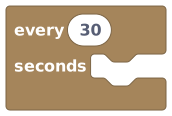 | every 30 seconds |
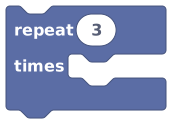 | repeat 3 times |
| wait 1 second |
 | NPC says "Hello!" |
 | a random number from 1 to 100 |
A shadow is a real default value, not a blank. People sometimes ignore an untouched shadow thinking it does nothing, but "wait 1 second" really waits, and "repeat 3 times" really repeats three times. Type over the shadow whenever you want a different value.
When there's no safe default: "Missing" placeholders
Some slots need a real thing from your world: a specific object, area, player, or NPC. The editor will never secretly pick one for you (imagine it quietly grabbing "some random player," chaos). So instead of a shadow, it drops in a loud Missing placeholder that means "you still need to choose this."
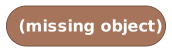 A 'Missing object' placeholder. It's a sticky-note that says: pick a real object before you publish.
These blocks do you a favour: a Missing placeholder will not publish. You'll see an error like "Choose an object before validating or publishing," which stops you from shipping a half-finished script. Pick a real reference, and the error clears.
The type system, in plain English
Every value in Hideout has a type: what kind of thing it is. A socket says which type(s) it accepts, and only matching plugs fit. That's the whole "type system." Here are the everyday types you'll meet:
| Type | What it is |
|---|---|
| Number | Any number: 7, 3.5, -2. |
| Text | Letters and words, like "open sesame". |
| Yes/No | Yes or no: true / false. |
| Player | One player. |
| Object | One object in the room. |
| NPC | One NPC. |
| Area | A rectangle of floor in the room. |
The promise is simple: a Player slot only takes a player. You
can't drop a number, or text, or an object into it. Only a player value (like
 , "the player who triggered this event") will
click in. That's why scripts so rarely "do the wrong thing": the wrong kind of thing
can't get in.
, "the player who triggered this event") will
click in. That's why scripts so rarely "do the wrong thing": the wrong kind of thing
can't get in.
A couple of details for the curious (you don't need these to build, but they explain edge cases):
- Whole numbers fit number slots. A whole number is a number, so it's accepted anywhere a number is wanted.
- Sockets can accept a small set of types. Some slots take more than one type. For example, the play-sound block accepts either a real sound or the text name of one.
- Some values "might be missing" (an optional player who may have left). Those get a deliberately different socket shape so a maybe-missing value can't sneak into a slot that needs a guaranteed one; you check it exists first.
- Shapes catch most mistakes instantly, but not all of them. A final, thorough check happens when you Validate or Publish, which is the real authority. So the habit to build: if a block won't click, fix it now; if you see a warning triangle, read it; and always hit Validate before Publish, the final spell-check.
Turning anything into a message
One block deserves a special mention because beginners reach for it constantly: to text (also called "cast to text").
 'To text' turns almost any value (a number, a position, a true/false) into readable text you can show in a message.
Want to show a score inside a toast? You can't drop a raw number into the middle of a
sentence, but you can wrap it in to text and glue it on with join text
(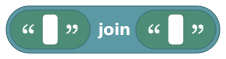 ), giving you something like
 "Score: " + 42. It's
the universal translator that lets you show any value to your players.
You can read any script now
That's the whole grammar:
- Four shapes (hat, stack, value, boolean) tell you what a block does.
- Plugs fit sockets, and only when they match, which is your safety net.
- Colours group blocks by family; shapes decide what connects.
- Shadows give you safe, editable defaults; Missing placeholders demand a real choice.
- Types keep the right kind of thing in the right slot.
Every block in the Block Reference is just one of these four shapes with a specific job. You now have the key to all of them.