Hello, World
This is the page where you go from "I've never scripted" to "I made my world do something." You'll build two tiny scripts, click by click, with a picture at every step. The blocks snap together like Scratch, so there's nothing to type. The first greets everyone who walks in. The second makes an object react when players touch it. Neither can fail. Let's go.
Open the Scripts editor for a room you can edit. If you're not sure how, the previous page walks you through it. Then come back here.
Part 1: Greet every player
We're building this rule:
When the room starts → show a toast that says "Welcome!"
A hat, an action, and one little value block. That's the whole thing.
Make a new behavior
In the sidebar on the left, click New behavior, type the name
Welcome, and click Create. A fresh, empty canvas opens. This is your blank page.Grab the “when room starts” hat
Open the Triggers category in the toolbox (the green one). Find when room starts and drag it onto the canvas.
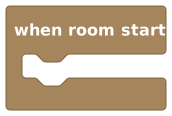 A hat block. It listens for the room to load, then runs whatever you snap underneath.
This is a hat block, the kind that always sits at the very top of a script. It's the "when" half of your rule. Nothing snaps above a hat, because nothing comes before "when this happens."
Grab the “show toast” action
Open the Cinematics category, find the Text Effects group, and drag out show toast. Snap it into the mouth of the hat, the little notch just under "when room starts." You'll feel it click.
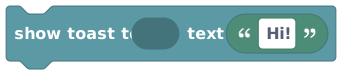 An action block. It pops a little message on screen. It reads 'show toast to … text …' and comes with the text already filled in.
See the text already sitting in the block? That's a shadow, a ready-to-go default value you can type right over. You never start with an empty hole. (More on shadows on How Blocks Fit Together.)
Say who sees it
The toast block reads show toast to … text …, so it needs to know who gets the message. Open the Player Info category, drag out all players, and plug it into the show toast to slot. (For a room-start greeting there's no single "triggering player" yet; everyone in the room is the audience.)
 The 'all players' value. Plugged into the audience slot, it sends the toast to everyone in the room.
Type your message
Click the text inside the toast block and type whatever you like, like
Welcome to my world!. Your script now reads, top to bottom:when room startsshow toast to all players, text "Welcome to my world!"That's a complete, working script. Read it out loud: "When the room starts, show all players a toast that says Welcome to my world." It does exactly what it says.
Publish it
Hit the lime Publish button in the top bar. The editor compiles your draft and makes it live. A little message confirms it's published, and your behavior's dot in the sidebar turns green.
GotchaUntil you Publish, your script is just a private draft, so players see nothing. Green dot = live. Amber dot = you forgot to Publish.
See it work
Close the editor and reload the room (or have a friend join). The toast pops up: "Welcome to my world!"
Why does it greet me every time?"When room starts" fires every time the room loads, not just once forever. Rooms unload when nobody's around and load again when someone returns, so the welcome fires fresh each time. That's perfect for a greeting. (If you ever need something to happen truly once, you'll use a variable to remember it, a trick for later.)
You just shipped a script. Take the win. The same pattern (hat on top, action underneath, type over the shadow, Publish) builds every script in Hideout. You already know the move.
Part 2: A button that reacts
A welcome is nice, but let's make the world react to a player doing something. We'll make an object respond when someone touches it.
We're building this rule:
When a player interacts with
[this object]→ show them a toast.
Pick an object to be your button
Place any object in your room: a sign, a lever, a treasure chest, anything. This is going to be your "button." Note roughly where it is; you'll point at it in a moment.
Make another behavior
Back in the editor, click New behavior again. Name this one
Button, and Create. (Yes, you can have as many behaviors as you want, each doing its own little job. They all run side by side.)Grab the “object is interacted with” hat
From the Triggers category, drag out when object is interacted with.
 Fires when a player clicks/touches the chosen object. It has a slot where you pick WHICH object.
Notice this hat has a slot for an object, because "when an object is interacted with" only makes sense if you say which object.
Choose your object
In the hat's object slot, pick the object you placed. The object block has a small Select object picker button next to its dropdown: click it, and the editor lets you click your object right there in the room. Click your button object to lock it in. (You can also choose it straight from the dropdown.)
Gotcha: you must choose a real objectIf you leave the slot showing a "Missing object" placeholder, the script won't publish. That's on purpose, so you never ship a half-finished button. Choose a real object and the warning clears.
Add a toast for the player who touched it
From Cinematics → Text Effects, drag show toast into the hat, just like before. Type a message:
You found the secret button!This time, instead of "all players," send the toast to whoever pressed the button. Open Player Info, drag out triggering player, and plug it into the show toast to slot. Now only the person who touched it gets the message.
Same friendly toast block as Part 1, so reuse what you know. Send it to the 'triggering player' so only they see it.Your script now reads:
when object [your button] is interacted withshow toast to triggering player, text "You found the secret button!"Publish and play
Hit Publish. Close the editor, walk up to your button, and interact with it. The toast appears. Touch it again and it fires again, every time. You built an interactive object.
You just used triggering player, "the player who just did this." It only appears inside hats where a player caused the event (like "interacted with"). You can drop it into other blocks too, to do something to that specific player. It's how you'd, say, give points only to the person who pressed the button. You'll use it constantly. (Full details on Events & Triggers.)
 “Triggering player”: the player who set off the event. Only appears under hats where a player caused it.
Look what you can already do
Two short builds in, and you've used the entire core loop of scripting:
- A hat block to listen for something (
when room starts,when object is interacted with). - An action block to make something happen (
show toast). - A shadow value you typed over (your message text).
- A value block plugged into a slot (
all players/triggering playeras the audience). - Choosing a real object so the script knows what it's about.
- Publishing to make it live.
That is not "beginner stuff you'll outgrow." It's the actual skeleton of every script a pro builds in Hideout: scoreboards, doors, minigames, shops. They're just more blocks snapped onto the same frame you just learned.