What Is Scripting?
Hideout is a cozy pixel-art game you and your friends hang out in, inside Discord and in the browser, for free. Scripting is how you give your own world a brain. A door that opens, a scoreboard that counts, an NPC that says hello: all of it is built by snapping colourful blocks together. There's no typing real code, no secret words to memorise, and nothing to break. This page explains the one idea behind all of it.
The one big idea: "when this → do that"
Every script you will ever build answers the same simple question:
When this happens, do that.
That's it. That's the whole secret. A script is just a rule you write for your world:
- When a player joins the room → show a welcome message.
- When someone touches the treasure chest → play a sparkle sound.
- When 30 seconds go by → change the lights.
You pick the "when" (something that happens), and you pick the "do" (what should happen because of it). Snap them together, and your world starts reacting on its own.
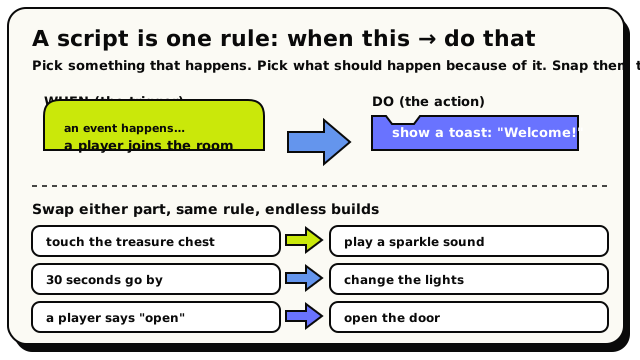 Every script is one rule: a 'when' (the trigger) snapped to a 'do' (the action). Swap either side and you get a whole new behaviour.
If you can say it as "when X happens, do Y," you can build it. Keep that sentence in your head and the rest of scripting falls into place.
It's drag-and-drop blocks (like Scratch)
You don't type any real code. You build with blocks, little puzzle pieces you drag out and snap together. If you've ever built with LEGO, you already understand the rules:
- Each block is a piece that does one thing.
- The pieces only fit together in ways that make sense. A piece literally won't click into the wrong spot.
- You stack them to describe what should happen.
Hideout scripting works just like Scratch, the block-based tool that millions of people use to learn to code. You drag colourful blocks that snap together, and you never type code. If you've used Scratch, Blockly, or MakeCode in class or at home, you already know the moves: it's the same idea, pointed at your own little game world.
Hideout's blocks are colour-coded and shaped so you can tell at a glance what each one is for. A block that starts a script looks like a hat. A block that does something looks like a brick that stacks. You'll learn the shapes on How Blocks Fit Together, but you can start building before you know any of that, because the editor only lets pieces snap where they belong.
A tiny example
Here's a real, complete script. It's two blocks. The first is an event, a hat-shaped block that listens for something to happen. The second is an action, a brick that does something.
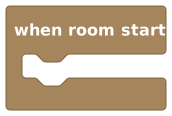 The hat block: 'when room starts'. It listens for the room to load.
That hat says "when room starts." Underneath it, you snap an action:
 The action block: 'show toast'. A toast is a little pop-up message.
Read top to bottom, the two blocks together say:
When the room starts → show a toast that says "Welcome!"
A toast is the little message that pops up on screen and then fades away on its own, like the notifications your phone shows. It's the easiest way to say something to your players, which is why we'll use it in your first build.
That two-block script is all you need to make your world greet every visitor. You'll build it for real, click by click, on the Hello, World page.
Why scripting is not scary
People hear "scripting" and picture a black screen full of typing. Hideout is the opposite. Here's why you can relax:
- Nothing to memorise. Every block lives in a labelled drawer (the toolbox). You browse and drag, you don't recall.
- You can't make a mess. Blocks only snap where they fit. If a piece won't click, that's the editor catching a mistake for you, before it can cause a problem.
- You can't break the live world by accident. Your edits are saved as a private draft. Players keep seeing the old version until you choose to Publish, so tinker all you like.
- You can always undo. Drag a block off, drop it somewhere else, change your mind. Nothing is permanent until you publish, and even then you can re-publish.
You do not need to finish these docs before you build something. The fastest way to "get it" is to open the editor and drag two blocks together. The next page shows you how to open it; the page after that builds your first script.
What a finished script looks like
Once you start stacking, a script reads almost like a to-do list with a title. Here's a slightly bigger one in plain words, a hat with a few actions underneath:
when player joins room          ← the event (the "when")
  show toast "Welcome!"         ← actions (the "do that"),
  wait 1 second                   run in order, top to bottom
  set object [Door] state to "open"
The hat is the heading. The bricks underneath are the steps, and the world runs them in order, from top to bottom, like following a recipe. Add more bricks, and your world does more.