Objects
Objects are the stuff your world is made of: chairs, walls, rugs, lamps, signs, the whole lot. Every one you place is a real, separate thing with its own name tag, the instance ID, and that tag is exactly how scripts say "this door" instead of "any door." This page covers what objects are, where to get them, and how to point at one.
What is an object?
An object is a single placeable thing in your world. A chair is an object. A wall tile is an object. A floor tile, a lamp, a teleporter, a sign: all objects. If you can drag it onto the grid in Build Mode, it's an object. Objects are what you decorate with, the furniture you lay out to make a space your own, just like dressing a room in The Sims.
Think of objects like LEGO bricks. There are many kinds of brick (a 2×4 red brick, a wheel, a window). But once you snap a brick into your build, it's one specific brick sitting in one specific spot, different from every other brick, even the ones that look identical.
Some sittable objects have more than one sitting point. Each point is a separate seat, so a two-seat sofa can hold two players at once. Interact with the open side of the furniture to use that seat. Taking a seat plays a spatial sound for the sitter and other players, with the same distance fade as footsteps.
Where objects come from: the picker
When you enter Build Mode, a panel slides up from the bottom: the object picker (sometimes called the marketplace). It's your catalogue of everything you can place. It's split into tabs:
| Tab | What's inside |
|---|---|
| Construction | Floor and wall building tools: wall tiles, floor tiles, doors, windows |
| Objects | Curated furniture and décor, grouped by room (Living Room, Bedroom, Kitchen, and so on) |
| Everything | The full catalogue of every object |
| Inventory | Objects you already own |
You can filter by colour and sort by price or by newest / oldest to find things fast.
Some objects you already own (your inventory), and placing those is free. Others cost coins. When you're about to place something that costs, a little price pill shows up so there are no surprises. If a purchase doesn't go through, you'll see "Purchase failed!" and the object stays in your hand so you can try again.
Every object has an instance ID
Here's the big idea of this whole page. The moment you place an object, it's given a unique instance ID, a number that belongs to that one object and no other.
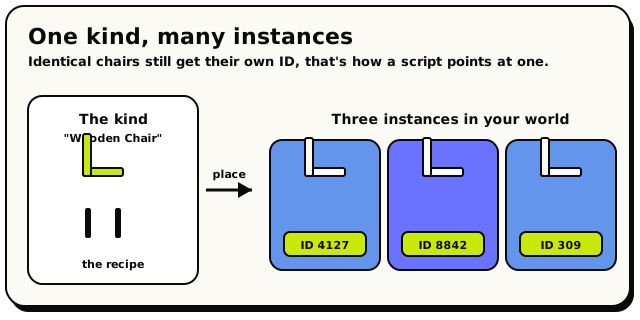 The chair 'kind' is the recipe; each one you place is a separate instance with its own ID.
- Place two identical chairs, and they get two different instance IDs.
- The ID is permanent for that object. It's how the game (and your scripts) tell one specific thing apart from everything else.
An instance just means "one actual copy of a thing." There might be a hundred copies of the same chair kind in the world, but each placed copy is its own instance with its own ID. The kind is the recipe; the instance is the cake you actually baked.
Instance IDs are whole numbers. Freshly placed objects get a random ID somewhere between 1 and 999,999 (never zero), and the game keeps rolling until it finds one that isn't already taken in that world. Objects you personally own use a separate range above 1,000,000, so the two pools never clash. You'll rarely need to know the exact number; the editor shows it to you when you pick an object.
Selecting and finding an object
There are two ways to grab hold of a specific object.
In Build Mode, just tap it. It becomes selected, and you can move, rotate, or delete it (see Build Mode).
In a script, you point at an object with the  The Object block: choose one specific object in your world.
block. It can do two things:
The Object block: choose one specific object in your world.
block. It can do two things:
- A dropdown that lists every object in your world, so you can pick one by name.
- A picker button that opens your live room so you can click the actual object to choose it. When you do, it shows you that object's name, its instance ID, its kind, and its position, handy for double-checking you grabbed the right one.
When a script is attached to an object, or runs because someone interacted with one,
you usually don't need to pick it by name at all. The  Triggering Object: means 'the object this is about', no picking needed.
block means "me" or "the object that triggered this." It makes scripts reusable:
the same script works on every door without naming a single one.
Triggering Object: means 'the object this is about', no picking needed.
block means "me" or "the object that triggered this." It makes scripts reusable:
the same script works on every door without naming a single one.
Objects and scripting
This is where objects and scripting meet. Almost every object block needs you to tell it which object, and that's exactly what the instance ID is for, working quietly behind the scenes.
In the scripting language there's an object type: a value that means "a specific
object in the world." The and
blocks both hand you one (and so does
 , right after a script creates an object;
more on that below). You then plug that into any block that acts on an object, like:
, right after a script creates an object;
more on that below). You then plug that into any block that acts on an object, like:
-
 Read where an object is.
-
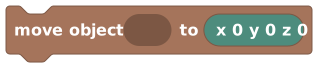 Move an object to a new spot.
-
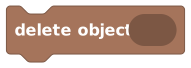 Remove an object from the world.
Scripts can also create objects.  Create a new object from the catalogue; it hands you the new object via 'last spawned object'.
conjures a brand-new object from the catalogue at a position you choose, and for the rest
of that run is the handle to it, so you can
move it, change its state, store it in a variable, or delete it later.
Create a new object from the catalogue; it hands you the new object via 'last spawned object'.
conjures a brand-new object from the catalogue at a position you choose, and for the rest
of that run is the handle to it, so you can
move it, change its state, store it in a variable, or delete it later.
There's also a useful starting block,  Runs when a player interacts with the object you choose.,
which kicks off a script whenever a player interacts with an object. Tick its
"highlight when nearby" option to draw a glow around the object and show a short hint
like "Press to open" when a player steps close.
Runs when a player interacts with the object you choose.,
which kicks off a script whenever a player interacts with an object. Tick its
"highlight when nearby" option to draw a glow around the object and show a short hint
like "Press to open" when a player steps close.
If your world has no objects at all, the picker shows a
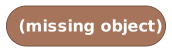 placeholder instead of a real choice. It's not a
block you drag in; it's the editor saying "you haven't picked an object yet." Place
(or pick) a real object and swap the placeholder out before you publish.
placeholder instead of a real choice. It's not a
block you drag in; it's the editor saying "you haven't picked an object yet." Place
(or pick) a real object and swap the placeholder out before you publish.
What's next?
Objects can change: open/closed, on/off. Learn states and how scripts read and set them.
Special objectsSigns, teleporters, spawners, and other objects that actually do things.
Build ModeThe full how-to for placing, moving, rotating, and deleting objects.
Object blocksEvery block for pointing at and acting on objects, with pictures.