Special Objects
Most objects just sit there looking good. Special objects actually do things: signs show messages, teleporters whisk players across the room, spawners create new objects. This page covers each one: what it does, how to set it up in Build Mode, and how a script can take the wheel.
Quick tour
Show text or a pixel-art emoji. Great for welcomes, hints, and live scoreboards.
TeleportersJump a player from one spot to another inside the same world. Matched by a code.
Object spawnersAn object that creates other objects, on a timer or when triggered.
Signs
A sign is a wall decoration that shows a message. Tap one in Build Mode and a little editor pops up with two modes: Text and Emoji.
Text signs
Type a message and it appears on the sign for everyone in the room. There are a couple of limits to keep signs readable:
| Limit | Value |
|---|---|
| Maximum lines | 5 lines |
| Maximum characters | 140 characters |
| Allowed characters | Letters, numbers, common symbols, and € (the font's character set) |
Spaces and blank lines are kept exactly as you type them, so you can lay text out nicely.
Emoji signs
Prefer a picture? Switch to Emoji mode and pick from a grid of built-in pixel-art icons (like a heart). The sign shows that icon instead of words. You can only use the built-in icons, not any random emoji.
Driving signs from scripts
Here's the magic: you can change what a sign says while your world is running. Show a live score, a countdown, or a hint that updates as players move.
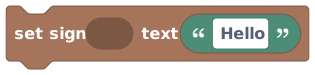 Set Sign Text: update what a sign says, live, for everyone in the room.
Set Sign Text rewrites a sign's words. Use it for a scoreboard ("Score: 12"), a welcome that uses the player's name, or a hint that changes as the game goes. The same line limits and allowed characters apply.
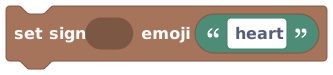 Set Sign Emoji: switch a sign to show a built-in icon by name.
Set Sign Emoji swaps a sign over to one of the built-in icons by name (such as
red_heart). Handy for status lights and simple emoji-style feedback: a green tick when a
puzzle is solved, for instance. You must use one of the supported icon names.
A sign stores what it shows as its state, either
text:... or icon:.... That's why changing a sign feels just like changing any other
object's state. You don't have to think about this to use signs; it's nice to know
why the two ideas line up.
Teleporters
A teleporter moves a player from one spot to another within the same world. Step onto one and you pop out at a matching one somewhere else in the room.
The trick is the code. Teleporters find their partners by sharing a code:
- Tap a teleporter in Build Mode and you get a "Choose teleporter code" box.
- Type a code (anything up to 32 characters) or pick one you've used before from the dropdown (it even shows how many teleporters already use each code).
- Any two teleporters with the same code are now linked.
Teleporters only connect when their codes match, and they only move players around inside the same world. Two teleporters with different codes won't link, and a teleporter can't carry a player out to a different world.
A teleporter's code is only shown to people who are allowed to build in that world. Visitors who can't edit can still use the teleporter, but they can't read its code.
Object spawners
An object spawner is an object that creates other objects. Think of a treasure chest that coughs up coins, or a machine that drops a new block every few seconds.
Tap a spawner in Build Mode to open its "Object Spawner Config", where you choose:
- What it spawns: one or more objects it can produce.
- How it picks the next one: round robin (take turns), random, or weighted (some show up more often than others).
- When it fires: manual (only when triggered) or auto (on a timer; the timer can't be faster than every half-second).
- Where it drops the object: within a radius, or right in front of the spawner.
A spawner can be set off manually by a player interaction or by a script, making it a great engine for games and surprises.
The spawner editor works with raw object numbers, so it's aimed at builders who are comfortable getting their hands dirty. Don't worry if it looks more technical than the rest; you can build a whole great world without ever touching it.
Scripts can create objects on their own with the  block: pick an object from the catalogue, give it a position and a facing, and it appears.
When you already have a script, that's usually simpler than configuring a spawner, and the
new object comes straight back to you as
block: pick an object from the catalogue, give it a position and a facing, and it appears.
When you already have a script, that's usually simpler than configuring a spawner, and the
new object comes straight back to you as  .
.
How special objects fit with scripting
Special objects are still ordinary objects under the hood,
so everything you've learned applies: each has its own instance ID, you point at it
with the  block, and many respond to
states and transitions. On top of that, signs get
their own dedicated script blocks ( and
) so you can drive them live as your world
plays.
block, and many respond to
states and transitions. On top of that, signs get
their own dedicated script blocks ( and
) so you can drive them live as your world
plays.