Troubleshooting
The causes below are roughly in order of "most common." Start at the top, check each one off, and you'll usually find the culprit within the first three.
The 60-second checklist
Before diving in, run through this. Most problems are on this list.
- Did you Publish? (Editing only saves a draft.)
- Is the behavior Enabled? (Grey dot = disabled.)
- Does your stack start with a hat block (an event)?
- Did you Validate and clear all red errors?
- Are any slots showing a "Missing …" block or an empty hole?
- Are you using the right event for what you expect?
- Did the event actually happen while you were watching?
If all seven are ticked and it still misbehaves, read on for the details.
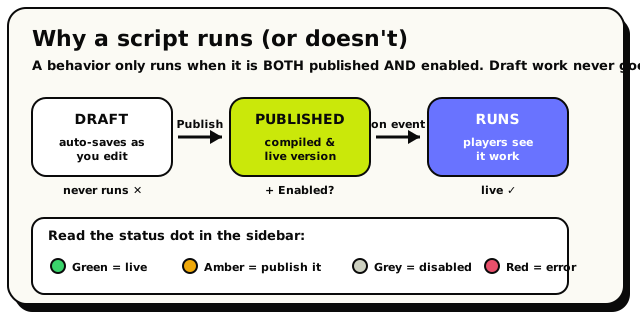 The path a script must travel to run, and the sidebar status dot that tells you where it's stuck.
Cause 1: It's only a draft (not published)
This is the number one cause, every time.
Editing your blocks auto-saves a draft. Drafts never run for players. The room keeps running the last published version until you publish again.
How to fix: click Publish (the lime button). Watch for the "Published! …is live" confirmation. The amber "Unpublished" chip in the top bar is your reminder that you have draft changes that aren't live yet.
Validate only checks your draft; it does not go live. If you only ever click Validate, players never see your changes. Validate to catch errors, then Publish to make them real.
Cause 2: The behavior is disabled
A behavior must be published and enabled to run. Disabling is a separate switch from publishing.
How to spot it: look at the status dot on the behavior in the sidebar:
| Dot | Meaning |
|---|---|
| Green | Enabled and published; this one runs. |
| Amber | Enabled but draft-only, so publish it. |
| Grey | Disabled; won't run even if published. |
| Red | Has a compile error; fix the diagnostic. |
How to fix: open the ⋯ More menu and choose Enable.
Cause 3: No hat block (loose blocks)
Every runnable stack must start with an event hat: "when player joins," "when object is interacted with," "every N seconds," and so on. A stack of action blocks with no hat on top is a loose block: it's saved, but it never runs.
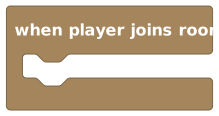 Every stack needs a hat like this on top
How to fix: drag an event hat from the Triggers category and snap your action blocks underneath it. If you're not sure which event to use, check Every event.
A stack that looks complete but has no hat does nothing at all: no error, no warning you'll necessarily notice. If a chunk of logic seems totally ignored, check whether it has a hat.
Cause 4: Wrong event for the job
Sometimes the script is running, just not when you think it should.
Common mix-ups:
- "When room starts" fires when the room loads, not when a player arrives. To react to a player, use "when player joins room."
- "When room starts" fires on every load, not once forever, so your "one-time" setup may run again and again. Guard it with a room variable.
- "When player says phrase" with contains fires on any message holding your word. If you wanted an exact password, switch the menu to equals.
- Grabbed vs un-grabbed, added vs deleted: these target different things. "Un-grabbed" and "added" are room-wide; "grabbed" and "deleted" target one specific object.
How to fix: open Every event and confirm the hat you picked really fires on the thing you expect.
Cause 5: A missing or empty slot
If a block has an empty slot, or shows a bright "Missing object / area / player / state / NPC" placeholder, your script won't publish.
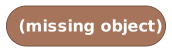 A 'Missing object' placeholder: pick a real object to clear it
This happens when:
- You dropped a block but never chose its object/area/player/state/NPC.
- You pointed a block at something (say, a door) and later deleted it, so the block keeps the old name but can no longer resolve it.
How to fix: click the placeholder and choose a real reference. The error reads "Choose a … before validating or publishing."
Most slots come pre-filled with a grey shadow (a real default value). A slot is only a problem when it shows a "Missing …" placeholder or a genuinely empty hole. That's the editor telling you to pick something.
Cause 6: "Triggering player" under the wrong hat
The triggering player block (and triggering NPC, and message text) only work under certain events. Use one where it doesn't belong and the script won't publish.
- Triggering player isn't available under: room starts · every N seconds · object state changes · any object added · object deleted · NPC finishes walking.
- Message text works only under "when player says phrase."
- Triggering NPC works only under the two NPC events.
How to fix: if there's no triggering player in your event (like "every N seconds"), use all players or a computed group instead. See the full availability list.
Cause 7: A reference went stale after a wait
A handle (like the triggering player) points at someone right now. If your script waits, that player might leave before it resumes, and then "do something to that player" quietly does nothing.
How to fix: if you act on a player (or object) after a wait, check they're still around first. This is part of a wider rule that's good to know: when you aim an action at a player who has left, or an object that was deleted, the action does nothing. It won't crash your script or throw an error. It quietly skips.
Cause 8: The run hit the gas limit
Every run has a work budget called gas. A huge loop can run out of it. When that happens, the run stops partway.
Signs: in the Inspector's Runs tab, a run shows as failed (a rose pill) instead of completed. A run that crosses the soft warning level (10,000) keeps going but is being watched; one that hits the hard limit (1,000,000) fails with "Script exceeded its gas budget."
How to fix: shrink your loops. A loop body of 50 steps × 5,000 times is 250,000 steps of work. Prefer reacting to events over looping to poll for things.
If a run stops partway, two different things happen. Any variable it changed since its last wait is rolled back, as if those changes never happened. But any world action it already did (moving an object, teleporting a player) stays done. So a half-finished run can leave your world in a partly-changed state. Build your scripts so that running them again is always safe, and don't assume a run reaches the end.
Cause 9: Someone else is editing it
If the canvas shows "{name} is editing this script," another person holds the edit lock. You can't edit (and Validate/Publish are disabled) until they close it or move to another behavior. If they vanish, the lock frees itself after about 90 seconds.
Cause 10: The world blocked the tap (proximity & locks)
Two world-building features change what a click on an object does, and both can look like "my script is broken" when they're doing their job:
- Proximity interactions (World Settings → Advanced): when it's on, a tap from more than ~5 tiles away does nothing: no state change and no interact event. If your trigger fires up close but not from across the room, this is why. Walk closer, or turn the setting off.
- A locked object flips the other way: the interact event does fire, but the object's own state won't budge from taps. If "the door opens from my script but not when players click it," check whether the object is locked (select it in build mode; the L pill shows its lock state).
How to fix: decide which behaviour you actually want. Locks are usually the point (your script drives the object); proximity is a world-wide choice made in World Settings.
Reading the Diagnostics and Runs tabs
The Inspector (top-bar button) is your best friend for debugging:
- Diagnostics lists compile problems for your current draft. Errors (rose) must be fixed before publishing; warnings (amber) are worth a look. Click any diagnostic to jump straight to the block it's about.
- Runs shows recent executions: the behavior name, whether each run
completedor failed, and the event that triggered it. Empty? Then your event hasn't fired yet, so go trigger it.
Still stuck? A worked diagnostic
- Published? Check for the amber "Unpublished" chip; if it's there, Publish.
- Enabled? Green dot? If grey, enable it.
- Right event? It should be "when player says phrase." Is the matcher set to equals for an exact password (not contains)?
- Filled in? The phrase slot has your password, and the
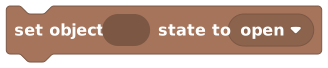 Set Object State block points at the real door (no "Missing object" placeholder).
 - Validate. Any red errors? Fix them, then Publish again.
- Test and watch the Runs tab. Say the password. A run should appear. If it's
completedbut the door didn't move, check the state name you set is one the door actually supports.