Publishing & Limits
You've built something cool. Now let's make it real. This page walks through how a script goes from "I'm editing it" to "players can see it," and the handful of runtime limits worth knowing, explained gently, with the common traps called out. Don't worry: the room has guardrails, and they're hard to fall off.
The lifecycle: draft → validate → publish → enable
Every behavior (a behavior is one rule, one script; see Projects & Behaviors) goes through a few stages on its way to running for players. Two of them, Published and Enabled, are switches that both have to be on. People mix these up, so let's go through each stage slowly.
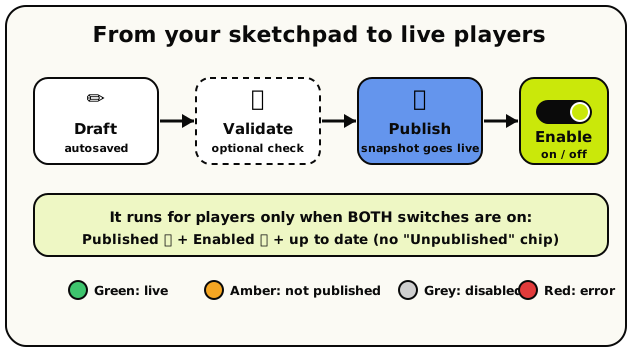 Draft autosaves, Validate is an optional check, Publish puts a snapshot live, and Enable is the separate on/off switch. Both Published and Enabled must be on.
1. Draft: your work in progress
While you snap blocks together, the editor autosaves a draft for you. You'll see "Saving…" then "Draft saved" in the top bar. A draft is your private sketchpad.
This is the big one. Editing blocks changes only your draft. Players in the room keep seeing the last version you published until you publish again. You can experiment freely, and nothing you type goes live by accident.
2. Validate: check it without going live (optional)
There's a Validate button. It asks the server to compile your draft and tells you about any errors, but it does not make anything live. Think of it as a spell-check. Handy, but optional.
Validating shows you that your script would work. It does not put it in front of players. Nothing a player sees changes until you Publish.
3. Publish: make this version live
When you hit Publish, Hideout takes a frozen snapshot of your draft, compiles it, and loads it into your live room. You'll see a "Published! Script is live" message. From this moment, players experience your new version.
4. Enable: the on/off switch
Separately, each behavior has a simple on/off toggle (Enabled / Disabled). It's a light switch. A behavior can be published but switched off, and then it won't run.
All three together
For a behavior to actually run for players, all of these must be true:
| Switch | What it means | If it's off… |
|---|---|---|
| Published | You hit Publish at least once | Nothing runs; players see no version |
| Enabled | The on/off toggle is on | The published version is switched off |
| Up to date | You published your latest edits | Players see your older published version |
Each behavior in the list has a coloured dot:
- Green: enabled and published. It's live and running.
- Amber: enabled but never published. You forgot the Publish button.
- Grey: disabled (switched off).
- Red: there's an error in the draft to fix first.
If you make edits after publishing, an "Unpublished" chip appears, a nudge that your live room is running something older than what's on your screen.
Runtime limits: the friendly guardrails
Once your script is live, the room runs it. To keep every room fast and fair, each script run has a few limits. You'll almost never hit them by accident, but knowing they exist helps you understand the warnings if you ever do.
What "gas" means
Every time a script runs, Hideout gives it a budget of gas. Gas is just a count of how much work the script does. Roughly, each little step costs one gas.
Here's the key thing: a loop that runs its inside blocks 1,000 times does about 1,000 times the work, so it costs about 1,000 times the gas. Most scripts use a tiny sliver of their budget. A runaway loop, on the other hand, can chew through a lot of it.
A wait doesn't reset the gas counter. If a script does a heap of work, waits, then resumes, it carries its gas total with it. Waits pause time, not the budget.
The two limits to know
There are two lines in the sand, and they behave very differently:
| Limit | Roughly | What happens |
|---|---|---|
| Soft warning | ~10,000 gas | Your script keeps running. It logs a quiet "this one's working hard" note for the team. Nothing breaks. |
| Hard limit | ~1,000,000 gas | The run stops with "Script exceeded its gas budget." This is the safety net for a runaway script. |
The soft warning is not an error. Crossing it means your script did a lot of work and finished; it's being watched, in case a script genuinely needs that much. The hard limit is a true backstop: it only triggers if a script does so much work in one go that it could slow the room, so the room stops it rather than freeze.
To hit the soft warning, you'd need something like 50 blocks running 200 times over. To hit the hard limit, you'd need a loop running hundreds of thousands of times. Normal worlds, even ambitious ones, never come close.
Why infinite loops are bad (and why you can't really make one)
In some tools, an accidental "loop forever" can lock up the whole program. Hideout protects you two ways:
- There's no
foreverorwhileblock. Every loop in Hideout runs a fixed number of times, or once per item in a list. A loop always ends. - Even if you nest loops into something enormous, the hard gas limit stops the run before it can hang the room.
So the worst case isn't a frozen room; it's one script run that gets cut short. Still, giant loops make that one trigger slow, so keep loop bodies small and prefer reacting to events over looping to check things.
If a run gets stopped at the hard limit, any variable changes it made since its last wait are thrown away, but things it already did to the world (teleports, object changes) stay done. So a runaway script can leave the world in a half-finished state. The fix is to keep runs small and not pile a hundred world-changes into one giant loop.
Timers and waits survive a restart
Rooms sleep when they're empty and wake when someone arrives. Your script state isn't lost when this happens; it's carefully saved and restored.
- Variables persist. Scores, flags, and saved values are all still there after a restart.
- Waits persist. A
waitthat hadn't finished yet resumes after the room wakes (once; it doesn't double-fire). - Timers persist. An
every N secondstimer remembers its schedule across a restart, rather than resetting to zero.
Timers and waits only run while the room is awake. If an every 30 seconds timer was
due many times while the room sat empty, it fires once when the room wakes, not once
per missed beat. So don't lean on every N seconds as a real-world wall clock. See
Timers, Loops & Waits for the full story.
Publishing a new version swaps your room over to the new script smoothly. Your saved
variables are kept, so a live game isn't wiped. Any scripts that were mid-wait on the
old version are cancelled (they were running yesterday's code), and your new version
takes over from there.
A quick publishing checklist
Build and let it autosave
Snap your blocks together. The editor saves your draft automatically. Watch for "Draft saved" in the top bar.
Validate (optional)
Hit Validate to catch errors early. A red dot on the behavior means there's something to fix first.
Publish
Hit Publish. Hideout compiles your draft and loads it into the live room. You'll see "Published! Script is live."
Make sure it's enabled
Check the behavior's on/off toggle is on. A green dot means enabled and published, so you're live.
Test it in the room
Trigger the event and watch it happen. If you tweak the blocks afterward, remember to Publish again. The amber "Unpublished" chip is your reminder.
A behavior runs for players only when it's published, enabled, and up to date: green dot, no "Unpublished" chip.