Behaviors & Scopes
You don't write one giant script for your whole world. You write lots of tiny ones, each doing one job, and each one is called a behavior. This page explains how behaviors are organised, what "scope" means (and why it decides what "this object" points to), and the three steps that take a behavior from a private draft to something players can actually see.
Projects, behaviors, and a handy binder
Every room has exactly one Script Project. Think of it as a binder that belongs to your room. Inside the binder are behaviors, and each behavior is one page, one rule:
- "Welcome players when they join."
- "Open the secret door when someone says the password."
- "Spawn a coin every 30 seconds."
You never cram all of that onto one page. You write a separate behavior for each job, which keeps each one small and easy to fix. The binder also holds things every page can share, like your variables (saved values) and your areas (named floor rectangles).
One behavior should do one clear thing. If a behavior is getting big and tangled, that's usually a sign it wants to be split into two. Small behaviors are easier to read and fix, and easy to switch off while you're testing.
Each behavior is one editing canvas, but a single canvas can hold several hat stacks at once. So one "Front Door" behavior could have a when object is interacted with stack and an every 30 seconds stack sitting side by side. (Hat blocks and events are covered in Events & Triggers.)
Scope: who the behavior is about
Every behavior has a scope: a sticky-note on the page that says who this rule is about. There are three kinds.
| Scope | Badge | The behavior is about… | "this" refers to… |
|---|---|---|---|
| Room | Room | the whole room | (nothing; it's the place itself) |
| Object | Object | one specific placed object | that exact object |
| NPC | NPC | one specific NPC | that exact NPC |
Scope does real work. It changes two things: what "this" means inside your blocks, and which events the behavior is allowed to use.
Room scope: rules about the place
A Room behavior is about the room as a whole. It's the right home for anything that isn't tied to one single prop:
- welcome messages and goodbyes,
- timed events with every N seconds,
- area rules ("when player enters the lava pit"),
- chat commands ("when player says the password"),
- game-wide state like the current score or round.
A room behavior has no automatic "this object". If you want to react to a specific door, you point at it inside the event block.
Object scope: rules about one prop
An Object behavior is glued to one placed object. The handy part here is the triggering object block.
 triggering object: automatically points at the object the behavior is glued to (or the object from an object event).
Inside an object behavior, automatically means
the object this behavior belongs to, so you never have to pick it by hand. Your event
hats inside that behavior already know which object they mean, too. That makes object
behaviors lovely and tidy for props with their own logic: a vending machine, a door,
a button, a collectible coin.
The triggering object block only makes sense inside an object behavior, or under an object event (like when object is interacted with). Drop it into a plain room behavior with no object event and your script won't publish: there's no single object for it to point at. If you copied logic over from an object behavior, that's the usual culprit.
NPC scope: rules about one character
An NPC behavior is glued to one NPC, the same way an object behavior is glued to a prop.
NPC scope is something the engine understands, but there aren't separate NPC behaviors with their own hats yet. To react to an NPC right now, use the when NPC is interacted with and when NPC finishes walking events from a room or object behavior, and pick the NPC inside the block. See Events & Triggers.
Which events can each scope use?
The short version: every event hat works in room behaviors and object behaviors. That includes the two NPC events; you pick which NPC inside the hat.
| Behavior scope | Can it place event hats? |
|---|---|
| Room Room | Yes, all of them |
| Object Object | Yes, all of them (and triggering object is automatic) |
| NPC NPC | No hats of its own yet; react to NPCs from a room or object behavior |
So the choice between room and object scope is mostly about convenience. If a rule is about one specific prop, an object behavior saves you from picking that prop over and over. If it's about the room or about many things, a room behavior is the natural fit.
There's a second idea also called "scope": variable scope (who shares a saved value: room or player). It's a separate thing. An object behavior can happily read and write room variables. Behavior scope is about who the behavior is about; variable scope is about who shares a value. You'll meet variable scope on its own page.
Draft → Publish → Enable: bringing a behavior to life
A behavior doesn't go live the instant you build it. Three separate switches decide whether players ever see it, and all three must line up.
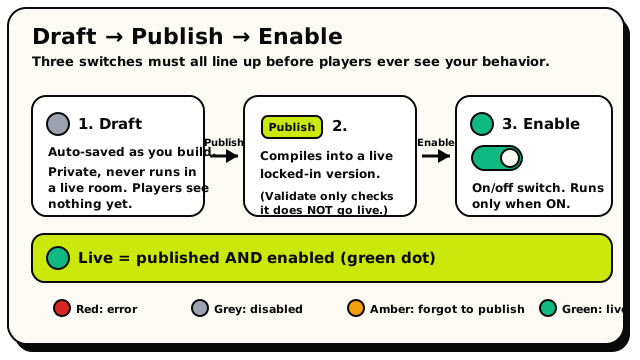 A behavior is only live when it's both published AND enabled: the green dot.
Edit the draft
As you snap blocks together, Hideout auto-saves your work as a draft. The top bar shows "Saving…" then "Draft saved". A draft is private: it's your work-in-progress, and it never runs in a live room. Players see nothing yet.
Publish
When you're happy, press Publish. Hideout compiles your blocks into a live, locked-in version and rooms pick it up right away. Now it's real. (There's also a Validate button. It only checks for mistakes and shows you any problems; it does not go live. Validate is not Publish.)
Enable
Each behavior has a simple on/off switch called enabled. A behavior only runs when it's both published and enabled. Toggle it off any time to silence a behavior without deleting it, which is perfect for testing.
So the rule: a behavior runs only when it is published AND enabled. A brand-new behavior you just built is saved, but it's still a draft, so nothing happens in your world until you publish it.
Reading the status dot
In your list of behaviors, each one has a little coloured dot that tells you its state at a glance:
| Dot | Meaning |
|---|---|
| Red | the draft has an error; fix it before it can go live |
| Grey | the behavior is disabled (switched off) |
| Green | enabled and published; it's live and running |
| Amber | enabled but never published; you forgot to hit Publish |
A green dot is the goal. If you see amber, your behavior is switched on but the last thing you built is still sitting in draft. Hit Publish and watch it turn green. Likewise, editing a published behavior creates new draft changes, and players keep seeing the old published version until you publish again.
A couple of helpful limits
You've got loads of room, but a few caps keep your world fast and snappy:
- Up to 50 enabled behaviors per room.
- Up to 200 triggers (hat blocks across all behaviors) per room.
- A behavior name can be 1 to 80 characters.
If you ever bump a limit, Hideout tells you exactly which one when you try to publish.