Groups & Lists
Most blocks act on one thing: one player, one item. But often you want many at once: everyone in the room, every player on the finish line, a whole list of high scores. This page covers two tools for "many things": player groups and lists.
The clipboard idea
A single player is like one name tag you're holding. A group is like a clipboard with several name tags clipped to it. A list is the same clipboard, but it can hold any kind of thing: numbers, words, coordinates, players.
The good news: almost every "do something to a player" block happily takes either a single name tag or the whole clipboard. So you can point one block at one person, or at a hundred.
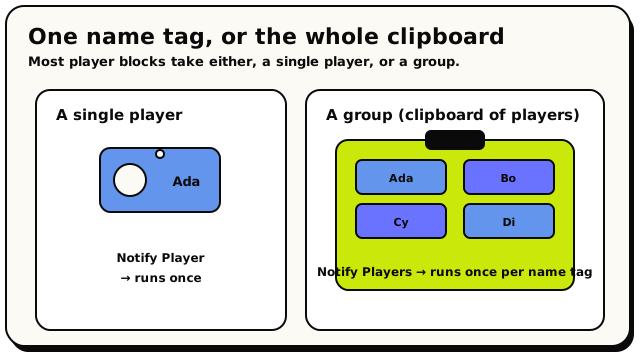 One name tag targets one player; a clipboard of tags is a group, and the same action runs once per tag.
A player group is basically a list of players. Anywhere a block wants "a group of players," it'll also accept a single player or a list of players. They're interchangeable. Don't worry about the exact distinction; the editor sorts it out for you.
Player groups: grabbing many players at once
A group is a handle that points at several players. The blocks that make a group live in the Groups category. Here are the ones you'll reach for most often.
Everyone in the room
 A group of every real player currently in the world.
All Players is the simplest group: everyone who's connected right now. Plug it straight into any block that takes players (like "notify all players" or "teleport all players") to affect the whole room.
Everyone standing in a zone
 A group of every player currently standing inside a chosen area.
Players In Area collects everyone standing inside an area you pick. Perfect for a finish line, a danger zone, or a lobby. If nobody's there, you get an empty group. That's normal, not an error.
There are a couple more group-makers worth knowing:
| Block | What it grabs |
|---|---|
 | Everyone seated on a chair object |
 | Everyone holding a particular object |
Every group block collects real humans only. NPCs are never in a player group. To control NPCs, head to the NPCs page instead.
"All Players" is like a doorman writing down everyone in the room at that exact second. If someone walks in two seconds later, they are not in a group you grabbed earlier; you'd have to ask for "All Players" again to get the fresh crowd. Groups don't auto-update. Also, players who have left the room are quietly skipped when the action actually runs, so you never act on a ghost.
Picking one player out of a group
Sometimes you have a group but want just one member:
| Block | What it does | If the group is empty |
|---|---|---|
 | Picks one member at random | Gives back "no player" |
 | The member closest to a point | Gives back "no player" |
 | The closest of everyone in the room | Gives back "no player" |
Nearest Player From Group looks only inside the group you hand it. Closest Player ignores groups and searches every human in the room. Easy to mix up, so pick based on whether you care about a subset or the whole room.
If a group is empty, these pickers hand back "no player." Plug that into an action and the action does nothing; it doesn't crash. So when it matters, check first (see counting, below).
Counting a group
 Tells you how many players are in a group, as a number.
Count Players In Group gives you a number, which is handy for gating a game. A classic: "if count of all players is at least 4, start the round." (You'll combine this with the if block.)
Targeting a whole group with one action
Here's the magic. Take any block that targets players (like Teleport Players or Notify Players) and drop a group into its player slot. The action runs once for each member.
- When Room Starts (or a timer)
- Notify Players → players: Players In Area (the finish-line area) → text:
"You made it!"
Every player standing on the line gets the message. Nobody else does. One block, a whole crowd.
You'll see both "Teleport Player" and "Teleport Players." They do the exact same thing; the only difference is the friendlier label. "Teleport Player" will happily accept a group, and "Teleport Players" will happily accept a single player. Use whichever reads nicer.
Two things to know:
- If the group you pass is empty, the action runs on nobody and quietly stops. No error.
- On many effect and cinematic blocks, leaving the player slot blank defaults to all players, not nobody. So a blank audience often means "the whole room."
Lists: storing many things
A list is a collection of values in order. Unlike a group (which only holds players), a list can hold numbers, text, coordinates, objects, or areas, one kind per list. Think of it as a numbered shopping list, or a row of LEGO bricks lined up.
You'll usually keep a list in a variable so it sticks around and grows over time. (See Variables for how variables work.)
Building a list
 Gives you a copy of a list with one more item added to the end.
List With Item Added is how you grow a list. But there's a catch worth understanding:
List With Item Added doesn't change the original list. It hands you back a brand-new copy with the item on the end. To actually make a list variable grow, you have to store the result back into that variable:
set list variable
gueststo (listguestswithtriggering playeradded)
If you forget the "store it back" part, the list never changes. (There are also handy Add To List action blocks that grow a variable directly, which is often simpler.)
A few more list reads you'll use:
| Block | What it tells you |
|---|---|
 | How many items are in the list (a number) |
 | Whether the list already has a certain item (true/false) |
 | The item at a position (the first is position 0) |
Item positions (called indexes) start at 0, not 1. A list of 3 items has positions 0, 1, and 2. To get the last item, use length minus 1. Asking for a position that doesn't exist gives you "nothing" rather than an error.
For-each: doing something to every item
The real power of a list (or a group) is the for-each loop. It runs a set of blocks once for every item, and hands you each item in turn through a  block.
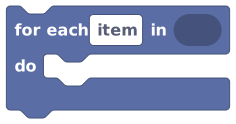 Runs the blocks inside it once for every item in a list, or every player in a group.
Because a player group counts as a list of players, you can loop straight over a group to do custom per-player logic, beyond what a built-in action allows.
for each
playerin (Players In Areaarena) do: set player variablescoreof (loop itemplayer) toscore+ 1 notify (loop itemplayer) →"Point scored!"
The loop runs once per player. Inside, "loop item player" is whoever the loop is currently on, so each person gets their own point and their own message.
If you only need a built-in action (teleport, notify, set emote), drop the group into that action and skip the loop. Reach for for-each when you need custom steps per player, like changing a per-player variable or running an "if" check on each one.
- An empty list (or group) runs the body zero times. That's normal.
- Changing the list while you loop over it can cause skipped or repeated items. It's safer to build a new list than to edit the one you're looping.
- Want to loop a fixed number of times with no list? Use
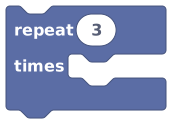 instead.
Quick reference
| You want… | Use… |
|---|---|
| Everyone in the room | All Players |
| Everyone in a zone | Players In Area |
| One random person | Random Player From Group |
| How many are in a group | Count Players In Group |
| Do an action to a whole crowd | Drop the group into the action |
| Custom steps per player | For Each over the group |
| Store many values | a list in a variable |
| Grow a list | List With Item Added (store it back!) |