Conditions & Logic
A great world doesn't only do things. It decides. Open the door if the player has the key. Show "You win!" if the score hits 10. This page is about decisions: asking yes/no questions and acting on the answer.
True and false: the yes/no answer
Every decision comes down to a single yes/no answer. In scripting we call that answer a boolean, a fancy word for "a value that is either true or false, never in between." A light switch is a boolean: on or off. There's no "maybe."
 A fixed true-or-false value you pick by hand from a dropdown.
You can spot boolean blocks by their pointy hexagon shape. That shape is the editor's promise: a hexagon only fits where a yes/no answer is wanted. (Want a refresher on block shapes? See Values & Types.)
The True or False block above is a fixed answer you choose by hand. It's handy for testing, but most of the time your yes/no answer comes from a question block instead, like the comparison block we'll meet next, whose answer changes as the game plays.
The if block: the fork in the road
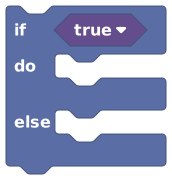 If the question is true, run the 'do' blocks. Otherwise, run the 'else' blocks.
The If / Else block is the heart of decision-making. It checks a yes/no question and picks a path:
- If the question is true, it runs the blocks in the do slot.
- If the question is false, it runs the blocks in the else slot (if you added one).
Think of a recipe: "If the cake is golden, take it out; otherwise, bake 5 more minutes." The C-shaped block literally hugs the steps that belong to each path.
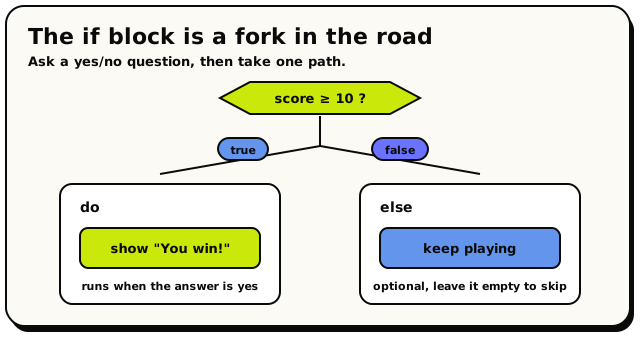 The if block asks a yes/no question, then takes the 'do' path when the answer is true or the optional 'else' path when it's false.
The question slot starts filled with a hidden true. So an empty if block always runs its "do" branch. That's almost never what you want, so plug your real question in.
The "else" slot is optional. Leave it empty if you only want something to happen when the question is true, and nothing otherwise. You can also click the gear icon on the block to add extra "else if" branches for testing more than two cases. Only the first true one runs.
Comparing values
The most common question is "how does this value compare to that one?" That's the Compare block.
 Checks two values against each other: equal, not equal, bigger, smaller.
Pick an operator from the dropdown:
| Operator | Means | True when… |
|---|---|---|
= | equal | the two values are the same |
!= | not equal | the two values are different |
> | greater than | the first is bigger |
< | less than | the first is smaller |
>= | greater than or equal | the first is bigger or the same |
<= | less than or equal | the first is smaller or the same |
if (compare
score>=10) do: show big text"You win!"
This checks the score variable every time it runs. The moment the score is 10 or more, the message shows.
For = and !=, the two sides must be the same kind of thing to match. The number 5 is not equal to the text "5".
For >, <, >=, and <=, both sides are read as numbers. Text that isn't a number counts as 0, so comparing words like "apple" < "banana" will not sort them alphabetically; both become 0. Use these for actual numbers.
There's no single "between" block. To check "score is between 1 and 10," combine two compares with an and block: score >= 1 and score <= 10. That's exactly what the next section is for.
Combining answers: and / or
Sometimes one question isn't enough. You want "the player has the key and the door is closed." The And / Or block combines two yes/no answers into one.
 Combines two yes/no answers: 'and' needs both, 'or' needs at least one.
Here's exactly how they behave, in plain English:
AND is true only when both sides are true.
| A | B | A and B |
|---|---|---|
| true | true | true |
| true | false | false |
| false | true | false |
| false | false | false |
OR is true when at least one side is true.
| A | B | A or B |
|---|---|---|
| true | true | true |
| true | false | true |
| false | true | true |
| false | false | false |
if (logic
has keyanddoor is closed) do: set object state to"open"
The door only opens when the player has the key and the door is currently closed. Swap "and" for "or," and it'd open if either were true.
Need to test three things? Plug one And / Or block into another. For example, "A and B and C" is just "A and (B and C)." You can nest them as deep as you like.
Unlike many programming languages, this block always checks both sides, even if the first already settles the answer. It's a tiny detail, but it means you shouldn't rely on the second side being "skipped." Reading conditions is instant and never pauses your script.
Flipping an answer: not
The Not block flips a yes/no answer to its opposite. True becomes false; false becomes true.
 Flips a yes/no answer: true becomes false, false becomes true.
| A | not A |
|---|---|
| true | false |
| false | true |
This is how you act when something is not the case.
if (not
door is open) do: show big text"It's locked"
The "not" flips the "is the door open?" check, so the message only shows while the door is not open.
not (A and B)is true when at least one of A or B is false.not (A or B)is true only when both are false ("neither").
These let you build precise "only when…" checks.
Like the logic blocks, the "not" slot defaults to a hidden true. So an untouched not block returns false. Plug your real question in.
Putting it all together
The pattern is always the same: a question (Compare, And/Or, Not, or a built-in question block) plugged into an if block that picks what happens.
Imagine a game that begins only when enough people are in the lobby and the host pressed go:
if (logic (count players in
all players>=2) andhost pressed start) do: start the round else: show big text"Waiting for players…"
One if, one and, one compare, and your world makes a real decision. (The "count players" part comes from Groups & Lists.)
Where yes/no answers come from
Compare, And/Or, and Not are how you build and combine answers. But lots of blocks produce a yes/no answer all on their own, ready to drop straight into an "if." A few you'll meet:
 : is this player inside an area?
 : is this NPC in the world right now?
 : does this list already have this item?
Any of these slots straight into an if, or into an and / or / not to combine with others.
Common mistakes
- Leaving a question blank. Empty
if,and,or, andnotblocks default to hidden values, so they don't do what you'd guess. Always plug your real question in. - Comparing text with
>or<. Those operators read everything as a number, and non-number text becomes0. Use=/!=for text. - Mixing types with
=. The number5does not equal the text"5". Keep both sides the same kind of thing. - Forgetting only one branch runs. With "else if" branches, the first true one wins and the rest are skipped.