Variables
A variable is a labelled box that remembers a value. It's how your world keeps track of things: a score, whether the door is open, how many players have found the secret. This page explains what variables are, the two kinds of "box" you can make, and how to put values in and take them back out.
What is a variable?
Imagine a little box with a name written on the side. You can put one thing inside, and the box remembers it for you. Later, you can peek inside to see what's there, or swap it for something new.
That's a variable. You give it:
- A name, like
scoreordoorIsOpen. (1 to 64 characters.) - A type: what kind of thing it holds (a number? some text? a true/false flag?). More on types below.
- A scope: who the box belongs to and how long it remembers. This is the big idea, so we'll spend most of the page here.
You make variables in the Variables panel inside the script editor. Once a variable exists, you use two kinds of block: one to set it (put a value in) and one to get it (read the value back out).
Behind the scenes, every variable has a hidden ID that never changes. So you can rename score to
points any time you like, and every block that uses it keeps working. Renaming never breaks
anything.
Scope: one box, or many boxes?
Scope is the most important idea here, and the one beginners trip over most. It answers a single question: "One box, or many boxes?"
Think about a school:
- One scoreboard in the gym. Everyone sees the same number. That's a room variable.
- A locker for each student. Same kind of locker, but the contents are private to each person. That's a player variable.
There are exactly two scopes. Here they both are at a glance:
| Scope | One box, or many? | Remembered for how long? | Needs an owner? | Best for |
|---|---|---|---|---|
| Room | One for the whole room | Forever (until you change it) | No | Shared state, like a round timer or party mode |
| Player | One per player | Forever, per person | Yes (which player?) | Per-person state, like each player's score |
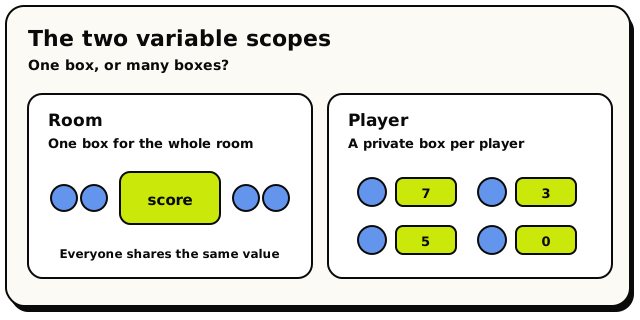 The two scopes side by side. A room shares one box, while a player scope quietly keeps a separate box for each person.
Let's walk through each one.
Room variables: the shared scoreboard
A room variable is one single box for the whole room. Everyone shares it. Every script in the room reads and writes the same value.
- Remembered: for as long as the room exists. It survives across script runs, across the room rebooting, and even when you re-publish your scripts. It does not reset on its own.
- Use it for: anything the whole room agrees on, like
partyMode(is the disco on?),roundTimer, ortotalCoinsCollected.
To read a room variable you use the  block, and to change it
you use
block, and to change it
you use  .
.
Set Room Variable puts a value into the room's shared box.
Room Variable Value reads the room's shared box. Plug it into any slot that wants that type.
Player variables: a locker for each person
This is the magic one, so read it twice.
A player variable looks like one variable when you make it, but the world quietly keeps a separate copy for every player. Player A's value and Player B's value are completely separate. Reading A's box never shows you B's.
This is exactly what you want for per-person state:
- Each player's own
score. - Whether this player
hasEnteredSecretArea. - Whether this player
wasWearingHat.
Because each player has their own copy, when you set or get a player variable you must say which player's box you mean. That extra "which player?" answer is called the owner.
 Set Player Variable. Note the extra slot where you say WHICH player's box to use.
 Player Variable Value also takes a player, so it reads the right person's box.
Most of the time the owner is the player who triggered your script. There's a ready-made block for
exactly that:  , which means "the player this event is
about". Drop it into the owner slot and you've got "this player's copy".
, which means "the player this event is
about". Drop it into the owner slot and you've got "this player's copy".
Player variables are why you can build a leaderboard, a per-player inventory, or a "you've already
opened this chest" check, without doing any extra work per player. You declare score once,
and every player automatically gets their own, starting at the default value. No setup needed.
For a player variable, the owner is a stable ID: the player's ID, never a live reference to the player itself. If you forget the owner (or plug in the wrong kind of thing), a get quietly returns the default value, and a set is quietly dropped. No error pops up, so a missing owner is a sneaky bug. Always wire the owner slot.
What can a box hold? (types)
Every variable has a type: the kind of value it can hold. You pick the type when you create the variable. The type is locked in. A number box can only hold numbers, a text box only text. This is a good thing, because it stops you from accidentally storing the wrong shape of data.
Here are the everyday types you'll reach for:
- Yes/No Boolean: a true/false flag.
doorIsOpen,partyMode. - Number Number: any number, whole or decimal.
score,roundCount. - Text Text: words and characters.
welcomeMessage. - Player Player: a single player.
- Object Object: a single placed object.
- Coordinate: a 3D point in the room (x, y, z). Great for remembering a spot.
- Area: a rectangular region of the room.
- Rotation: a facing direction (
north,east,south, orwest).
You can also make a list of any of those: a Number list for high scores, a Player list for
a team, and so on. (Lists get their own List blocks for adding
and removing items.)
Every box starts with a default
You never have to "fill in" a variable before using it. A brand-new variable already holds a sensible starting value, so you can read it right away:
| Type | Starts as |
|---|---|
| Boolean | false |
| Number | 0 |
| Text | empty ("") |
| Rotation | north |
| Player / Object | nothing (empty) |
| List | an empty list |
That's why each player's score starts at 0 with zero setup, and why a fresh doorIsOpen flag
starts false. The default is ready to go.
A new variable of type Player or Object starts as nothing, not "whoever is around". If you read it before setting it, you get an empty value. Set it first before you rely on it.
Setting vs getting
Most variable work uses two moves, with a third option when you need to forget a value:
- Setting = putting a value into the box. You use a
Set … Variableblock (a stack/action block, a step in your recipe). You give it the new value. - Getting = reading the value out. You use a
… Variable Valueblock (a value block, an ingredient you slot into another block). - Clearing = removing the current value with
 . The
variable becomes
. The
variable becomes nulluntil you set it again. This is not the same as resetting a number to0or a boolean tofalse.
So to bump a score by one, you get the current score, add one with a math block, and set the score to the result:
- When a player interacts with a coin…
- Set player variable
[triggering player]score - …to: (get player variable
[triggering player]score)+1
Each player's score climbs on its own, completely separate from everyone else's. That's a working leaderboard in three lines.
Hideout doesn't have a single "change variable by 1" block. To count something up, you always get, add, then set like the example above. It's two more blocks, but it keeps things clear.
Common mistakes to dodge
- "My player variable is shared!" You probably forgot to vary the owner, or used a fixed
player in the owner slot. Use so each player gets
their own box.
- Forgetting the owner entirely. A player or object set with no owner is silently dropped, with no error. Always wire the owner slot.
- Expecting room variables to reset. They don't reset on their own, not on reboot and not on
publish. If you want a fresh start each round, reset it yourself in a
 handler or at the start of a round.
 - Mixing up clearing and emptying a list. makes the
list variable
null. removes every item but keeps a
real list with zero items.
removes every item but keeps a
real list with zero items.
While a script step runs, your variable changes are held in a temporary buffer and only saved when the step finishes successfully. If a script crashes or runs out of its budget partway through, the variable changes from that step are thrown away as if they never happened. (Anything the script already did in the world, like moving an object, is not undone, though.) For everyday building, remember this: finish the step, and your changes stick.
What's next?
How data flows between blocks, why colours and shapes matter, and how to turn anything into text.
Lists & LoopsStore many things in one variable, and do something to each of them.
Events & TriggersThe "when this happens" blocks that kick your scripts off.
Build a ScoreboardPut player variables to work in a real, step-by-step build.