Timers, Loops & Waits
Sometimes you want your script to pause, do something a few times, go through a whole list, or fire on a regular beat. This page is about how Hideout handles time, and the one big idea that makes all of it make sense: scripts react to things that happen. They don't run over and over in the background.
The big idea: scripts react, they don't run constantly
If you've used other game tools, you might expect scripts to run a little bit every single frame, like a tiny engine that never stops. Hideout does not work that way.
Your room sits quietly and only runs script blocks when something happens:
- a player joins,
- somebody clicks an object,
- a chat message arrives,
- a timer goes off,
- the room boots up.
When one of those things happens, Hideout finds the matching event block (the
hat-shaped block at the top, like 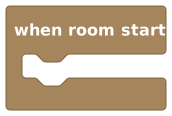 ) and runs the
blocks underneath it top to bottom, all the way through, in one go, unless it hits
a wait.
) and runs the
blocks underneath it top to bottom, all the way through, in one go, unless it hits
a wait.
Think of a script as a recipe card the room follows when you ring the bell (an event). It reads each line and does it. It does not stand at the stove all day "checking"; it only cooks when triggered.
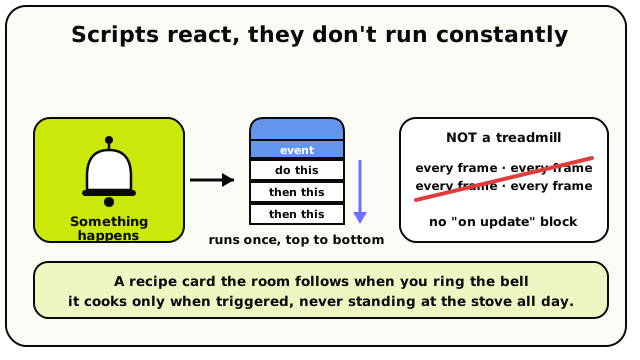 An event is the bell. When it rings, the matching script runs once top-to-bottom. There's no treadmill ticking every frame.
This is why there's no "every frame" or "on update" block in Hideout, and why there never should be. To make something happen on a clock, use the every N seconds block. To make something happen in response to the world, use the matching event block. New to events? Start with Events & Triggers.
Wait N seconds: pause this one script
 Wait, then carry on with the next block.
The Wait Seconds block does exactly what it says: it pauses, then continues with
whatever block comes next. Put Wait 3 seconds in the middle of a script and the blocks
after it run three seconds later.
when player joins room
  say "Welcome!"
  wait 2 seconds
  say "Make yourself at home."
That player sees "Welcome!", then two seconds later sees "Make yourself at home."
Wait pauses this script, not the world
This is the part beginners get wrong, so let's be crystal clear: wait only pauses
the one script that's running it. The room keeps going. Every other player keeps
moving. Every other script keeps firing. The world does not freeze.
When a script hits wait, Hideout doesn't sit and count. It writes a little note that
says "come back to this script in 3 seconds," sets a timer, and goes off to handle
everyone else. When the timer rings, it picks your script back up exactly where it
left off: same variables, same place in the recipe. The technical name for a paused,
resumable script run is a fiber, but you never need to think about that.
A few precise details worth knowing:
- The number of seconds can be a variable or a calculation, not just a fixed number.
Wait [myDelay] secondsis fine. - A negative wait (like
wait -5 seconds) just becomeswait 0. It doesn't go backwards in time. - There is no "wait until something is true" block. To react to a condition, use the event block for that thing instead. That's the event-driven way.
After a long wait, the player who triggered your script might have left. If your
script says "wait 30 seconds, then teleport that player," and they logged off, the
teleport quietly does nothing instead of crashing, but it won't happen. For anything
after a long wait, don't assume the same player is still around.
Repeat N times: do something a few times
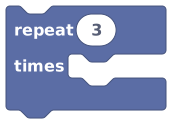 Runs the blocks inside it a fixed number of times.
The Repeat N Times block runs the blocks inside it a set number of times. Want to drop five gifts, or flash a light three times? Repeat is your friend.
repeat 3 times
  flash the light
  wait 1 second
That flashes the light three times, one second apart. Simple as that.
A loop doesn't run "in the background." It's still part of that one top-to-bottom run. The room does each pass, one after another, before moving on. A small loop is instant. A giant loop makes that one trigger take a while (more on that below).
For each: go through a whole list
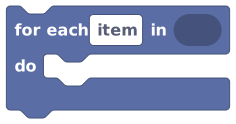 Runs the inside blocks once for every item in a list or group.
For Each is how you do something to every item in a list or every player in a group, without knowing how many there are ahead of time.
for each player in [all players in the area]
  give that player a point
Inside a For Each, you get a special block called the loop item, the current thing you're looking at on this pass.
 The loop item is the current thing being looped over.
On the first pass, the loop item is the first player. On the second pass, it's the second player. And so on, until the list runs out.
The loop item only exists inside that For Each block, and its type matches whatever the list holds: players, objects, numbers, text. If you have two For Each loops, each one has its own loop item.
Every N seconds: run on a clock
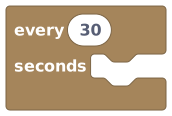 An event block that fires again and again on a regular beat.
Every N Seconds is an event block, a hat, just like "when room starts." It's the one and only way to make something happen on a repeating clock. Use it for day/night cycles, score ticks, spawning enemies on a timer, or refreshing a scoreboard.
every 10 seconds
  spawn a coin somewhere
The 5-second floor
The smallest interval you can use is 5 seconds. If you set it lower, the script won't publish: Hideout will tell you the interval must be at least 5 seconds. (Staff and dev rooms can go down to 1 second, but normal rooms are capped at 5.)
The number of seconds here must be a plain number you type in. It can't be a variable, because the room needs a fixed schedule to keep a neat list of all its timers.
Rooms go to sleep when nobody's in them. While a room is asleep, no timers fire and no scripts run. There's nobody home to run them.
And when the room wakes up, a timer that was missed many times fires once, not once per
miss. Example: you have every 30 seconds, the room is empty for 30 minutes, then
someone walks in. The timer fires once on wake-up, not 60 times to "catch up."
So every N seconds means "no more often than every N seconds while the room is awake,"
not "exactly N seconds apart forever, even when empty." Don't use it as a real-world
clock.
Because rooms sleep and wake constantly, the
Fires on every room wake-up, not just once ever.block runs every time the room loads, not once for the lifetime of the room. For
genuine one-time setup, save a room variable like hasInitialized and check it first.
Loops are bounded by "gas," not a fixed count
A natural worry: what if I accidentally make a loop that goes forever? Good news: the room has a safety net. Every script run has a work budget called gas, and a runaway loop will hit that limit and stop, instead of freezing the room.
You don't need the exact numbers to build great stuff, but here's the short version:
- A loop that's too big burns through gas and eventually gets stopped.
- Long before that, a moderately heavy loop crosses a soft warning line. Your script still works; it's being watched.
The full story (the actual limits, what counts as "gas," and what happens when you hit the ceiling) lives on Publishing & Limits.
A loop with a lot of blocks running thousands of times can get slow. When you can, react to an event instead of looping to check things. Events are basically free; big loops are not.
Quick reference
| You want to… | Use | Notes |
|---|---|---|
| Pause, then continue | Wait Seconds | Pauses this script only; the world keeps going. |
| Do something a fixed number of times | Repeat N Times | Runs the inside blocks N times. |
| Do something to every item | For Each | Use the loop item for the current one. |
| Run on a repeating clock | Every N Seconds | Minimum 5 seconds; doesn't run while empty. |
There's no wait until, no break, no continue, no while, and no forever block.
Hideout is event-driven by design: instead of looping to wait for something, you react
to the event for it. A repeat or for each always runs its full count.
What's next?
The "when this happens" blocks that start every script.
Publishing & LimitsGas, runtime limits, and going live, the friendly version.
Timers (Block Reference)The exact Wait and Seconds blocks, with every detail.
Lists (Block Reference)Everything you can do with For Each and the loop item.