Lists
A list is an ordered collection of values: a numbered shopping list, a playlist, or a queue of players waiting for a turn. These blocks let you build a list, add and remove items, check what's inside, and pull a single item back out.
Why use a list?
A plain variable holds one value. A list holds many values, all in order, under one name.
Reach for a list when you want to track a group of things:
- the players currently in a mini-game
- the order people joined a queue
- a set of spawn points to choose from
- the high scores so far
Lists keep their order (first item, second item, third item) and can hold the same value more than once. Each item has a position number called its index. Indexes start at 0, so the first item is at index 0, the second is at index 1, and so on.
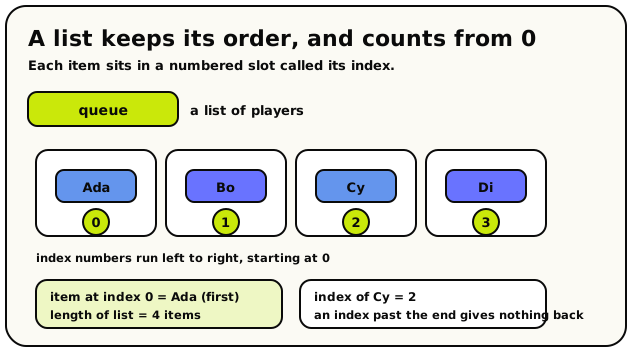 A list holds items in order, each in a numbered slot. Indexes count from 0, so the first item is at index 0.
To keep a list around between events, store it in a list-type variable (the Variables panel has "Number list", "Player list", and so on). The blocks here read and build list values; your variable is where the list lives. See Variables.
Building a list
Start from nothing and add items one at a time.
 An empty list, the starting point.
- gives you a fresh, empty list with zero items.
 hands you a new list with one item added to the
end. It does not touch the original; it makes a copy with the extra item on it.
hands you a new list with one item added to the
end. It does not touch the original; it makes a copy with the extra item on it. hands you a new list with a matching item removed
(every copy of that item, if it appears more than once).
hands you a new list with a matching item removed
(every copy of that item, if it appears more than once).
Those two blocks build a new list and leave the old one alone, so you have to save the result somewhere to keep it. If your list is stored in a variable, you also get action blocks that change that variable directly (no saving step needed):
 adds an item to the end.
 adds an item to the start.
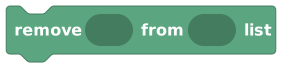 takes an item out.
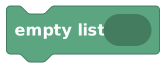 empties the list completely.
Reading from a list
 Item at index pulls out one item by its position.
 tells you how many items are in the list (a number).
- gives the item at a position (index) you give (index 0
is the first item). Asking for an index that doesn't exist gives nothing back.
 gives a random item from the list. Great for "pick a
random spawn point" or "choose a winner".
gives a random item from the list. Great for "pick a
random spawn point" or "choose a winner". gives the position (index) of an item, counting from 0,
or -1 if the item isn't in the list.
gives the position (index) of an item, counting from 0,
or -1 if the item isn't in the list.
Checking a list
 is a Yes/No block. It
answers true or false to "is this item in the list?". Drop it straight into an
If / Else condition.
is a Yes/No block. It
answers true or false to "is this item in the list?". Drop it straight into an
If / Else condition.
To do something with each item in turn (message every queued player, check every spawn
point) you use the 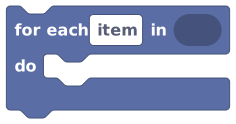 loop. It lives on the
Conditions & Loops page because it's a
control-flow block, but it's the natural partner to everything here.
loop. It lives on the
Conditions & Loops page because it's a
control-flow block, but it's the natural partner to everything here.
Worked example
- Build or store a list of players, say everyone who joined the round.
- Use to set a
winnervariable:set winner to (random item from [players]). - Show a toast that names them:
"The winner is " + display name of [winner].
Under the hood
The precise rules
- A list can hold one item type: a list of numbers, a list of players, a list of coordinates, and so on. You can't mix types in one list.
- Positions (indexes) start at 0: the first item is index 0, the second is index 1, and so on. Asking for an index past the end (or a negative one) gives nothing back rather than crashing.
- A player group (like "all players") counts as a list of players, so list blocks work on it too.
- Blocks that search the world and build a list from the results return at most 50 items. Looping over a long list also takes time, so keep your lists a sensible size.
The list blocks
Empty List
ValueListsany listGives you a brand-new list with nothing in it yet.
This block makes a fresh, empty list that you can start filling up. Pick what kind of thing the list will hold (numbers, text, players, objects, and so on) from the dropdown. Use it whenever you need a starting point for collecting items, for example as the value you store into a list variable before you begin adding things to it.
Inputs & fields
| Slot | Accepts | Default | What it's for |
|---|---|---|---|
empty ... list | dropdown | boolean | Choose: boolean, number, text, coordinate, player, object, area |
How it behaves
Compiles to a constant empty list value. The dropdown only sets the list's item type for type-checking; the list itself always starts with zero items. It is a pure value with no side effects and does not pause the script.
Watch out
An empty list is not the same as 'no list'. Its length is 0, and looping over it does nothing, but it is still a real list.
The item-type dropdown locks what the list can hold. If you try to add a different kind of thing, the block connection will be refused.
Tips
Use this to reset a list variable: set the list variable to an empty list to wipe it clean.
Plug it straight into 'list ... with ... added' to start building a list from scratch.
Examples
set room list variable {scores} to empty {number} listCreates a new, empty number list so you can add scores to it later.
List With Item Added
ValueListsany listGives you a copy of a list with one more item added to the end.
This block takes a list and an item, and gives back a new list that is the same as the original but with that item tacked on at the end. The original list is never changed; you get a fresh copy. Use it inside other value blocks, or store the result back into a list variable to actually grow that variable.
Inputs & fields
| Slot | Accepts | Default | What it's for |
|---|---|---|---|
list | Yes/No listNumber listText listDuration listPosition (X, Y) listPosition (X, Y, Z) listPlayer listObject listArea listGroup of players | The list you want a copy of with one more item on the end. | |
with | Yes/NoNumberTextDurationPosition (X, Y)Position (X, Y, Z)PlayerGroup of playersObjectArea | The item to put on the end of the list. |
How it behaves
Calls the list.append builtin: it builds and returns a brand-new list equal to the input list plus the item at the end. It does not modify the input list in place (lists are immutable values here). If the list socket is empty it falls back to a text list. If the item socket is empty, a 'null' value is appended. The item's type is checked against the list's item type. Pure value, no waiting.
Watch out
It does NOT change the list it was given. If you want a list variable to actually grow, you must store the result back into that variable (or use the 'add to ... list' action blocks instead).
The new item always goes on the END. There is no option here to add to the start.
Tips
Chain several of these together to add several items at once, then store the final list.
For directly growing a list variable, the 'add ... to ... list' action block is usually simpler.
Examples
set room list variable {guests} to list {guests} with {triggering player} addedTakes the current guest list, makes a copy with the new player on the end, and saves it back.
List With Item Removed
ValueListsany listGives you a copy of a list with a matching item taken out.
This block takes a list and an item, and gives back a new list that is the same as the original but with that item removed. The original list is left untouched. If the same item appears more than once, every copy of it is removed. Use it to filter something out of a list, then store the result back into a list variable.
Inputs & fields
| Slot | Accepts | Default | What it's for |
|---|---|---|---|
list | Yes/No listNumber listText listDuration listPosition (X, Y) listPosition (X, Y, Z) listPlayer listObject listArea listGroup of players | The list you want a copy of with a matching item taken out. | |
with | Yes/NoNumberTextDurationPosition (X, Y)Position (X, Y, Z)PlayerGroup of playersObjectArea | The item to remove from the list. |
How it behaves
Calls the list.removeItem builtin: it returns a new list keeping only the items that are NOT equal to the given item. ALL matching items are removed, not just the first one. The input list is not changed (it returns a fresh copy). Equality is value-based (two equal numbers, the same player, etc. all match). Empty list socket falls back to a text list; empty item socket removes items equal to 'null'. Pure value, no waiting.
Watch out
It removes EVERY copy of the matching item, not just the first one.
It does not change the original list. Store the result back into your list variable for the change to stick.
If the item is not in the list, you get back an unchanged copy. That is not an error.
Tips
To take items off the front or back regardless of value, use 'remove item from start/end of list' instead.
Combine with 'list includes' to check first if the item is even there.
Examples
set room list variable {players in game} to list {players in game} with {triggering player} removedBuilds a copy of the list without the player, then saves it back.
Length Of List
ValueListsNumberTells you how many items are in a list.
This block gives you the number of items in a list. An empty list has length 0, a list with three things in it has length 3, and so on. Use it to check how full a list is, to loop a certain number of times, or to compare against limits like a maximum number of players.
Inputs & fields
| Slot | Accepts | Default | What it's for |
|---|---|---|---|
length of list | Yes/No listNumber listText listDuration listPosition (X, Y) listPosition (X, Y, Z) listPlayer listObject listArea listGroup of players | The list you want to count the items in. |
How it behaves
Calls the list.length builtin and returns the item count as a number. If the socket is empty or holds something that is not a list, it counts as 0. A player group counts as the number of players in it. Pure value, no waiting.
Watch out
The count is the number of items, but item positions (indexes) start at 0. A list of length 3 has indexes 0, 1, and 2.
Tips
Use 'length of list = 0' to check whether a list is empty.
Use this with 'item at index' and a counter to step through a list yourself, though 'for each' is usually easier.
Examples
if length of list {players} ≥ 4 → (start the game)Checks how many players are in the list before starting.
List Includes
Yes/NoListsYes/NoChecks whether a list already has a certain item in it (true or false).
This block answers yes-or-no: is this item somewhere in the list? It gives true if the item is found and false if it is not. Use it before adding something to avoid duplicates, or to check membership, like 'is this player on the VIP list?'
Inputs & fields
| Slot | Accepts | Default | What it's for |
|---|---|---|---|
list | Yes/No listNumber listText listDuration listPosition (X, Y) listPosition (X, Y, Z) listPlayer listObject listArea listGroup of players | The list to search in. | |
includes | Yes/NoNumberTextDurationPosition (X, Y)Position (X, Y, Z)PlayerGroup of playersObjectArea | The item to look for in the list. |
How it behaves
Calls the list.contains builtin and returns a boolean. It checks each item with value-based equality and returns true if any item matches. An empty list, an empty list socket, or an empty item socket returns false. Pure value, no waiting.
Watch out
Equality is by value/identity: two equal numbers match, the same player matches, but a coordinate only matches another coordinate with exactly the same x/y/z.
An empty item socket gives false, even if the list itself contains null-ish values.
Tips
Pair it with 'if' to avoid adding the same item twice.
Works on player groups too, so you can ask 'is this player in this group?'
Examples
if (not) list {guests} includes {triggering player} → add {triggering player} to end of {guests} listChecks first so the same player is not added twice.
Item At Index
ValueListsanyGets the item at a particular position in a list.
This block reaches into a list and pulls out the item at the position you give it. Positions start at 0, so index 0 is the first item, index 1 is the second, and so on. Use it when you want a specific item by its place in the list rather than searching for it by value.
Inputs & fields
| Slot | Accepts | Default | What it's for |
|---|---|---|---|
item at index | NumberWhole number | 0 | Which position to read from. The first item is index 0. |
in list | Yes/No listNumber listText listDuration listPosition (X, Y) listPosition (X, Y, Z) listPlayer listObject listArea listGroup of players | The list to read an item from. |
How it behaves
Calls the list.itemAtIndex builtin. The index is rounded to the nearest whole number. If the rounded index is negative or past the end of the list, it returns a null value (it does not error or crash). The output's type matches the list's item type. Pure value, no waiting.
Watch out
The first item is index 0, not 1. To get the third item, use index 2.
Asking for an index that does not exist gives you a null value, not an error. Always check the list length first if you are not sure.
Decimal indexes are rounded to the nearest whole number.
Tips
Use 'length of list - 1' to get the last item's index.
For going through every item in order, 'for each' is usually cleaner than reading by index.
Examples
item at index {0} in list {queue}Pulls out whatever is first in the queue list.
Random Item From List
ValueListsanyPicks one random item out of a list.
This block reaches into a list and grabs one item at random, with every item having an equal chance. Use it to pick a random winner, choose a random spawn point, play a random sound, or surprise players with a random outcome.
Inputs & fields
| Slot | Accepts | Default | What it's for |
|---|---|---|---|
random item from | Yes/No listNumber listText listDuration listPosition (X, Y) listPosition (X, Y, Z) listPlayer listObject listArea listGroup of players | The list to pick a random item from. |
How it behaves
Calls the list.random builtin. It picks a uniformly random index and returns that item. If the list is empty (or the socket is empty), it returns a null value. The output's type matches the list's item type. Pure value, no waiting. Each time it runs it can pick a different item.
Watch out
On an empty list it gives back a null value, so guard against empty lists if that would cause problems.
It can pick the same item two times in a row. It is true random, not a shuffle that avoids repeats.
Tips
Great for picking a random player: plug a player list or player group in.
Build a list of options first, then pull a random one for variety each time.
Examples
set player variable {winner} to random item from {players}Chooses one player from the list at random.
Index Of Item In List
ValueListsNumberTells you the position of an item in a list, or -1 if it is not there.
This block finds where an item sits in a list and gives you its position number. The first item is at index 0, the second at 1, and so on. If the item is not in the list at all, it gives -1. Use it when you need to know an item's place, not just whether it exists.
Inputs & fields
| Slot | Accepts | Default | What it's for |
|---|---|---|---|
index of | Yes/NoNumberTextDurationPosition (X, Y)Position (X, Y, Z)PlayerGroup of playersObjectArea | The item whose position you want to find. | |
in list | Yes/No listNumber listText listDuration listPosition (X, Y) listPosition (X, Y, Z) listPlayer listObject listArea listGroup of players | The list to search in. |
How it behaves
Calls the list.findIndex builtin. It returns the index of the FIRST item that equals the given item, using value-based equality. If no item matches, or the item socket is empty, it returns -1. Pure value, no waiting.
Watch out
Positions start at 0, so the first item's index is 0, not 1.
If the item is not found you get -1, which is a real number you should check for before using it as an index.
If the item appears more than once, you only get the position of the first one.
Tips
Check for -1 first: 'if index of X in list ≥ 0' means 'X is in the list'.
If you only care whether the item exists, 'list includes' is simpler.
Examples
set player variable {my spot} to index of {triggering player} in list {queue}Stores where the player is in the queue, or -1 if they are not queued.
Loop Item
ValueListsany
Stands for the current item while a 'for each' loop is running.
This block represents whatever item the surrounding 'for each' loop is currently looking at. Each time the loop moves to the next item in the list, this block's value changes to that new item. Drop it inside a 'for each' loop's body to use the current item, for example to message that player, move that object, or add that number up. The dropdown lets you pick which loop you mean if you have loops inside loops.
Inputs & fields
| Slot | Accepts | Default | What it's for |
|---|---|---|---|
item | dropdown | ||
VARIABLE_TYPE | custom |
How it behaves
Compiles to reading the hidden local variable that the enclosing 'for each' loop stores its current item into. It must be placed inside a matching 'for each' loop; the dropdown selects which loop (by its item name) when loops are nested. Its type and value follow that loop's item type and the item at the current position. Pure value, no waiting.
Watch out
It only works inside a 'for each' loop. Outside of one, it has no item to refer to.
If you have nested loops, double-check the dropdown points at the loop you actually mean.
Renaming the loop's item name may change which loop this dropdown refers to.
Tips
Give your 'for each' loops clear item names so the dropdown choices are easy to tell apart.
Drag this block out of the toolbox while standing inside a loop and it will offer that loop automatically.
Examples
for each {player} in {players}: do → message {item player} "Welcome!"Inside the loop, 'item player' is whichever player the loop is currently on.
Add To List
ActionLists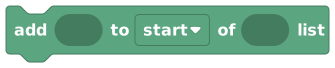
Adds an item to the start or end of a list variable and saves the change.
This action block adds an item directly into a list variable and saves the change. You pick whether it goes on the 'start' or the 'end'. Unlike the value blocks, this one actually updates the stored list variable, so you do not need to set anything back. The editor automatically uses the right room, player, or object version based on which list variable you plug in.
Inputs & fields
| Slot | Accepts | Default | What it's for |
|---|---|---|---|
add | Yes/NoNumberTextDurationPosition (X, Y)Position (X, Y, Z)PlayerGroup of playersObjectArea | The item to add to the list variable. | |
to | Yes/No listNumber listText listDuration listPosition (X, Y) listPosition (X, Y, Z) listPlayer listObject listArea listGroup of players | The list variable to add the item into. Choose a room, player, or object list variable. | |
to ... of | dropdown | START | Choose: start, end |
How it behaves
Loads the chosen list variable, then calls list.prepend (for 'start') or list.append (for 'end') with the item, and stores the result back into that same list variable. The variable's scope (room, player, or object) is detected from the variable you pick, and for player/object lists the matching owner is used. If the item socket is empty a null value is added. When the variable holds a player group, adding players de-duplicates them (the same player is not stored twice). It does not pause the script.
Watch out
This permanently updates the list variable. It is not a copy, unlike the 'list ... with ... added' value block.
For a player-group list variable, adding a player who is already in it does nothing (player groups have no duplicates).
Only room and object scripts can use this block. It is not available in NPC-owned scripts.
Tips
Use 'start' vs 'end' to control ordering, for example a queue adds to the end and serves from the front.
Combine with 'list includes' if you want to avoid adding the same value twice in a plain list.
Examples
add {triggering player} to {end} of {queue} listAppends the player to the queue list variable and saves it.
Remove Item From List
ActionListsTakes a matching item out of a list variable and saves the change.
This action block removes an item directly from a list variable and saves the change. If the item is in the list more than once, every copy of it is removed. Unlike the value blocks, this updates the stored variable straight away. The editor automatically uses the right room, player, or object version based on which list variable you plug in.
Inputs & fields
| Slot | Accepts | Default | What it's for |
|---|---|---|---|
remove | Yes/NoNumberTextDurationPosition (X, Y)Position (X, Y, Z)PlayerGroup of playersObjectArea | The item to take out of the list variable. | |
from | Yes/No listNumber listText listDuration listPosition (X, Y) listPosition (X, Y, Z) listPlayer listObject listArea listGroup of players | The list variable to remove the item from. Choose a room, player, or object list variable. |
How it behaves
Loads the chosen list variable, calls the list.removeItem builtin to drop every item equal to the given one, and stores the new list back into the same variable. The variable's scope (room, player, or object) and its owner are detected from the variable you pick. Equality is value-based. If the item socket is empty, items equal to null are removed. It does not pause the script.
Watch out
It removes ALL copies of the matching item, not just the first.
If the item is not in the list, nothing changes. That is fine, not an error.
This edits the real variable, unlike the 'list ... with ... removed' value block.
Only room and object scripts can use this block.
Tips
To remove by position instead of value, use 'remove item at index' or 'remove item from start/end'.
Check with 'list includes' first if you need to know whether anything was actually there.
Examples
remove {triggering player} from {players in game} listDeletes the player from the list variable and saves it.
Remove First Or Last Item
ActionLists
Removes the very first or very last item from a list variable.
This action block drops one item off the start or the end of a list variable, whichever you choose, and saves the change. It does not care what the item is; it removes whatever is in that end spot. Great for queues (remove from the start to serve the next person) and stacks (remove from the end to undo the most recent thing).
Inputs & fields
| Slot | Accepts | Default | What it's for |
|---|---|---|---|
remove item from ... of list | Yes/No listNumber listText listDuration listPosition (X, Y) listPosition (X, Y, Z) listPlayer listObject listArea listGroup of players | The list variable to remove an end item from. Choose a room, player, or object list variable. | |
remove item from | dropdown | START | Choose: start, end |
How it behaves
Loads the chosen list variable, then calls list.removeFirst (for 'start') or list.removeLast (for 'end'), and stores the shortened list back into the variable. The variable's scope and owner come from the variable you pick. If the list is already empty, nothing happens (removing from an empty list leaves it empty). It does not pause the script.
Watch out
On an empty list it does nothing and will not error.
It removes by position, not by value, so it does not matter what the item is.
This edits the real list variable.
Only room and object scripts can use this block.
Tips
Pair 'add to end' with 'remove from start' to make a fair first-in-first-out queue.
Pair 'add to end' with 'remove from end' to make a last-in-first-out stack.
Examples
remove item from {start} of list {queue}Drops the first person off the queue when it is their turn.
Remove Item At Index
ActionLists
Removes the item at a specific position from a list variable.
This action block removes whatever item sits at the position you give it, and saves the change. Positions start at 0, so index 0 is the first item. Use it when you know exactly which slot you want gone, for example after finding a position with 'index of'.
Inputs & fields
| Slot | Accepts | Default | What it's for |
|---|---|---|---|
remove item at index | NumberWhole number | 0 | Which position to remove. The first item is index 0. |
from list | Yes/No listNumber listText listDuration listPosition (X, Y) listPosition (X, Y, Z) listPlayer listObject listArea listGroup of players | The list variable to remove an item from. Choose a room, player, or object list variable. |
How it behaves
Loads the chosen list variable, calls the list.removeAtIndex builtin (the index is rounded to a whole number), and stores the shortened list back into the variable. The variable's scope and owner come from the variable you pick. If the index does not exist (negative or past the end), nothing is removed and the list is unchanged. It does not pause the script.
Watch out
Positions start at 0. To remove the third item, use index 2.
An index that does not exist removes nothing and will not error.
Decimal indexes are rounded to the nearest whole number.
Only room and object scripts can use this block.
Tips
Use 'index of' to find an item's position first, then feed that into this block.
Use 'length of list - 1' to target the last item.
Examples
remove item at index {0} from list {tasks}Deletes whatever is at the start of the tasks list variable.
Empty List
ActionListsWipes all items out of a list variable, leaving it empty.
This action block clears a list variable so it has nothing left in it. Use it to reset a list between rounds, wipe a leaderboard, or start fresh. It updates the stored variable directly. The editor automatically uses the right room, player, or object version based on which list variable you plug in.
Inputs & fields
| Slot | Accepts | Default | What it's for |
|---|---|---|---|
empty list | Yes/No listNumber listText listDuration listPosition (X, Y) listPosition (X, Y, Z) listPlayer listObject listArea listGroup of players | The list variable to empty out. Choose a room, player, or object list variable. |
How it behaves
Resolves the chosen list variable and stores a fresh empty list (the default value for that variable's list type) back into it. The variable's scope (room, player, or object) and owner are taken from the variable you pick. After this runs, the list's length is 0. It does not pause the script.
Watch out
This wipes EVERY item at once. There is no undo.
It edits the real list variable, not a copy.
Only room and object scripts can use this block.
Tips
Use it at the start of a new round to reset things like the scoreboard or player list.
Setting a list variable to an 'empty list' value block has the same effect.
Examples
when round starts → empty list {scores}Clears all scores so the new round starts clean.