Functions
A function is a chunk of blocks you bundle up, give a name, and reuse. Build the logic once, then “call” it by name wherever you need it, instead of copying the same pile of blocks over and over. Functions keep your scripts short, tidy, and easy to fix.
What's a function, really?
Imagine you have a favourite move you do a lot: say, “teleport the player home, play a sound, and pop up a welcome message.” Without functions, you'd glue those three blocks together everywhere you needed them. Five places? Five copies. Spot a bug? Fix it five times. Ugh.
A function fixes that. You define “go home” once, as its own little named recipe. Then anywhere you want it to happen, you drop in one block: call “go home.”
Three everyday analogies:
- A recipe card. Write “make pancakes” once. Whenever you're hungry, you say “make pancakes,” and you don't re-write the recipe each time.
- A speed-dial button. One press triggers a whole sequence you saved.
- A LEGO sub-assembly. Build the little spaceship cockpit once, then click that same cockpit onto every ship.
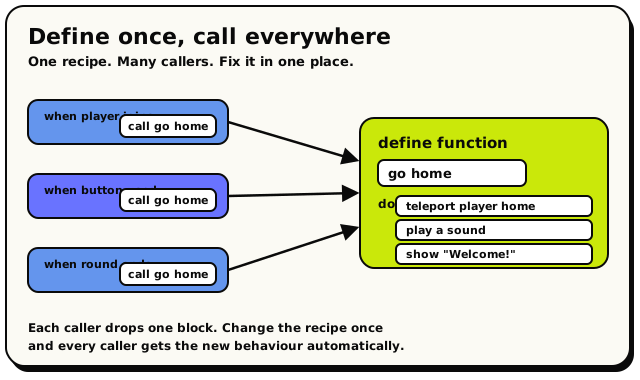 Define the recipe once, then call it from as many places as you like. Each caller drops a single block, and fixing the recipe fixes every caller at once.
The three function blocks
Define Function
ActionFunctions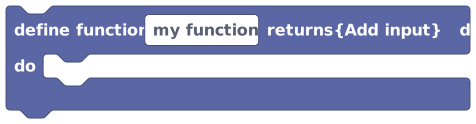
Creates your own reusable block of steps that you can give a name and run from anywhere in the same script.
A function is a named bundle of blocks you build once and then run as many times as you like. Give it a name, optionally add inputs (using the "Add input" button), put the steps inside the "do" section, and optionally choose what kind of value it gives back. Use this to avoid copying the same blocks over and over: write the steps once, then call the function wherever you need them.
Inputs & fields
| Slot | Accepts | Default | What it's for |
|---|---|---|---|
define function | text | my function | |
returns | custom | none | Choose: No return, Boolean, Number, Text, Rotation, Player, Object, Coordinate, Area, Boolean list, Number list, Text list, Player list, Object list, Coordinate list, Area list |
How it behaves
This block sits on its own (it has no previous or next connector) and is not part of a normal trigger stack; the compiler skips it during normal flow and only compiles its body when something calls it. The body is compiled the first time it is called for a given event type and reused afterwards, so it is outlined rather than copied at every call site. Inputs you add become parameters available inside the body via the input block. If you set a return type, you must end the function so it produces a matching value. Recursion (a function that calls itself, directly or through a chain) is not supported and is reported as an error. Defining a function does not run it; only calling it does.
Watch out
Defining a function does nothing by itself. You must add a call to actually run it.
Functions cannot call themselves (recursion is blocked).
If you pick a return type, the function must actually return that type of value, and you have to use the call as a value block, not as a plain step.
This block has no event/trigger of its own; it can only be placed loose and used by call blocks in the same behavior.
Tips
Give functions clear names like "open all doors" so your script reads like instructions.
Use inputs to make a function flexible, e.g. one "greet player" function that takes the player as an input.
Examples
define function {greet} returns {No return}
 do → say "Welcome!"
Creates a function named greet whose body says a welcome message; you then call greet wherever you want that message.
See also
Function Input
ValueFunctions
Reads the value of one of the inputs passed into the function you are currently inside.
When you add inputs to a function, this block lets you read those inputs from inside the function's steps. Pick which input you want from the dropdown and the block hands you its value, ready to plug into other blocks. For example, a "greet player" function with a player input can use this block to know which player to greet.
Inputs & fields
| Slot | Accepts | Default | What it's for |
|---|---|---|---|
input | custom | ||
VARIABLE_TYPE | custom |
How it behaves
Only works inside a function definition. It looks up the chosen parameter on the function it lives in and emits a LOAD_LOCAL that reads that parameter's value (the argument the caller passed in). The block's output type matches the parameter's declared type. If placed outside any function, or if the chosen input does not exist on the function, the compiler reports an error and the block produces nothing useful.
Watch out
It only works inside a function definition. Using it anywhere else is an error.
You must actually add an input to the function first, then select it here; otherwise there is nothing to choose.
Its type follows the input you defined, so it can only be plugged into sockets that accept that type.
Tips
Name your function inputs clearly so the dropdown is easy to read.
Combine several input blocks to use multiple inputs inside one function.
Examples
define function {greet} (input: player)
 do → send message to {input player} saying "Hi!"
Inside the greet function, the Function Input block supplies the player that was passed in when greet was called.
See also
Here's what each one is for:
| Block | What it does |
|---|---|
| Define Function | Creates the recipe. You name it and put the blocks inside it. |
 Call Function Call Function | Runs a recipe you defined, by name. |
| Function Input | A value handed into the function so it can work on different things each time. |
Step 1: Define it
Define Function: your reusable recipe. Name it, then snap blocks inside.
Drop a Define Function block onto the canvas, give it a name (it starts life as
my function), and place the blocks you want it to run inside it.
A function can also return a value. That means it works something out and hands an answer back to whoever called it, like asking a friend "what's 2 plus 2?" and getting "4" back. The dropdown lets you say what type of answer it gives:
- No return (the default): it does stuff (teleport, play a sound) and hands nothing back.
- number, text, boolean, player, object, and more: it figures something out and gives you the answer to use elsewhere.
Name a function after the job it does: give starter kit, reset the round,
is player a winner. When you read your script later, the call block reads like a sentence.
Step 2: Call it
Call Function: one block that runs your whole recipe.
Anywhere you want the function to run, drop a Call Function block and pick your function from its dropdown. That one block stands in for the whole pile of blocks inside the definition.
Step 3: Pass it inputs (optional)
Sometimes you want the same recipe to work on different things. “Teleport home” is handy, but “teleport this player home” is handier: you choose who, each time you call it.
That's what inputs (also called parameters) are for. You add an input to your function,
and inside the function you grab its value with the
Function Input block.
- Define a function called
welcomewith one input namedwho(a player). - Inside it, use the Function Input block to teleport
whohome and greet them. - Now call
welcomeand hand it any player: the triggering player, a random player, whoever. Same recipe, different guest each time.
Functions vs. events: don't mix them up
An event block, the rounded "hat" block at the top of a stack, runs automatically when something happens in your world. A function does nothing until something calls it. It's a tool sitting in a drawer: useful, but it only acts when you reach for it. So always pair a function with a Call Function block, which usually lives under some event.
A function can call another function, but not itself. Recursion (a function that calls itself, directly or through a chain of other functions) isn't supported: the editor catches it and refuses to publish, with a “calls itself recursively” error. Use a loop block instead when you need to repeat something.
For ordinary nested calls (function A calls B calls C…), the engine also caps how deeply calls can nest at runtime: 16 levels. Go past that and the run stops with a “function call depth limit” error. Normal “call a helper” use never gets close.
Why bother? The payoff
- Less copy-paste. Build it once, use it everywhere.
- One place to fix. Change the recipe, and every call updates automatically.
- Readable scripts.
call give starter kitsays what it means at a glance.