Groups
A group is a collection of players, like “everyone in the room” or “everyone standing in the lobby.” These blocks build groups, pick individuals out of them, and run actions on a whole crowd at once.
Read the friendly intro in Groups & Lists first. It explains how one block can affect many players at the same time.
The shape of a Groups script
Almost every script in this category follows the same three steps: build a group, optionally pick one player out of it, then act on the result.
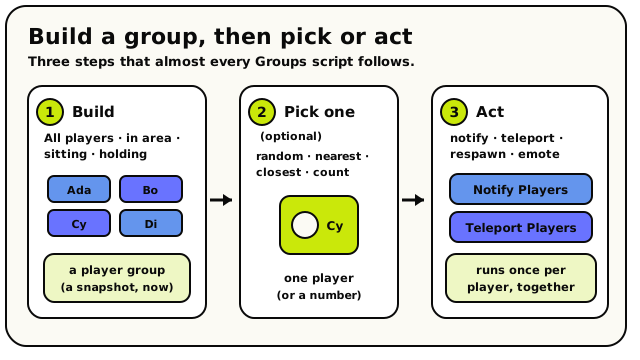 Build a group, optionally pick one player, then act on everyone. The blocks in this category fall into those three roles.
Step 1: build a group
These Value blocks collect a set of players into one Group of players value that you can plug into any group action.
 All Players: everyone in the world right now.
- is the simplest: every real person currently in the
world. NPCs are never included.
 collects only the players standing inside an
Area you choose, like a lobby, a finish line, or a danger pit.
collects only the players standing inside an
Area you choose, like a lobby, a finish line, or a danger pit. and
and
 build groups from who is seated on, or
holding, a particular object. Handy for musical chairs or carrying a flag.
build groups from who is seated on, or
holding, a particular object. Handy for musical chairs or carrying a flag.
Every group is a snapshot taken the instant the block runs. If you store it and use it later, people who left are skipped and people who joined are not included. Re-build the group when you need a fresh one.
Step 2: pick one out (optional)
Sometimes you want a single player, not the whole crowd. These take a Group of players and hand back one Player (or a count).
 Random Player From Group picks one winner at random.
- chooses one player at random, like a winner
or whoever is "it".
 finds the nearest player in the whole world to a
point, while
finds the nearest player in the whole world to a
point, while  only searches inside a group
you provide.
only searches inside a group
you provide. reports how many players are in a group as a
Number. Use it to wait until enough people have joined.
reports how many players are in a group as a
Number. Use it to wait until enough people have joined.
Step 3: act on the group
These Action actions run once on every player in the group, all at the same time. They each accept a single player, a group, or a list of players.
 Teleport Players moves a whole group to one spot at once.
 pops a short message on everyone's
screen.
pops a short message on everyone's
screen.- and
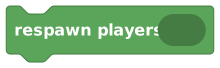 move a crowd to a chosen spot or back to spawn.
 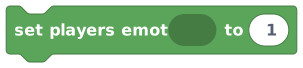 makes everyone play the same emote, perfect for
a group cheer.
makes everyone play the same emote, perfect for
a group cheer.
Running rounds
 Start Round flips a room true/false variable to true.
and  are friendly
shortcuts for a game loop. They flip a room true/false variable
to
are friendly
shortcuts for a game loop. They flip a room true/false variable
to true or false. The rest of your script checks that variable to decide what counts as
"during the round". Use the same variable in both blocks so they control one shared round state.
The blocks
All Players
ValueGroupsGroup of playersGives you a group of every real person currently in the world.
This block hands you a player group containing everyone who is in your world right now. Use it whenever you want an action to affect all the visitors at once, like teleporting everyone, notifying everyone, or making everyone do an emote. The group updates to whoever is present at the moment the block runs.
How it behaves
Compiles to the builtin 'players.all', which returns a player group of every human player currently in the room. NPCs are never included. The group is a fresh snapshot taken the instant the block runs, so people who join or leave afterwards are not reflected. Runs instantly and does not pause the script.
Watch out
NPCs are never part of this group, only real players.
It is a snapshot of who is present right now. If you store it and use it later, people who left will be skipped and people who joined will not be included.
Tips
Plug this straight into any block that takes players, like 'notify players' or 'teleport players', to affect everyone.
Combine with 'count players in' to find out how many people are in your world.
Examples
notify players {all players} text "The game is starting!"Sends a message to every player currently in the world.
See also
Players Sitting At Object
ValueGroupsGroup of playersGives you a group of all the players who are sitting on a chosen seat or chair.
This block gives you a player group of everyone currently sitting on the object you plug in. Use it for seat-based games, like a musical-chairs round or a quiz where players must be seated to play. If nobody is sitting on the object, you get an empty group.
Inputs & fields
| Slot | Accepts | Default | What it's for |
|---|---|---|---|
players sitting at * | Object | The chair or seat object to check. Everyone currently sitting on it is collected into the group. |
How it behaves
Compiles to the builtin 'players.sittingAtObject', which returns a player group of every human player whose current seat matches the given object. If the input is not a valid object, it returns an empty group. NPCs are excluded. The group is a snapshot taken when the block runs, and the block runs instantly without pausing.
Watch out
Only counts players actually seated on that specific object right now.
Returns an empty group if the input is not a valid object.
Tips
Use with 'count players in' to check if a seat is taken or how many seats are filled.
Combine with 'random player from' to pick a winner from everyone seated.
Examples
set players emote {players sitting at {the throne}} to 5Makes everyone sitting on the throne play emote 5.
See also
Players Holding Object
ValueGroupsGroup of playersGives you a group of all the players who are currently holding a chosen object.
This block gives you a player group of everyone holding the object you plug in. Use it for games where a held item matters, like carrying a flag or holding a key. If nobody is holding the object, you get an empty group.
Inputs & fields
| Slot | Accepts | Default | What it's for |
|---|---|---|---|
players holding * | Object | The object to check. Everyone currently holding (grabbing) it is collected into the group. |
How it behaves
Compiles to the builtin 'players.holdingObject', which returns a player group of every human player whose held object matches the given object. If the input is not a valid object, it returns an empty group. NPCs are excluded. The group is a snapshot taken when the block runs, and the block runs instantly without pausing.
Watch out
Usually only one player can hold a given object at a time, so this group is often a single player or empty.
Returns an empty group if the input is not a valid object.
Tips
Combine with 'random player from' or just use it directly to act on whoever is holding the item.
Use with 'count players in' to check whether anyone is holding the object.
Examples
notify players {players holding {the flag}} text "You have the flag!"Messages whoever is currently holding the flag object.
See also
Nearest Player From Group
ValueGroupsPlayerFinds the one player in a group who is standing closest to a chosen spot.
This block looks through a player group and returns the single player who is nearest to a position you give it. Use it to find who is closest to a goal, a button, or any spot in your world. Unlike 'closest player', this only considers players who are already in the group you provide.
Inputs & fields
| Slot | Accepts | Default | What it's for |
|---|---|---|---|
nearest player from * | Group of players | The player group to search within. | |
to * | Position (X, Y, Z) | The point in the world to measure distance from. The closest player in the group to this point is returned. |
How it behaves
Compiles to the builtin 'players.nearest', which takes a player group and a 3D position, then returns the player from that group standing closest to that position. If the group is empty or the location is not a valid position, it returns null (no player). Players who are no longer in the world are skipped. Runs instantly and does not pause the script.
Watch out
Only searches inside the group you provide, not the whole world; use 'closest player' if you want everyone.
Returns 'no player' if the group is empty.
Distance is measured in 3D, including height.
Tips
Combine with 'players in area' to find the nearest player within a specific zone.
Use an object's position as the location to find who is closest to that object.
Examples
notify {nearest player from {all players} to {position of the exit door}} text "You are closest to the exit!"Picks whoever among all players is nearest to the exit door and messages them.
See also
Closest Player
ValueGroupsPlayerFinds the one player in the whole world who is standing closest to a chosen spot.
This block returns the single player anywhere in your world who is nearest to a position you give it. It is like 'nearest player from group' but it automatically searches everyone present, so you do not need to provide a group. Use it to find who is closest to a button, a door, or any point.
Inputs & fields
| Slot | Accepts | Default | What it's for |
|---|---|---|---|
closest player to * | Position (X, Y, Z) | The point in the world to measure from. The single closest player in the whole world to this point is returned. |
How it behaves
Compiles to the builtin 'players.closest', which looks at all human players currently in the room, then returns the one standing closest to the given 3D position. If there are no players or the location is not a valid position, it returns null (no player). NPCs are excluded. Runs instantly and does not pause the script.
Watch out
Searches every real player in the world; NPCs are never included.
Returns 'no player' when nobody is in the world.
Distance is measured in 3D, including height.
Tips
Use this when you want the nearest of everyone and do not already have a group.
Pair with 'set players emote' or 'teleport players' to act on the closest person.
Examples
notify {closest player to {position of the welcome sign}} text "Welcome!"Finds whoever in the world is nearest the sign and messages them.