Conditions & Loops
These are the control-flow blocks: the ones that make decisions and repeat actions. They don't change your world by themselves. Instead they decide which of your other blocks run, how many times, and when. They're the steering wheel of every script.
Notice their shape: most of these are C-shaped blocks, like a bracket with an open mouth. Whatever blocks you tuck inside that mouth are the part the block controls.
If / Else: make a decision
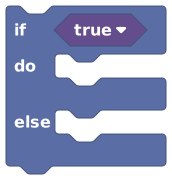 If / Else runs blocks only when a condition is true.
The block asks a yes/no question, then runs one set of
blocks if the answer is true and (optionally) a different set if it's false. It's a
fork in your recipe: "If the cake is golden, take it out; otherwise, bake five more
minutes."
The question goes in the pointy hexagon slot, a Yes/No value. You build it with Logic blocks (compare, and/or, not) or any block that answers true/false, like "is player in area?".
Need more than two outcomes? Put another if / else inside the else part to keep asking
follow-up questions.
Repeat N times: do it again
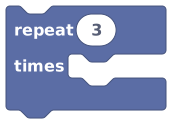 Repeat N times runs the inside blocks a fixed number of times.
The block runs the blocks inside its mouth a set
number of times in a row. Want to spawn five coins, or flash a light three times? Set the
count and put the action inside. It starts at 3 by default, so type over it.
For each: do something to every item
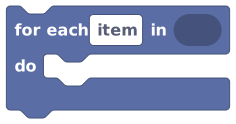 For each runs the inside blocks once per item in a list.
The block walks through a
list (or a player group) and runs its inside blocks
once for every item. On each pass, the current item is available as the
 block. That's how you say "do something to this one".
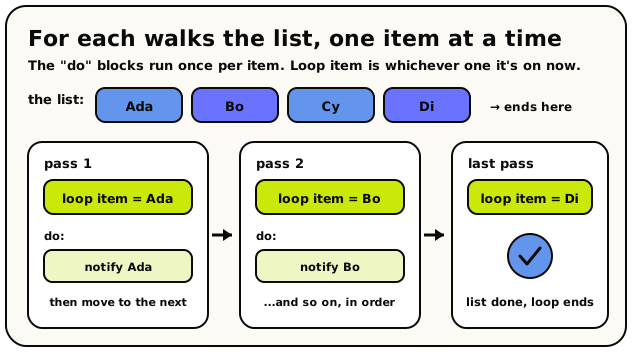 For each runs its inside blocks once per item, in order. On each pass, loop item is whichever item the loop is on right now.
for each item in (players in [lobby]) → inside the loop:
notify [loop item] "The match is starting!".
Each time around, loop item is the next player, so everyone gets the message.
Wait: pause this run
 Wait seconds pauses this script before the next block.
The block pauses this one script run for a
number of seconds, then carries on with the next block. It starts at 1 second.
This is perfect for timed sequences: open a door, wait 3 seconds, close it again.
Only this run pauses on a wait. The room keeps running, other players keep moving, and other scripts keep going. The wait is more like setting a kitchen timer than standing still. There's much more in Timers, loops & waits.
What about "while", "break", and "forever"?
Hideout has no while loop, no break, no continue, and no forever block. That's on purpose.
Your scripts run in response to events (things that happen in the world), not on an endless
loop. So instead of looping forever, you wire up the right trigger:
- To do something on a clock, use the every N seconds event hat (see Timers, loops & waits).
- To do something when the world changes, use the matching event hat.
And because there is no break, a repeat or for each loop always runs all the way to the
end of its count or list once it starts.
Every time around a loop is more work for the room. A small loop is fine, but a loop running many thousands of times can get slow and eventually be stopped by the engine's safety limit. Keep loop bodies small, and prefer events over giant loops.
The blocks
If / Else
ActionConditionsRuns one set of blocks if a question is true, and (optionally) another set if it is false.
This is the main decision block. It checks a true/false condition. If the condition is true, the blocks in "do" run. If it is false, the blocks in "else" run instead. Click the gear icon on the block to add extra "else if" branches, so it can test several conditions in order. It is how your world reacts differently to different situations.
Inputs & fields
| Slot | Accepts | Default | What it's for |
|---|---|---|---|
if * | Yes/No | true | The yes/no question to check. |
How it behaves
Conditions are checked from top to bottom. The first branch whose condition is true runs, and the rest are skipped. If none are true, the "else" branch runs (if you added one). The condition input defaults to a hidden "true" so an empty "if" always runs its "do" branch. Extra "else if" branches added with the mutator each get their own condition and statement slot. Reading the conditions is instant, but the blocks inside a branch run normally (and may wait if they contain pause blocks).
Watch out
An untouched condition defaults to true, so a blank "if" always runs its "do" branch. Plug your real condition in.
Only the first matching branch runs. Once one condition is true, the others (and the else) are skipped.
Tips
Use the gear icon on the block to add "else if" branches when you need to test more than two cases.
Combine the condition with and/or/not logic blocks to test several things at once.
You don't have to use the "else" slot; leave it empty if you only want something to happen when the condition is true.
Examples
if compare {score} {>=} {10} → do: show big text "Great job!" → else: show big text "Try again"Checks the score: 10 or more shows praise, otherwise shows the try-again message.
See also
Repeat N Times
ActionLogicRuns the blocks inside it a set number of times in a row.
This block repeats whatever you put inside it a chosen number of times. Set the number (the default is 3) and the blocks in the "do" slot run once for each count. Use it for things like spawning five enemies, flashing a light a few times, or giving out coins in a loop.
Inputs & fields
| Slot | Accepts | Default | What it's for |
|---|---|---|---|
repeat * | NumberWhole number | 3 | How many times to run the blocks inside. |
How it behaves
The count is read once at the start and rounded to a whole number. The inner blocks run that many times, top to bottom, then the script continues past the loop. A count of 0 or a negative number runs the inside zero times. If the inside contains a wait/pause block, each pass waits in turn, so a long loop with waits can take a while. The engine has a built-in gas limit, so extremely large loops may be stopped to protect the world.
Watch out
The number of times is locked in when the loop starts. Changing a variable inside the loop will not change how many times it runs.
A negative or zero count skips the inside completely.
Tips
For looping over a list of players or objects instead of a fixed count, use the "for each" block.
Keep the count reasonable; very large loops can hit the safety limit and stop early.
Examples
repeat {3} times → do: add object at a random spotRuns the spawn action three times, creating three coins.
For Each
ActionListsRuns the blocks inside it once for every item in a list.
This loop goes through a list one item at a time, from first to last, and runs the blocks inside its 'do' section for each one. While it is on a particular item, you can refer to that item with the 'item' block (using the name you typed). Use it to do the same thing to every player, every object, or every value in a list.
Inputs & fields
| Slot | Accepts | Default | What it's for |
|---|---|---|---|
in | Yes/No listNumber listText listDuration listPosition (X, Y) listPosition (X, Y, Z) listPlayer listObject listArea listGroup of players | The list to walk through, one item at a time. | |
for each | text | item |
How it behaves
Compiles to a counted loop: it stores the list and a starting index of 0 into hidden locals, then while the index is less than the list's length it reads list.itemAtIndex into the loop's item local, runs the body, and increments the index. The item name field both labels the loop and ties matching 'loop item' blocks to it. The list's length is read each pass, and the index advances by one each pass. If the list is empty the body never runs. It does not pause the script by itself, but any waiting blocks inside the body will still wait on each pass.
Watch out
It walks the list in order from first (index 0) to last.
Changing the list variable inside the loop can change how many passes happen, because the length is checked each time around. This can cause skipped or repeated items, so it is usually safer to build a new list instead of editing the one you are looping over.
An empty list means the body runs zero times. That is normal, not a bug.
Tips
Give the item a clear name (like 'player' or 'door') so the matching 'item' block is easy to read.
Use it with a player list to do the same action to everyone at once.
To loop a fixed number of times without a list, use 'repeat ... times' instead.
Examples
for each {player} in {players}: do → set variable {health} of {item player} to 100Runs the heal block once for each player in the list.
Wait Seconds
ActionTimersPauses this part of the script for a number of seconds before moving on to the next block.
Drop this block into a stack to make the script stop and do nothing for a while, then carry on. It is perfect for spacing things out, like flashing a light, waiting a second, then turning it off. You choose how long to wait by plugging in a number of seconds (it starts at 1).
Inputs & fields
| Slot | Accepts | Default | What it's for |
|---|---|---|---|
wait * | NumberWhole number | 1 | How many seconds to pause before running the next block. |
How it behaves
Multiplies the seconds input by 1000 to get milliseconds, then runs the WAIT_MS instruction which suspends this fiber until the wake-up time (now plus the rounded-up milliseconds) is reached. Only this running stack pauses; other triggers and other players' scripts keep running normally. A negative or zero wait becomes an immediate continue. The wait is logged to the debug trace as "Waiting Nms". This block is not available in NPC-owned scripts (room and object scopes only).
Watch out
It only pauses the current stack, not the whole world. Other event handlers keep going.
Because the script genuinely sleeps here, anything after the wait runs later. If the object is deleted while waiting, the rest may never run.
You cannot use this block inside an NPC-owned behavior.
Tips
Chain several waits with actions between them to build simple timed sequences.
Use the Seconds block in the socket so the value reads clearly, e.g. "wait 3 seconds".
Examples
set object state of {the lamp} to "on" → wait {1} seconds → set object state of {the lamp} to "off"Turns the lamp on, holds for one second, then turns it back off.