NPCs
NPCs are characters you control with scripts: shopkeepers, guides, enemies, pets. These blocks spawn them, move them around, point them at players, and make them speak and react.
Start with the NPCs concept page to learn the difference between scripted NPCs and AI-powered ones, then come back here for every block.
The NPC must be spawned first
The single most important rule: an NPC only responds to walk, face, say, and emote commands once it is actually in the world. Spawn it, command it, and despawn it when you're done.
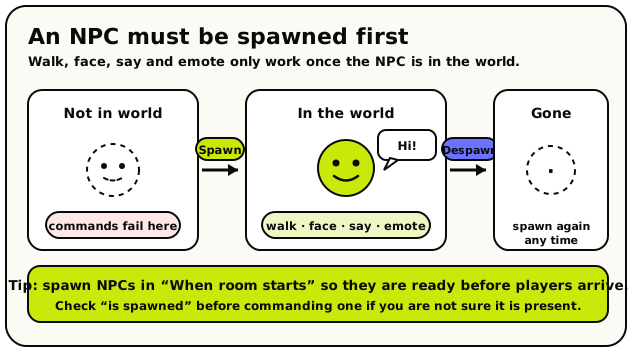 Not in world, then Spawn, then command it, then Despawn. Commands sent to an NPC that isn't spawned fail.
Pointing at an NPC
Every action below needs to know which character it's controlling. Two value blocks answer that.
 NPC: pick a specific named character from a dropdown.
- lets you choose one of your world's NPCs from a dropdown. Use
it whenever you mean a known, fixed character.
 stands for whichever NPC set off the current event.
It only works inside
stands for whichever NPC set off the current event.
It only works inside  and
and
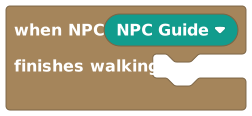 , and it lets one script work for many NPCs.
Bringing NPCs in and out
 Spawn NPC brings a character into the world at a spot, facing a direction.
- makes an NPC appear at a position, facing a direction.
Do this in a
 event so characters are ready before players
arrive.
event so characters are ready before players
arrive.  removes an NPC from the world. You can spawn it again
later.
removes an NPC from the world. You can spawn it again
later. is a Yes/No check, put it in
an "if" to avoid spawning the same NPC twice, or commanding one that isn't there.
is a Yes/No check, put it in
an "if" to avoid spawning the same NPC twice, or commanding one that isn't there.
Moving and turning
 Walk NPC To paths the NPC over and waits until it arrives.
- sends an NPC walking to a spot. Importantly, your script
pauses at this block until the NPC arrives, so the next block runs only after it gets there.
 snaps it there instantly with no walking and no wait.
 turns it to face
 north,east,south, orwestwithout moving.
Because waits, you can chain "walk here, say something,
turn to face the player" and it plays out in order. Use
instead when you want an instant reset with no pause.
Talking and reacting
 NPC Says speaks the exact line you write.
- makes the NPC speak the exact words you type, always the
same, perfect for scripted dialogue.
 hands the AI a prompt and the NPC speaks whatever it
writes. The reply is generated in the background, so your script does not wait, and the
wording varies each time.
hands the AI a prompt and the NPC speaks whatever it
writes. The reply is generated in the background, so your script does not wait, and the
wording varies each time. plays an animation chosen by number, like a wave or a
dance.
plays an animation chosen by number, like a wave or a
dance.
Reading facts about an NPC
 gives an NPC's location as a Position (X, Y, Z)
point. Feed it into a spawn or teleport to place something exactly where it stands.
gives an NPC's location as a Position (X, Y, Z)
point. Feed it into a spawn or teleport to place something exactly where it stands. gives its on-screen name as Text,
ready to join into a message.
gives its on-screen name as Text,
ready to join into a message. isn't a block you add on purpose. The editor drops it in as
a repair marker when a referenced NPC can't be found. Replace it with a real
before publishing.
isn't a block you add on purpose. The editor drops it in as
a repair marker when a referenced NPC can't be found. Replace it with a real
before publishing.
The blocks
NPC
ValueNPCsNPCPicks a specific NPC from your world so other blocks can control it.
This block lets you choose one of the NPCs in your world from a dropdown menu. Drop it into any socket that asks for an NPC, like 'spawn NPC' or 'NPC says'. It's the way you point a block at the exact character you want to move, talk, or react. If the NPC you picked gets deleted, the block keeps the old choice and shows it as unavailable rather than silently switching to a different NPC.
Inputs & fields
| Slot | Accepts | Default | What it's for |
|---|---|---|---|
NPC | npc |
How it behaves
Reads the NPC you picked in the dropdown and passes it along to the block it is plugged into. If no NPC is selected (the dropdown is empty), the block produces an empty NPC value and any NPC action using it will fail at runtime with a 'needs an NPC' error.
Watch out
If you leave the dropdown empty (no NPC chosen), the block resolves to nothing and any action using it will fail.
If the NPC referenced here is deleted from the world, the block shows it as an 'Unavailable NPC' and stays broken until you pick a valid one.
Tips
Use this block whenever you want to control a known, fixed character. For the character that triggered an event, use 'triggering NPC' instead.
Examples
When room starts → NPC {Guard} says "Welcome to the castle!"The NPC block pins the action to the Guard specifically, so only that character speaks.
Triggering NPC
ValueNPCsNPCStands for whichever NPC caused the event that is currently running.
When your script runs because of an NPC, this block becomes that NPC. For example, inside a 'When NPC is interacted with' or 'When NPC arrives' event, 'triggering NPC' is the exact character involved. It saves you from having to hard-pick a specific NPC, so the same script can work for many different NPCs. It only works inside NPC-related events.
How it behaves
Returns the NPC tied to the event that is currently running. It only works inside two events: 'When NPC is interacted with' and 'When NPC arrives', which are the events that supply this value. The editor does not let you use it anywhere else.
Watch out
This block only exists inside NPC events (when an NPC is interacted with, or when an NPC arrives). It won't appear or work in other events.
It does not let you choose an NPC; it always refers to the one tied to the running event.
Tips
Great for reusable behaviour: write one script that responds to whatever NPC triggered it, instead of one script per NPC.
Examples
When NPC arrives → NPC {triggering NPC} says "I made it!"The triggering NPC is whichever character finished walking, so the right one speaks every time.
Position Of NPC
ValueNPCsPosition (X, Y, Z)Gives you the exact spot in the world where an NPC is standing.
This block reports an NPC's current location as a 3D position (x, y, z). You can feed that position into other blocks, for example to teleport a player to where an NPC is, to measure distance, or to spawn something nearby. Plug an NPC into the socket to choose which character's position you want.
Inputs & fields
| Slot | Accepts | Default | What it's for |
|---|---|---|---|
position of NPC * | NPC | (default) | The NPC whose location you want to read. |
How it behaves
Reads the NPC's current position in the world the moment the block runs and returns it as a 3D position (x, y, z).
Watch out
If the NPC isn't spawned, its position may not be meaningful. Check 'is spawned' first if you're not sure.
Tips
Combine with a teleport or spawn block to place things exactly where an NPC stands.
Examples
spawn NPC {Helper} at {position of NPC {Guide}} facing SouthThe new NPC appears at the same spot the Guide is standing.
Name Of NPC
ValueNPCsTextGives you the on-screen name of an NPC as text.
This block returns the display name of an NPC, the friendly name shown above the character, as a piece of text. You can use it inside messages, comparisons, or speech so your script talks about the NPC by name. Plug an NPC into the socket to choose which one.
Inputs & fields
| Slot | Accepts | Default | What it's for |
|---|---|---|---|
name of NPC * | NPC | (default) | The NPC whose display name you want to read. |
How it behaves
Reads the NPC's display name the moment the block runs and returns it as text.
Tips
Join this with other text to make personalised messages, like "Talk to " + name of NPC.
Examples
show message to everyone: join("Say hi to ", {name of NPC {Guide}})The message includes whatever name the Guide currently has.
See also
NPC Is Spawned
Yes/NoNPCsYes/NoTells you yes or no whether an NPC is currently in the world.
This is a true/false block that checks if an NPC has been spawned (is actually present and visible in the world). Use it inside an 'if' block to avoid trying to move or talk to an NPC that isn't there yet. Plug an NPC into the socket to choose which one to check.
Inputs & fields
| Slot | Accepts | Default | What it's for |
|---|---|---|---|
NPC * | NPC | (default) | The NPC you want to check. |
How it behaves
Returns true if the NPC is currently spawned (present and visible in the world) and false if it is not.
Watch out
An NPC must be spawned before walk, face, say, and emote actions will work on it.
Tips
Use this before spawning to avoid spawning the same NPC twice, or before commanding an NPC to make sure it exists.
Examples
if not ({NPC {Guard}} is spawned) → spawn NPC {Guard} at {0,0,0} facing SouthThe Guard is only spawned when it isn't already present, so you never get duplicates.
See also
Spawn NPC
ActionNPCsMakes an NPC appear in the world at a spot you choose, facing a direction.
This action brings an NPC into the world (or moves it in if it's not yet present) at a chosen position and facing a chosen direction. Use it at the start of your game, or whenever you want a character to show up. You must spawn an NPC before you can make it walk, talk, or emote.
Inputs & fields
| Slot | Accepts | Default | What it's for |
|---|---|---|---|
spawn NPC * | NPC | (default) | Which NPC to bring into the world. |
at * | Position (X, Y, Z) | 0, 0, 0 | Where in the world the NPC should appear. |
facing * | Direction | South | Which direction the NPC should face when it appears. |
How it behaves
Spawns the chosen NPC at the given position, facing the given direction. The facing is snapped to one of the four cardinal directions (north, east, south, west). The action fails if NPC control isn't available in the room, if no NPC is chosen, or if the position isn't valid. It runs instantly and does not pause the rest of your script.
Watch out
Spawning an NPC that is already spawned has no useful extra effect; check 'is spawned' if you need to avoid re-spawning.
Requires the NPC control capability; in rooms where NPC actions aren't available this block fails at runtime.
Tips
Spawn your NPCs in a 'When room starts' event so they're ready before players arrive.
Use the coordinate picker on a position block to grab an exact spawn spot in your world.
Examples
When room starts → spawn NPC {Guard} at {12, 0, 5} facing SouthAs soon as the room loads, the Guard appears at the gate facing south.
Despawn NPC
ActionNPCsRemoves an NPC from the world so it disappears.
This action makes an NPC leave the world, the opposite of spawning. Use it when a character should vanish, for example after a conversation, when a level ends, or to clean up NPCs you no longer need. A despawned NPC can be spawned again later.
Inputs & fields
| Slot | Accepts | Default | What it's for |
|---|---|---|---|
despawn NPC * | NPC | (default) | Which NPC to remove from the world. |
How it behaves
Removes the chosen NPC from the world. The action fails if NPC control isn't available, if no NPC is chosen, or if the server reports an error. It runs instantly and does not pause the rest of your script.
Watch out
Despawning an NPC that isn't spawned generally does nothing harmful but commands sent to a despawned NPC will fail.
Tips
Pair spawn and despawn to make NPCs come and go as part of your story or level flow.
Examples
When ... → despawn NPC {Shopkeeper}The Shopkeeper disappears from the world until you spawn them again.
See also
Walk NPC To
ActionNPCsSends an NPC walking to a spot and waits until it gets there before continuing.
This action tells an NPC to walk to a chosen position. The NPC finds its own path and moves there over time. Importantly, your script PAUSES at this block until the NPC actually arrives, then carries on with the next block. That makes it easy to do things in order, like walk somewhere, then speak. Pair it with the 'When NPC arrives' event if other scripts need to know it reached the spot.
Inputs & fields
| Slot | Accepts | Default | What it's for |
|---|---|---|---|
walk NPC * | NPC | (default) | Which NPC should walk. |
to * | Position (X, Y, Z) | 0, 0, 0 | The position the NPC should walk to. |
How it behaves
Tells the chosen NPC to walk to the given position. The script pauses at this block until the NPC reaches the spot, then continues at the next block. The action fails if NPC control isn't available, if no NPC is chosen, or if the position isn't valid.
Watch out
This block pauses your script until the NPC arrives. If the NPC can't reach the spot, the wait can stall the script there.
The NPC must be spawned first; walking a despawned NPC will fail.
Because it waits, don't expect later blocks in the same script to run while the NPC is still walking.
Tips
Use it to choreograph scenes: walk an NPC to a point, then have it say something or face a direction.
If you want movement that doesn't pause the script, use 'teleport NPC' for an instant jump instead.
Examples
walk NPC {Guide} to {5, 0, 5} → NPC {Guide} says "Follow me!"The Guide walks to the spot first, and only after arriving does it speak, because walk-to waits.
Teleport NPC
ActionNPCsInstantly moves an NPC to a spot and turns it to face a direction.
This action snaps an NPC straight to a new position and direction with no walking, the NPC just appears there. Use it for instant moves, resets, or surprises. Unlike 'walk NPC to', it does not wait, so the rest of your script keeps running right away.
Inputs & fields
| Slot | Accepts | Default | What it's for |
|---|---|---|---|
teleport NPC * | NPC | (default) | Which NPC to teleport. |
to * | Position (X, Y, Z) | 0, 0, 0 | The position to instantly move the NPC to. |
facing * | Direction | South | Which direction the NPC should face after teleporting. |
How it behaves
Instantly moves the chosen NPC to the given position and turns it to face the given direction. The facing is snapped to one of the four cardinal directions. It runs instantly and does not pause the script. The action fails if NPC control isn't available, if no NPC is chosen, or if the position isn't valid.
Watch out
Teleport is instant, there is no walking animation between the old and new spot.
The NPC must be spawned first; teleporting a despawned NPC will fail.
Tips
Use teleport for resets (snap an NPC back to its start) and walk-to for natural movement.
Examples
When ... → teleport NPC {Guard} to {0, 0, 0} facing NorthThe Guard instantly returns to its starting spot facing north.
Turn NPC To Face
ActionNPCsTurns an NPC to face a chosen direction without moving it.
This action rotates an NPC so it faces north, east, south, or west, while it stays in the same spot. Use it to make characters look at players, look toward an event, or pose for a scene.
Inputs & fields
| Slot | Accepts | Default | What it's for |
|---|---|---|---|
turn NPC * | NPC | (default) | Which NPC to turn. |
to face * | Direction | South | Which direction the NPC should face. |
How it behaves
Turns the chosen NPC to face the given direction, snapped to one of the four cardinal directions (north, east, south, west). The NPC stays in place. The action fails if the direction is missing or invalid, if NPC control isn't available, or if no NPC is chosen. It runs instantly and does not pause the script.
Watch out
Directions are limited to the four cardinal directions (north, east, south, west).
The NPC must be spawned first.
Tips
After walking an NPC somewhere, use this to make it face the player or the action.
Examples
When NPC is interacted with → turn NPC {triggering NPC} to face SouthWhenever a player talks to the NPC, it turns to face south toward them.
See also
NPC Says
ActionNPCsMakes an NPC say a line of text you write.
This action makes an NPC speak the exact words you type or build with text blocks. The line appears as the NPC's speech, just like a chat bubble. Use it for scripted dialogue, hints, or reactions. Because you write the words yourself, the result is always the same, unlike the AI reply block.
Inputs & fields
| Slot | Accepts | Default | What it's for |
|---|---|---|---|
NPC * | NPC | (default) | Which NPC should speak. |
says * | Text | Hello! | The exact words the NPC should say. |
How it behaves
Makes the chosen NPC speak the exact text you give it, shown as a speech bubble. The action fails if the text is missing, if NPC control isn't available, or if no NPC is chosen. It runs instantly and does not pause the script.
Watch out
The NPC must be spawned for it to speak.
This says exactly what you write; it does not generate or change the wording.
Tips
Build dynamic lines by joining text blocks, for example greeting a player by name.
For improvised, character-driven replies, use 'NPC replies with AI to' instead.
Examples
When NPC is interacted with → NPC {triggering NPC} says "Hello, traveler!"When a player interacts, the NPC says the fixed greeting line.
Set Emote For NPC
ActionNPCsMakes an NPC play an animated emote chosen by its number.
This action plays an emote (a little animation like a wave or dance) on an NPC. You pick which emote by its number id. Use it to add personality and reactions to your characters. The number is rounded to a whole number before it's used.
Inputs & fields
| Slot | Accepts | Default | What it's for |
|---|---|---|---|
set emote for NPC * | NPC | (default) | Which NPC should play the emote. |
to * | NumberWhole number | 1 | The number id of the emote to play. |
How it behaves
Makes the chosen NPC play the emote whose number you give it. The number is rounded to a whole number first. The action fails if NPC control isn't available or if no NPC is chosen. It runs instantly and does not pause the script.
Watch out
Emotes are chosen by number, so you need to know which id maps to which animation.
Non-whole numbers are rounded to an integer.
The NPC must be spawned to play an emote.
Tips
Try different emote ids to find the animation you want.
Examples
When NPC is interacted with → set emote for NPC {triggering NPC} to 1The NPC plays emote number 1 when a player interacts with it.
See also
NPC Replies With AI To
ActionNPCsAsks the AI to write a reply for an NPC and have it speak the result.
This action lets an NPC respond using AI. You give it a prompt (an instruction like "Greet the player" or "Answer their question about the castle"), and the AI writes a line in the NPC's voice, which the NPC then says. The reply is generated in the background, so your script keeps running immediately and does not wait for the AI. Use it for natural, varied conversations instead of fixed scripted lines.
Inputs & fields
| Slot | Accepts | Default | What it's for |
|---|---|---|---|
NPC * | NPC | (default) | Which NPC should generate and speak an AI reply. |
replies with AI to * | Text | Greet the player | An instruction telling the AI what the NPC should respond to or talk about. |
How it behaves
Sends your prompt to the AI for the chosen NPC. The prompt is cut to the maximum allowed length first. The AI writes the reply in the background and the NPC speaks it once it is ready, so the script does NOT pause and moves straight to the next block. The action fails if the prompt is missing, if NPC control isn't available, or if no NPC is chosen.
Watch out
The reply is not instant and not guaranteed to be the same each time, the AI writes it in the background.
Your script does not wait for the reply, so don't assume the NPC has spoken on the very next block.
Very long prompts are cut to the maximum text length.
The NPC must be spawned to speak the reply.
Tips
Write clear, short prompts describing what the NPC should say or react to.
Use plain 'NPC says' when you need an exact, predictable line; use AI reply when you want flexible, in-character responses.
Examples
When NPC is interacted with → NPC {triggering NPC} replies with AI to "Warmly greet the player and ask their name"The AI writes a friendly greeting in the NPC's voice and the NPC speaks it shortly after.
Missing NPC
ValueNPCsNPCA placeholder that shows up when an NPC a block expected can no longer be found.
You don't add this block yourself. It appears automatically as a stand-in when a saved script can't find the NPC value it needs, for example if an NPC reference was deleted or didn't load. It marks where a real NPC block should go so you can fix it by plugging in a valid NPC.
How it behaves
It stands in for an NPC that could not be found and produces an empty NPC value, so any action that relies on it will fail at runtime. You cannot add it from the toolbox; the editor only ever drops it in automatically as a repair marker.
Watch out
Seeing this block means something is broken: a real NPC reference is missing. Replace it with a valid NPC block.
You cannot drag this block out of the toolbox; it only appears as a repair placeholder.
Tips
When you see a Missing NPC placeholder, pick the intended NPC from an 'NPC' block and plug it in.