Variables
A variable is a labelled box that remembers a value for you: a score, a true/false flag, a player, a coordinate. These blocks set (write into the box) and get (read back out of the box). Variables are how your world remembers anything between one moment and the next.
The idea that matters most: scope
Before you use a variable, you pick its scope. Scope means who shares the box, and that one choice decides whether there is one box or many boxes. Think of a school:
- Room Room: the score on the gym scoreboard. There's exactly one, and everyone sees the same number.
- Player: each student's own locker. Same kind of locker, but the contents are private to that student. There's one box per player.
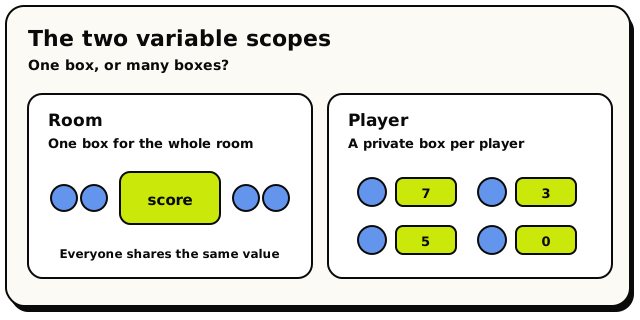 The two scopes at a glance. A room shares one box, while a player scope quietly keeps a separate box for each person.
You create your variables in the Variables panel (you give each one a name, a scope, and a type). After that, the blocks below read and write them. New to all this? Read Variables & memory for the full tour.
Variables are tracked by a hidden ID, not by their name. Rename a variable any time, and every block that uses it keeps working.
Getting a value (reading)
Each scope has a get block, a value block you plug into a slot wherever you need the remembered value.
 Get a room variable: the room's shared memory.
- reads the room's one shared value.
 reads one player's value. You tell it
which player.
reads one player's value. You tell it
which player.
A player variable has many boxes, so the get block has to know whose box to open. You snap a player into its socket, usually the triggering player (the one who set off the event). Leave that socket empty and the script won't publish: the editor flags a "missing input" error until you fill it.
Setting a value (writing)
Each scope also has a set block, a stack (action) block that writes a value into the box.
 Set a room variable: change the shared value.
- writes the room's shared value.
 writes one player's value.
The value you put in is checked against the variable's type. You can't, for example, store text in a number variable. The block won't let you snap the wrong thing in.
Clearing a value
Use  when you want a variable to contain nothing
(
when you want a variable to contain nothing
(null) until you set it again. Plug the room, player, or object variable's value block into
the socket. For a player or object variable, that value block also says whose copy to clear.
Clear Variable forgets the current value without replacing it with 0, false, or empty text.
Clearing is different from resetting to the type's starting value. A cleared number is null,
not 0; a cleared boolean is null, not false. This is useful when zero or false are real
answers and you need a separate "not set yet" state.
Clear Variable also works with list variables and makes the whole variable null. Use
 when you only want to remove every item while keeping
a real list with zero items.
when you only want to remove every item while keeping
a real list with zero items.
Hideout has no one-step "change variable by 1" block. To bump a number up, you read it, add with a Math block, and set it back:
set room variable score to (room variable score) + 1
What variables remember (and forget)
| Scope | One box or many? | Survives the round / reboot? |
|---|---|---|
| Room | One for the whole room | Yes, kept forever until you overwrite it |
| Player | One per player | Yes, kept per player |
Room and player variables stick around across rounds, reboots, and even republishing
your scripts. If you want a fresh score each round, reset it yourself (for example, in a
when room starts handler). They never clear automatically.
A quick worked example
- In the Variables panel, add
scorewith scope Player, type Number. (Number variables default to0, so every player starts at zero with no setup.) when player interacts with [coin]→set player variable [triggering player] score to (player variable [triggering player] score) + 1.
Each player's score is their own. Player A scoring never touches player B.
Under the hood
The precise rules
- Variable names are 1 to 64 characters long.
- A brand-new variable that holds a player or an object starts out as nothing
(
null), not "the current player". Set it before you rely on it. - Changing a variable's type in the panel resets its starting value to that new type's default.
- Clearing a variable stores
nulluntil another set block writes a value. It does not restore the variable's starting value. - The writes a script makes are buffered: held in memory and only saved once the run finishes a step successfully. If a run crashes or runs out of budget, the variable changes it made since its last wait are thrown away. World actions it already did (like moving an object) still stay done, though.
- Leaving a player set block's owner socket empty is a publish-time error, so the
editor stops you before you ever run. But if the socket is filled with something that turns
out to be nothing at run time (a player value that's
null), that one write is silently skipped.