Logic
Logic blocks answer one question: yes or no? They're the pointy hexagon Yes/No blocks you drop into an If / Else condition. With them you compare values, combine yes/no answers, and flip them around, so your script can decide what to do.
True and false, the building blocks
Every logic block gives back a boolean (say "BOO-lee-un"). A boolean is a value that's either true or false, like a light switch that's either on or off, never "maybe". You can spot these blocks by their pointy hexagon shape, which only fits into hexagon-shaped slots.
 True or False: a plain yes/no value you can toggle.
The block is the simplest one of all: a toggle you flip
between true and false. Use it to set a starting flag, or as a placeholder
while you build the rest of your script.
Compare: is one value bigger, smaller, or equal?
 Compare: checks two values and answers true or false.
The block checks two values against each other. Pick
the test from its dropdown:
| Symbol | Means |
|---|---|
= | equal to |
!= | not equal to |
< | less than |
> | greater than |
<= | less than or equal to |
>= | greater than or equal to |
Use it for questions like "is score greater than 10?" or "does the message equal
open?".
For = and !=, the two values are checked for being truly the same kind of thing (number to
number, text to text). So the number 5 is not equal to the text "5".
For <, >, <=, and >=, both sides are read as numbers first: true counts as 1,
false as 0, and any text that isn't a number counts as 0.
And / Or: combine two questions
 And / Or: combine two yes/no answers into one.
The block joins two true/false answers:
- and: true only when both sides are true. "Is the player in the lobby and is the game ready?"
- or: true when at least one side is true. "Did they say
hiorhello?"
Not: flip a yes/no answer
 Not: turns true into false and false into true.
The block flips its answer to the opposite: true
becomes false, and false becomes true. Perfect for "if the door is not
open…".
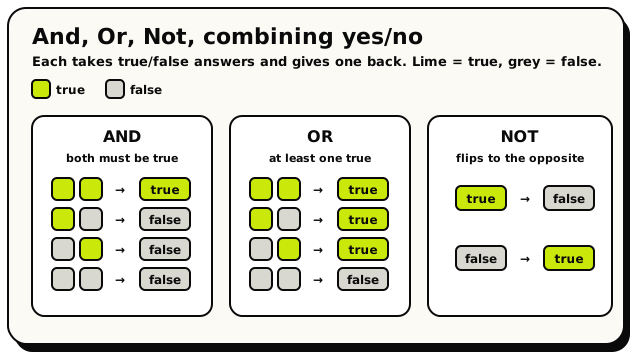 How and, or, and not turn yes/no answers into one yes/no answer.
Logic blocks plug into each other. To ask "A is true and B is not true", drop a
not block inside one side of an and block. The hexagon shapes only let yes/no answers
connect, so you can't accidentally build a question that makes no sense.
Worked example
if ( (message text = "swordfish") and (is [triggering player] in [entrance]) ) → then
teleport [triggering player] to [inside].
Both halves must be true, so the and block guards the door.
Under the hood
The precise rules
- All these blocks read instantly and never pause the script.
- And / Or always checks both sides. There's no "short-circuiting" (a shortcut some programming languages take where they skip the second side once the first decides the answer). So don't count on the second side being skipped.
- These blocks give a true/false answer in the editor, but the final word on any tricky type question comes from the publish-time check. Hit Validate before you Publish.
The blocks
True or False
Yes/NoLogicYes/NoA simple yes/no value that is either true or false.
This is the most basic Logic block. It holds the word "true" or "false", which you pick from the dropdown. You plug it into anywhere that asks a yes/no question, like the "if" block's condition or a true/false variable. Think of it as the answer to a question you already know.
Inputs & fields
| Slot | Accepts | Default | What it's for |
|---|---|---|---|
VALUE | dropdown | TRUE | Choose: true, false |
How it behaves
Compiles to a constant boolean. The value is true unless the dropdown is set to FALSE (any value other than "FALSE" is treated as true). It is read instantly and never pauses the script.
Watch out
It is a fixed value you choose by hand. If you want a true/false answer that changes while the game runs (like "is this player nearby?"), use a condition block such as compare or one of the question blocks instead.
Tips
Handy for testing: drop a "true" or "false" straight into an "if" block to temporarily force one branch to run while you debug.
Examples
set room variable {gameStarted} to {false}Saves the value false into a room variable so you can flip it to true later when the game begins.
Compare
Yes/NoLogicYes/NoChecks two values against each other and answers true or false (like is one bigger, smaller, equal, or different).
This block compares value A with value B using the symbol you pick: equals (=), not equal (!=), less than (<), greater than (>), less than or equal (<=), or greater than or equal (>=). It gives back true or false, so it slots right into an "if" block or anywhere a yes/no answer is wanted. Use it to ask questions like "is the score 10 or more?" or "did the player type the right word?".
Inputs & fields
| Slot | Accepts | Default | What it's for |
|---|---|---|---|
compare | Yes/NoNumberWhole numberText | The first value to compare. | |
B | Yes/NoNumberWhole numberText | The second value to compare against the first. | |
OP | dropdown | EQ | Choose: =, !=, <, >, <=, >= |
How it behaves
Both inputs are evaluated and compared. For = and !=, the comparison checks whether the two values are truly equal (number to number, text to text, etc.). For <, >, <=, >= the values are read as numbers: numbers stay as-is, true counts as 1 and false as 0, and text is parsed as a number (text that isn't a number counts as 0). Reads instantly and never pauses the script.
Watch out
The greater/less comparisons treat everything as a number. Comparing text like "apple" < "banana" will not sort alphabetically; both turn into 0.
When checking = or !=, the two sides must be the same kind of thing to match (the number 5 is not equal to the text "5").
Tips
Use != (not equal) to run something only when two values are different.
For 'between' checks, combine two compare blocks with a logic AND block, e.g. score >= 1 AND score <= 10.
Examples
if compare {score} {>=} {10} → do: show big text "You win!"Compares the score variable to 10 and, when it is 10 or higher, shows the winning message.
And / Or
Yes/NoLogicYes/NoCombines two yes/no answers into one: "and" needs both to be true, "or" needs at least one.
This block joins two true/false values together. Pick "and" to get true only when BOTH sides are true. Pick "or" to get true when EITHER side (or both) is true. It is how you check more than one condition at once, like "the player is in the area AND the door is open".
Inputs & fields
| Slot | Accepts | Default | What it's for |
|---|---|---|---|
logic * | Yes/No | true | The first true/false value. |
B * | Yes/No | true | The second true/false value. |
OP | dropdown | AND | Choose: and, or |
How it behaves
Both inputs are evaluated. With AND the result is true only if both A and B are true; with OR the result is true if at least one is true. Values are checked for truthiness, so it works even with non-boolean values plugged in indirectly. Reads instantly and never pauses the script. Note: unlike many programming languages, both sides are always evaluated (there is no short-circuiting).
Watch out
Both inputs default to a hidden "true" block, so an untouched block always returns true. Make sure you plug your real conditions in.
Both sides are always run; do not rely on the second side being skipped when the first is false.
Tips
Chain these: plug an and/or block into another and/or block to test three or more conditions.
Use the "not" block together with this to build "neither" or "only one" style checks.
Examples
if logic {has key} {and} {door is closed} → do: set object state to "open"The door only opens when the player has the key AND the door is currently closed.
See also
Not
Yes/NoLogicYes/NoFlips a yes/no answer to its opposite: true becomes false and false becomes true.
This block takes a true/false value and reverses it. Plug in something that is true and you get false; plug in something false and you get true. It is perfect for "if this is NOT happening" checks, like running code only when a player is NOT in an area.
Inputs & fields
| Slot | Accepts | Default | What it's for |
|---|---|---|---|
not * | Yes/No | true | The true/false value to flip. |
How it behaves
Evaluates the inner value and returns its opposite based on truthiness (anything truthy becomes false, anything falsy becomes true). Reads instantly and never pauses the script.
Watch out
The socket defaults to a hidden "true" value, so an empty "not" block returns false. Plug your real condition in.
Tips
Combine with the compare or the area-check blocks to act when something is NOT the case.
"not (A and B)" is true when at least one of A or B is false.
Examples
if not {door is open} → do: show big text "It's locked"Flips the "door is open" check so the message only shows while the door is NOT open.