Events
Every script starts with an event: a hat-shaped block that says "when this happens…". The blocks you snap underneath it run whenever that thing happens in your world.
Think of an event as a trigger. A player walks in, an object gets clicked, ten seconds pass: each of these is something Hideout can watch for. You pick the event, then you decide what happens next.
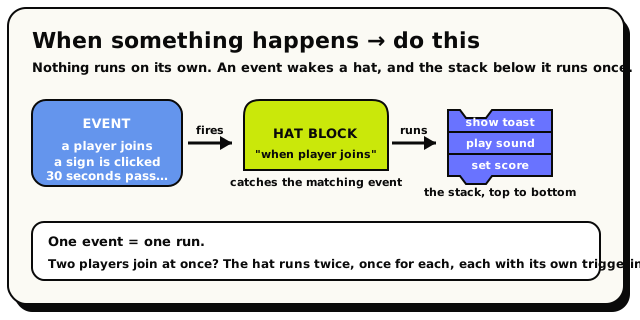 Nothing runs on its own: an event wakes a hat, and the stack of blocks beneath it runs once.
The most common event of all is 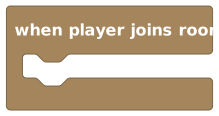 , which fires
every time someone walks into your world:
, which fires
every time someone walks into your world:
When Player Joins Room is a hat block. Snap your welcome actions underneath it.
A few things that are true for every event block:
- They are hat-shaped, with a rounded top, so nothing can snap above them. They are always the first block in a stack.
- Many events give you a triggering player (the person who caused it), so you can act on just that one player. Events that fire on their own, like a timer, don't have one.
- You can use the same event more than once, in different scripts, to react to it in different ways.
Here is every event block, with a picture and a plain-English explanation:
When Room Starts
EventEvents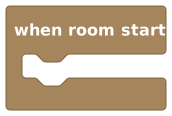
Runs the blocks inside it once, the moment your world starts up.
This is a hat block (a starting block) that runs one time, when your world's scripts first switch on. Put your setup here: spawn objects, reset scores, or show a welcome message. It's the most common way to begin a script. Note: if you edit your script, it restarts, so this block runs again.
How it behaves
Runs the blocks inside it once, as soon as the world's scripts start. Nobody triggered it, so there is no triggering player, object, or NPC, and blocks like 'triggering player' have no one to act on. It works in both room and object behaviors.
Watch out
There is no 'triggering player' here because nobody triggered it, so player-specific blocks inside it won't have a player to act on.
It runs when the SCRIPT starts, not each time a new player joins. Use 'when player joins room' for per-player setup.
Tips
Great place to set starting values for variables, like a score of 0 or a timer.
Combine with 'every N seconds' to start a repeating loop right away.
Examples
when room starts → set room variable {score} to 0As soon as the world loads, the score variable is reset to zero so every game begins fresh.
When Player Joins Room
EventEventsRuns every time a player walks into your world.
This hat block runs every time a new player enters the room. Use it to greet people, give them starting items, or set up anything that should happen for each person one by one. Inside it, the 'triggering player' block refers to the player who just joined.
How it behaves
Runs the blocks inside it once for each player who joins. That player becomes the triggering player, so a 'triggering player' block inside it points to whoever just joined.
Watch out
It does NOT run for players who were already in the room when the script started. It only fires on a fresh join.
If a player leaves and comes back, it runs again each time they re-enter.
Tips
Use the 'triggering player' block inside to send a message or give an item to just the person who joined.
Pair with 'when player leaves room' to keep a running count of who's online.
Examples
when player joins room → say to {triggering player} "Welcome to my world!"Every person who enters gets their own personal welcome message.
When Player Leaves Room
EventEvents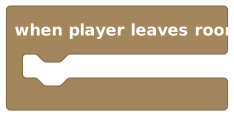
Runs every time a player leaves your world.
This hat block runs every time a player exits the room. Use it to clean up after someone, lower an online-player count, or save their progress. Inside it, the 'triggering player' block refers to the player who is leaving.
How it behaves
Runs the blocks inside it once for the leaving player. That player becomes the triggering player, so a 'triggering player' block inside it points to whoever is leaving.
Watch out
The player is on their way out, so some actions targeting them (like showing a long message) may not be seen.
It fires once per leave; a player who left earlier and is already gone won't re-trigger it.
Tips
Use it to decrease an 'online players' counter you increase in 'when player joins room'.
Good place to remove a player from a team list or save their score.
Examples
when player leaves room → change room variable {online count} by -1Each time someone leaves, the online-player counter goes down by one.
When Object Is Interacted With
EventEvents
Runs when a player clicks or taps a specific object you choose.
This hat block runs when a player interacts with the object you plug in. It's perfect for buttons, doors, chests, vending machines, and anything clickable. Tick 'highlight when nearby' to draw a glowing outline around the object when a player stands close, and type a short hint like 'Press to open' so people know they can use it. Inside the block, 'triggering player' refers to whoever interacted.
Inputs & fields
| Slot | Accepts | Default | What it's for |
|---|---|---|---|
when object * | Object | (default) | The object players click or tap to run this event. Pick a real object from your world, not a variable or calculated value. |
highlight when nearby | checkbox | FALSE | |
with hint | text |
How it behaves
Runs the blocks inside it when a player clicks or taps the chosen object. The player who interacted becomes the triggering player. You must pick a real object from your world for the object slot; a variable or calculated object won't compile. The 'highlight when nearby' checkbox adds a glowing outline for nearby players, and the hint text shows alongside it (the hint is trimmed if it gets too long).
Watch out
The object slot needs a real object you pick from the world, not a variable or calculated object. Anything else causes an error.
The hint text only shows if you ALSO turn on 'highlight when nearby'. Typing a hint on its own does nothing.
Long hints get cut off, so keep them short, like 'Press to open'.
Tips
Turn on 'highlight when nearby' with a short hint so players actually discover they can click the object.
Use 'triggering player' inside to reward or affect just the person who clicked.
Examples
when object {a door} is interacted with → set object state of {the door} to "open"Clicking the door switches it to its open state for everyone.
Every N Seconds
EventEvents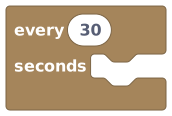
Runs the blocks inside it over and over, on a timer you set.
This hat block repeats forever, like a clock. Set how many seconds to wait, and the blocks inside run again each time that much time passes. Use it for things that should keep happening: spawning enemies, ticking down a countdown, or checking scores. The wait time is a fixed number you choose; it can't change while the world is running.
Inputs & fields
| Slot | Accepts | Default | What it's for |
|---|---|---|---|
every * | NumberWhole number | 30 | How many seconds to wait between each run. Must be a fixed number you set (defaults to 30). |
How it behaves
Runs the blocks inside it once every few seconds, using the number you set. A timer triggers on its own, so there is no triggering player, object, or NPC. The wait time must be a fixed number you type in. There's a minimum allowed gap between runs, so very small values cause an error.
Watch out
There's a minimum gap between runs, so you can't make it fire super fast. Very small values cause an error.
The number of seconds must be a fixed value you type in, not a variable or a calculation.
There's no 'triggering player' here, because the timer fires on its own.
Tips
Use a room variable as a countdown and lower it by 1 each second for a timed game.
Keep heavy work out of very short intervals to avoid slowing the world down.
Examples
every {1} seconds → change room variable {time left} by -1Once a second, the time-left variable drops by one, creating a countdown.
See also
When Object State Changes
EventEvents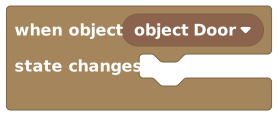
Runs when a specific object switches to a different state.
Many objects have 'states', like a door being open or closed, or a light being on or off. This hat block runs whenever the object you choose changes from one state to another. Use it to react to those changes, such as playing a sound when a door opens or updating a score when a switch flips.
Inputs & fields
| Slot | Accepts | Default | What it's for |
|---|---|---|---|
when object * | Object | (default) | The object whose state you want to watch. Pick a real object from your world, not a variable. |
How it behaves
Runs the blocks inside it each time the chosen object switches to a new state. You must pick a real object from your world; a variable or calculated object won't compile. A state change isn't caused by a player, so there is no triggering player.
Watch out
The object slot needs a real object you pick, not a variable or calculated object.
It runs on ANY state change for that object, so you may want to check which state it's in now before reacting.
Tips
Check the object's current state inside the block to react only to certain changes (like only when it opens).
Pair with 'set object state' blocks elsewhere to build chains of reactions.
Examples
when object {a door} state changes → if state of {the door} is "open" then play soundWhenever the door switches state, the script checks if it's now open and plays a sound if so.
See also
When Any Object Is Added
EventEvents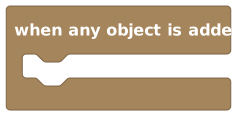
Runs whenever any new object appears in the world.
This hat block runs whenever an object is added to the world, no matter which one. Use it to react to new things being placed or spawned, like keeping a count of objects or running setup on anything that appears. Unlike the other object events, it watches ALL objects, so you don't pick a specific one.
How it behaves
Runs the blocks inside it each time any object is added to the room. It watches every object, so there's no object slot to fill in. Adding an object isn't caused by a player, so there is no triggering player.
Watch out
It runs for EVERY object that gets added, which can be a lot if your world spawns many things.
There's no object slot here, so it isn't tied to one particular object.
Tips
Use it to keep a live count of how many objects exist in the world.
Be careful pairing it with 'add object' blocks, or you could trigger it repeatedly in a loop.
Examples
when any object is added → change room variable {object count} by 1Every time a new object shows up, the counter goes up by one.
See also
When Object Is Deleted
EventEvents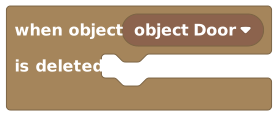
Runs when a specific object you choose is removed from the world.
This hat block runs when the object you pick gets deleted. Use it to clean up, update counts, or react when something is destroyed or removed. Because it watches one specific object, you choose exactly which one to keep an eye on.
Inputs & fields
| Slot | Accepts | Default | What it's for |
|---|---|---|---|
when object * | Object | (default) | The object you want to watch for deletion. Pick a real object from your world, not a variable. |
How it behaves
Runs the blocks inside it when the chosen object is removed. You must pick a real object from your world; a variable or calculated object won't compile. A deletion isn't caused by a player, so there is no triggering player.
Watch out
The object slot needs a real object you pick, not a variable or calculated object.
The object is being deleted, so you can't do anything that needs it to still exist afterward.
Tips
Good for spawning a replacement or a particle effect where the object used to be.
Use it to decrease a counter you increased with 'when any object is added'.
Examples
when object {treasure chest} is deleted → broadcast message "The treasure is gone!"Deleting the chest triggers a message to everyone in the world.
See also
When Object Is Grabbed
EventEvents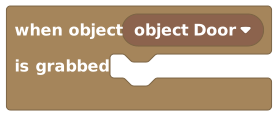
Runs when a player picks up a specific object you choose.
This hat block runs when a player grabs (picks up) the object you choose. Use it for pickups, holdable items, or anything a player can carry. Inside the block, 'triggering player' refers to whoever grabbed it.
Inputs & fields
| Slot | Accepts | Default | What it's for |
|---|---|---|---|
when object * | Object | (default) | The object you want to watch for being picked up. Pick a real object from your world, not a variable. |
How it behaves
Runs the blocks inside it when the chosen object is grabbed. The player who picked it up becomes the triggering player. You must pick a real object from your world; a variable or calculated object won't compile.
Watch out
The object slot needs a real object you pick, not a variable or calculated object.
It only runs when the object is actually grabbed and held, not when it's just clicked.
Tips
Use 'triggering player' inside to give points or effects to whoever grabbed the item.
Pair with 'when object is un-grabbed' to react when they let go.
Examples
when object {coin} is grabbed → change player variable {score} of {triggering player} by 1Grabbing the coin gives the player who picked it up a point.
When Any Object Is Un-Grabbed
EventEvents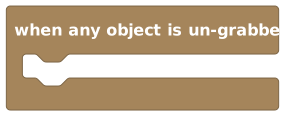
Runs whenever a player lets go of any object they were holding.
This hat block runs when a player releases (un-grabs) any object they were holding. Use it to react when an item is dropped or set down, like snapping it back into place or scoring it. Unlike 'when object is grabbed', it watches ALL objects, so you don't pick a specific one. Inside it, 'triggering player' refers to whoever let go.
How it behaves
Runs the blocks inside it each time any held object is released. The player who let go becomes the triggering player. It watches every object, so there's no object slot to fill in.
Watch out
It runs for every object being released, not just one you chose, because there's no object slot.
It pairs naturally with 'when object is grabbed'. Just remember: grab watches one object you pick, but un-grab watches all of them.
Tips
Use 'triggering player' to know who dropped the item.
Good for snapping a dropped object back to a home position.
Examples
when any object is un-grabbed → play sound
Letting go of any held object plays a drop sound.
When Player Says Phrase
EventEvents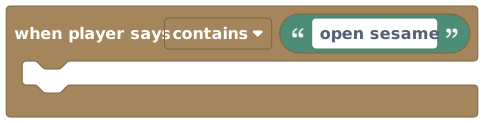
Runs when a player types a certain word or phrase in chat.
This hat block listens to chat and runs when a player's message matches the phrase you set. Use the dropdown to choose how it matches: 'contains' (the phrase appears anywhere in the message), 'equals' (the message is exactly the phrase), or 'starts with' (the message begins with the phrase). Great for secret words, chat commands, and password doors. Inside it, 'triggering player' is whoever said it.
Inputs & fields
| Slot | Accepts | Default | What it's for |
|---|---|---|---|
PHRASE * | Text | open sesame | The text to listen for in chat. Defaults to "open sesame". |
when player says | dropdown | contains | Choose: contains, equals, starts with |
How it behaves
Runs the blocks inside it when a chat message matches your phrase, using the match type from the dropdown ('contains', 'equals', or 'starts with'). The player who typed the message becomes the triggering player. The phrase can't be empty, and only its first 128 characters are used.
Watch out
The default match type is 'contains', so 'hello' also fires on 'hello there'. Use 'equals' for an exact match.
The phrase can't be empty, or you'll get an error.
Only the first 128 characters of a long phrase are used; the rest is ignored.
Tips
Use 'starts with' to build chat commands like '/give' or '!start'.
Use 'triggering player' inside to respond to just the person who said it.
Examples
when player says equals {open sesame} → set object state of {the gate} to "open"If a player types exactly 'open sesame' in chat, the gate opens.
When Player Enters Area
EventEvents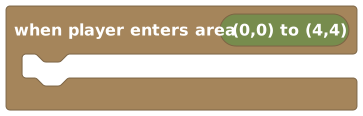
Runs when a player walks into a rectangular zone you draw on the floor.
This hat block runs when a player steps into the area you mark out. Click the little picker button to draw a rectangle on the map (or plug in an area). Use it for trigger zones like trap rooms, checkpoints, secret areas, or teleport pads. Inside it, 'triggering player' is the player who entered.
Inputs & fields
| Slot | Accepts | Default | What it's for |
|---|---|---|---|
when player enters area * | Area | (0,0) to (4,4) | The rectangular floor region to watch. Use the picker button to draw it on the map; defaults to a small 4x4 box. |
when player enters area | custom |
How it behaves
Runs the blocks inside it when a player crosses into the chosen area. The player who entered becomes the triggering player. You must draw or plug in an area, or it won't compile. The picker button is a tool for drawing the rectangle on the map, not a place to type.
Watch out
You must draw or pick an area, or the script won't compile.
It runs on ENTERING, so standing still inside the area afterward won't keep re-triggering it.
Pair it with 'when player leaves area' for things that should turn off when they walk out.
Tips
Use the picker button to draw the zone right on the map instead of typing coordinates.
Great for teleporting the 'triggering player' or showing a 'You found the secret!' message.
Examples
when player enters area {the vault} → say to {triggering player} "You found the secret room!"Walking into the marked vault area shows a private message to whoever entered.
When Player Leaves Area
EventEvents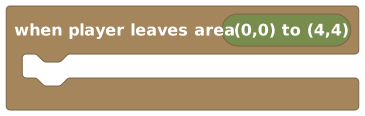
Runs when a player walks out of a rectangular zone you draw on the floor.
This hat block runs when a player steps out of the area you mark out. Click the picker button to draw a rectangle on the map (or plug in an area). Use it to turn off effects, end mini-games, or react when someone leaves a zone. Inside it, 'triggering player' is the player who left.
Inputs & fields
| Slot | Accepts | Default | What it's for |
|---|---|---|---|
when player leaves area * | Area | (0,0) to (4,4) | The rectangular floor region to watch. Use the picker button to draw it on the map; defaults to a small 4x4 box. |
when player leaves area | custom |
How it behaves
Runs the blocks inside it when a player crosses out of the chosen area. The player who left becomes the triggering player. You must draw or plug in an area, or it won't compile. The picker button is a tool for drawing the rectangle on the map, not a place to type.
Watch out
You must draw or pick an area, or the script won't compile.
It runs the moment the player crosses out of the zone.
Tips
Pair with 'when player enters area' to start something on entry and stop it on exit.
Use 'triggering player' to undo whatever you did when they entered.
Examples
when player leaves area {the boost pad} → set player variable {speed boost} of {triggering player} to falseStepping out of the boost area removes the speed boost for that player.
When NPC Is Interacted With
EventEvents
Runs when a player talks to or clicks a specific NPC you choose.
This hat block runs when a player interacts with the NPC you plug in. (An NPC is a character you add to your world, like a shopkeeper or a guard.) Use it to start conversations, open shops, or kick off quests when someone talks to a character. Tick 'highlight when nearby' to outline the NPC when a player stands close, and add a short hint like 'Press to talk'. Inside the block, 'triggering player' is whoever interacted.
Inputs & fields
| Slot | Accepts | Default | What it's for |
|---|---|---|---|
when NPC * | NPC | (default) | The NPC players interact with to run this event. Pick a real NPC from your world, not a variable. |
highlight when nearby | checkbox | FALSE | |
with hint | text |
How it behaves
Runs the blocks inside it when a player interacts with the chosen NPC. The player who interacted becomes the triggering player, and the NPC they interacted with becomes the triggering NPC. You must pick a real NPC from your world; a variable or calculated NPC won't compile. Just like the object-interact block, the 'highlight when nearby' checkbox adds a glowing outline for nearby players, and the hint text shows alongside it.
Watch out
The NPC slot needs a real NPC you pick from the world, not a variable or calculated NPC.
The hint text only shows if you ALSO turn on 'highlight when nearby'.
Keep the hint short, because long hints get cut off.
Tips
Turn on 'highlight when nearby' with a hint like 'Press to talk' so players know they can interact.
Use 'triggering player' and 'triggering NPC' inside to make conversations feel personal.
Examples
when NPC {shopkeeper} is interacted with → make {triggering NPC} say "Welcome to my shop!"Talking to the shopkeeper NPC makes them greet the player.
When NPC Finishes Walking
EventEvents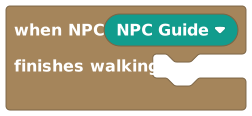
Runs when a specific NPC reaches the end of its walk.
This hat block runs when the NPC you choose finishes walking to a spot. Use it to chain movement together, like having an NPC walk somewhere and then say something or walk again once it gets there. Inside it, 'triggering NPC' refers to the NPC that just arrived.
Inputs & fields
| Slot | Accepts | Default | What it's for |
|---|---|---|---|
when NPC * | NPC | (default) | The NPC whose walking you want to watch. Pick a real NPC from your world, not a variable. |
How it behaves
Runs the blocks inside it when the chosen NPC finishes walking and reaches its destination. That NPC becomes the triggering NPC. You must pick a real NPC from your world; a variable or calculated NPC won't compile. No player caused the arrival, so there is no triggering player.
Watch out
The NPC slot needs a real NPC you pick, not a variable or calculated NPC.
There's no 'triggering player' here, only a 'triggering NPC', because no player caused the arrival.
It runs when the walk finishes, not while the NPC is still moving.
Tips
Chain walks together: when one walk finishes, start the next, to build patrol routes.
Use 'triggering NPC' to make the NPC react right when it arrives, like waving or talking.
Examples
when NPC {guard} finishes walking → make {triggering NPC} walk to next pointEach time the guard reaches a point, it starts walking to the next one, looping a patrol.
What's next
Now that something can start your script, give it something to do: