NPCs
An NPC is a "non-player character," a person in your world who isn't a real human. Hideout has two very different kinds, and scripting controls one of them: the puppet. This page shows you how to spawn a puppet, walk it around, make it talk, and react when a player walks up to it.
Two kinds of NPC
Before you write a single block, you need to know which kind of NPC you have. The two kinds look identical on screen, but they behave completely differently.
| AI NPC | Scripted NPC (puppet) | |
|---|---|---|
| Brain | A real AI that thinks for itself | None; your blocks are its brain |
| Decides what to do? | Yes, on its own | No, only when you tell it |
| Behaviour | Different every time | Exactly the same every time |
| Controlled by scripts? | No | Yes |
Think of it like a stage. An AI NPC is an improv actor: it makes things up as it goes. A scripted NPC is a marionette, a puppet on strings that only moves, speaks, or turns when you pull a string. This page is all about the puppet.
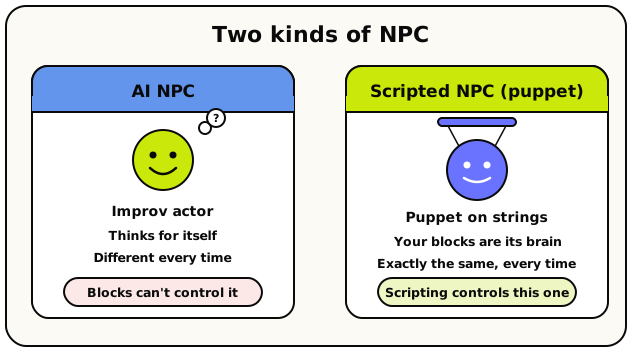 Same face on screen, opposite brains: the AI NPC thinks for itself; the scripted puppet does only what your blocks say.
A scripted NPC has no mind of its own. It does nothing until a block tells it to, and then it does exactly that, every single time. That makes it perfect for predictable things: a quest-giver who always says the same line, a guard who patrols a fixed route, a boss that appears the moment a round begins.
Script blocks only work on the scripted NPCs that belong to your room. If you point an NPC block at an AI NPC (or an NPC from another room), it simply won't run. That's by design.
Your cast list: the NPCs panel
In the script editor there's a panel called NPCs (look for it in the top bar). This is your cast list, the place where you create the puppet actors a script can later direct.
Open the NPCs panel
Click NPCs in the editor's top bar. You'll see every scripted NPC in your room, each with its avatar, name, and bio.
Create a new NPC
Hit New NPC at the bottom. Give it a name, an optional bio, and dress it up. This builds the actor. It doesn't put it in the world yet.
Direct it with blocks
Now your script can spawn it, move it, and make it talk. That's the rest of this page.
Each NPC row has an Edit (pencil) and a Delete (trash) button. Deleting an NPC retires it, and any blocks that pointed at it turn into a "Missing NPC" placeholder you'll need to fix.
Referencing an NPC in a script
Every NPC action needs to know which NPC you mean. You point at one with an NPC value block, a block that stands for a particular character, ready to drop into any NPC action. There are two you'll use constantly.
 The everyday 'pick an NPC' block. Choose the actor from a dropdown.
 The NPC that set off the current event. Only works inside NPC events.
valueNpc: the everyday picker. Choose a specific NPC from your cast list.valueTriggeringNpc: "the NPC this event is about." It only works inside the two NPC events (npc.interactandnpc.arrived), where it points at the NPC involved.
You can also ask questions about an NPC:
| Block | What it tells you |
|---|---|
 | The NPC's name (text) |
 | Where the NPC is standing (a coordinate) |
 | Whether the NPC is in the world right now (true/false) |
Spawn first, always
Here's the single most important rule: an NPC must be spawned before you can do anything else with it. Spawning is what actually puts the puppet's body into the world. Walking, talking, turning: none of it works on an NPC that isn't there.
 Puts the NPC into the world at a coordinate, facing a direction (default: south).
 Removes the NPC from the world.
A classic beginner bug is calling NPC Says on an NPC you never spawned. Nothing happens, and you're left wondering why. So spawn first.
Spawning an NPC that's already there re-places it. Despawning one that's already gone does nothing and doesn't complain. This is called being idempotent, a fancy word for "safe to run twice." It means you can spawn your NPCs in a When Room Starts script without worrying about doubles.
Moving the puppet: walk, teleport, face
Once an NPC is spawned, you can move it around three ways.
 The NPC walks to a coordinate, finding its own path. The script pauses until it arrives.
 Instantly snaps the NPC to a coordinate, with no walking animation.
 Turns the NPC to face north, east, south, or west without moving it.
| Action | What it does | Pauses the script? |
|---|---|---|
| Walk NPC To | Finds a path and walks there | Yes, waits until it arrives |
| Teleport NPC | Snaps there instantly | No |
| Turn NPC To Face | Rotates in place | No |
Walk NPC To pauses your script until the NPC arrives. That's usually what you want: a chain of walks makes a clean patrol route, with each step finishing before the next begins. But watch out for three things:
- An NPC that's sitting down can't walk. Get it up first.
- If there's no path to the spot (a wall in the way), the walk fails right away.
- If a different script gives this NPC a new command mid-walk, the current walk is cancelled, and a cancelled walk never reports "arrived."
Talking: say vs aiSay
This is the most important distinction on the page. Two blocks look nearly identical, but they're worlds apart.
NPC Says: your exact words
 The NPC speaks the exact line you typed, as a chat bubble.
The NPC says exactly what you typed. It's instant, free, and identical every time. Think of it as handing the actor a card with their line printed on it.
- Capped at 100 characters.
- No AI, no cost, no waiting.
- Use it for anything that must be precise: quest text, jokes, lore, instructions.
NPC Replies With AI: an instruction, not a script
 You write an instruction; a small AI writes one in-character line for the NPC to speak.
Here you don't write the actual words. Instead you write an instruction (like "Greet the player"), and a small AI turns it into a single line of dialogue in the NPC's voice, using the NPC's name and bio for character. The line comes out a little different every time.
- The script does not pause. The reply is written in the background and pops up when ready (you'll see a typing indicator first).
- It's one-shot: no memory, no conversation, one fresh line.
- Use it sparingly for flavour: a greeting that feels alive instead of robotic.
NPC Replies With AI runs on a cheap, fast helper model, never the big brains the AI NPCs use. The precise rules:
- Reply capped at 100 characters; your instruction capped at 500 characters.
- One reply at a time per NPC. Ask again while it's thinking and you get "still thinking about an earlier AI reply."
- Per-room budget of 10 replies per minute. Go over and it tells you to try again shortly.
- If the server has no AI set up, the block fails softly. It won't crash your script.
say is a script. aiSay is improv with guardrails. Reach for say by default. Reach for aiSay only when a tiny bit of randomness makes a moment feel more human.
Emotes
 Plays an emote on the NPC: a wave, a laugh, a reaction.
The Set Emote For NPC block plays an emote, like a wave or a laugh. Each emote has an id number: any id above 0 plays that emote, and 0 clears whatever's playing. The NPC must be spawned first, like every other action here.
Reacting to the world: the two NPC events
Puppets don't only do things; they can also react. Two event blocks (the hat-shaped blocks that start a script) are made for NPCs.
When a player walks up: npc.interact
 Runs when a player walks up to and interacts with this NPC.
This is the natural way to make a quest-giver, a shopkeeper, or a "press to talk" character. When a player walks up and interacts with the NPC, this script runs.
Inside it you get two handy values:
- Triggering Player: the person who interacted (great for rewarding only them).
- Triggering NPC: the NPC they talked to.
The player must be within 8 tiles of the NPC for this to fire. "Interacting" means walking up to the NPC, not clicking it from across the map. Too far away, and nothing happens, silently.
When an NPC finishes walking: npc.arrived
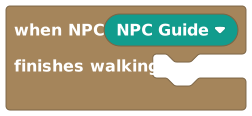 Runs when a scripted NPC finishes a 'Walk NPC To'.
This fires the moment a scripted NPC finishes a walk. Use it to trigger the next beat of a scene: "the guard reached the gate, now open it." Inside this event, Triggering NPC points at the NPC that just arrived.
Remember: if a walk gets interrupted by another command, it's cancelled and this event won't fire for that walk. Only a walk that finishes on its own counts as "arrived."
Cinematic NPC dialog: the cutscene conversation
NPC Says is a quick speech bubble. But sometimes you want a proper conversation: a full-screen panel with the NPC's portrait, several lines you click through one at a time, and emotes per line. That's NPC Dialog.
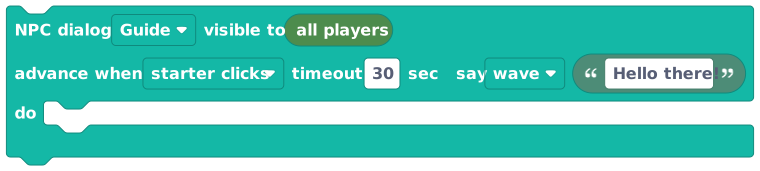 A click-through cutscene conversation with portrait, multiple steps, and per-step emotes.
 Closes an open NPC dialog early.
The key behaviour: NPC Dialog pauses your script until the player clicks through it. It's a cutscene, so the blocks after it only run once the player has read and advanced past every line. Good for tutorials, quest briefings, and story moments.
- Each line is capped at 280 characters (an empty line becomes
...). - You can have 1 to 32 steps.
- Per-step emotes only show for ids 1 to 27 (a narrower range than the plain emote block).
- Who advances it is the "wait mode": the default waits for the player who triggered the script; you can also set it to advance on any player's click, or wait for all players. In a room-start or timer script (where there's no triggering player) the default falls back to "any."
- If nobody clicks within the timeout (default 30 seconds, max 5 minutes), the dialog resolves on its own so your script never hangs forever.
A worked example: a quest-giver
Here's how the pieces fit together in plain English:
- When Room Starts → Spawn NPC (the guard) at the gate.
- When NPC Is Interacted With (the guard) →
- NPC Says:
"Halt! State your business." - NPC Dialog: a two-step briefing about the quest.
- Walk NPC To: a spot beside the open gate.
- NPC Says:
- When NPC Finishes Walking (the guard) →
 Set Object State on the gate to
 "open".
Spawn first, react to the player, talk, walk, then let the arrived event open the gate. That's a complete little scene.
Common mistakes
- Forgetting to spawn. Walk, talk, face, and emote all silently do nothing on an un-spawned NPC. Spawn first.
- Confusing
saywithaiSay.sayis your exact words (free, instant).aiSayis an instruction the AI turns into a line (background, limited to 10/minute per room). - Expecting
npc.interactfrom across the map. The player must be within 8 tiles. - Putting time-critical blocks after NPC Dialog. They wait until the player clicks through. That's the whole point of a cutscene.
- Pointing a block at an AI NPC. It won't run. Scripting only controls this room's scripted NPCs.