Functions
A function lets you take a group of blocks, give it a name, and run that whole group whenever you want just by calling its name. Build the steps once, then reuse them anywhere in your behavior instead of copying the same pile of blocks over and over.
A recipe you write once
Picture a recipe card. You write the steps for pancakes one time, and after that you just say "make pancakes" whenever you're hungry. You don't scribble out the full recipe again every single time. A function is that recipe card: write the steps once, give the card a name, then point at the card instead of repeating yourself.
Here's why that's handy. Say you have a routine you use a lot: teleport the player home, play a
sound, and pop up a "welcome back" message. Without a function, you'd glue those three blocks
together in every spot that needs them. Five spots means five copies, and if you spot a mistake
you're fixing it five times. With a function, you write those three blocks once, name it
welcome the player, and drop a single block wherever you want it. Fix the recipe once, and
every place that uses it updates automatically.
This is the same idea as Scratch's "My Blocks" (custom blocks): you make your own block that stands for a bunch of steps. Hideout just splits it into a block to define the function and a block to call it.
Step 1: Define the function
To make a function, you use the Define Function block. You give it a name, then snap the
blocks you want it to run inside its do section.
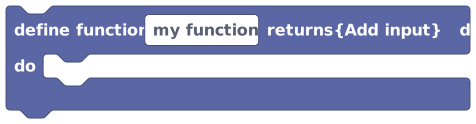 Define Function is your reusable recipe. Name it, then place the blocks you want it to run inside the 'do' section.
A new function starts out named my function, so rename it to something that says what it does,
like open all doors, reset the round, or welcome the player. Good names make your script
read like plain instructions later on.
One important thing: a Define Function block sits on its own. It is not attached to an event (those rounded "hat" blocks at the top of a stack), and it does not run by itself. It's like writing the recipe card and leaving it in a drawer: nothing happens until something reaches for it. To actually run the steps, you have to call it, which is the next step.
Step 2: Call the function
Anywhere you want your function to run, drop a Call Function block and pick your function from its dropdown. That one little block stands in for the whole group of blocks inside the definition.
 Call Function runs a function you defined, by name. This one block stands in for the whole group of blocks inside it.
Usually the Call Function block lives underneath an event, so something in your world kicks it
off. For example: "when a player joins, call welcome the player." You can call the same
function from as many places as you like, and they all run the same steps. Change the function
later and every call follows along automatically.
Step 3: Pass in inputs (optional)
Sometimes you want the same recipe to work on different things. "Teleport home" is useful, but "teleport this player home" is even better, because you choose who each time you call it.
That's what inputs are for (you might also hear them called parameters). On the Define Function block, the "Add input" button adds an input and lets you give it a name and a type. Then, inside the function, you read that input's value with the Function Input block.
 hands you the value that was passed in. You pick which
input you want from its dropdown, and it slots into other blocks just like any value. If you
added a
hands you the value that was passed in. You pick which
input you want from its dropdown, and it slots into other blocks just like any value. If you
added a who input that holds a player, this block gives you that player to use inside your
steps. It only works inside its own Define Function block, so using it anywhere else is a
mistake the editor will flag.
- Define a function called
greetwith one input namedwhothat holds a player. - Inside it, use the Function Input block to send
whoa message saying "Hi!". - Now call
greetand hand it any player you like: the player who just joined, a random player, whoever. Same recipe, a different guest each time.
Returning a value
So far our functions just do things. But a function can also return a value, which means it works something out and hands an answer back to whoever called it, like asking a friend "what's 2 plus 2?" and getting "4" back so you can use it.
On the Define Function block there's a returns dropdown where you say what kind of answer the
function gives back:
- No return (the default): the function does stuff (teleport, play a sound) and hands nothing back. You use its Call Function block as a normal step in a stack.
- A type like number, text, boolean, player, object, and more: the function works out that kind of answer for you to use elsewhere. You drop its Call Function block into a slot that wants that type, the way you'd plug in any other value block.
If you give a function a return type, you have to actually end it with a matching value, and you have to use its call as a value (not as a plain step). The other way round counts too: using a "No return" function in a value slot is also a mistake. The editor will tell you if you've mixed them up.
A couple of real limits
Functions are flexible, but two rules are worth knowing so nothing surprises you:
- A function can't call itself. It's allowed to call other functions, but not itself, either directly or through a chain of other functions calling back around. (The fancy name for a function calling itself is recursion, and it isn't supported.) Set that up by accident and the editor catches it and won't let you publish. When you need to repeat something, reach for a loop block instead.
- Calls can't nest too deeply. When functions call other functions that call still more functions, the engine caps how deep that can go while it runs. Stack the calls too deep and the run stops with a call-depth error. Normal "call a helper" use never gets near the limit, so you only hit this if a chain runs away.
Why bother?
Functions earn their keep in three ways: less copy-paste (build the steps once, reuse them
everywhere), one place to fix (change the function and every call updates), and easier to
read (call give starter kit says what it means at a glance, instead of a tall pile of blocks
you have to puzzle through).