Players
Your world is full of real people, and scripts let you do things to them: teleport them, greet them, give them points. But a script never grabs a human directly. It works with a handle, a little name-tag that points at one person. This page is all about that name-tag: how you get one, what you can read off it, and how to act on the right person every time.
A player is a handle, not a human
Think of a player in scripting as a name-tag you're holding. It's not the person themselves; it's a token that says "this one, right here." You pass that name-tag into blocks to say who an action is for.
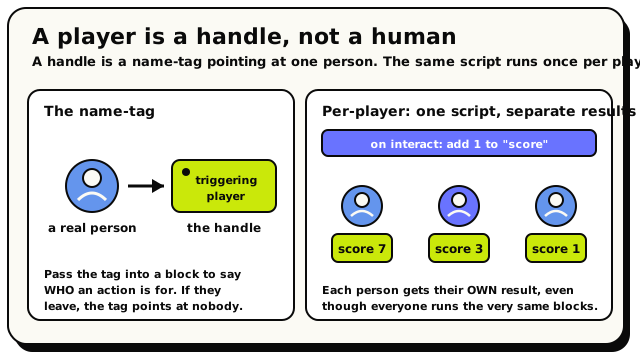 A handle is a name-tag pointing at one person, and the same script runs once per player, each with their own result.
There are a few important truths about these handles:
- A handle points at one specific person in your room right now.
- A handle only works while that person is connected. If they leave the room, the handle quietly points at nobody, and any action on it simply does nothing (no crash, no error).
- Handles are always real people, never NPCs. NPCs have their own separate blocks. A "player" is always a human.
This page is about a single player, one name-tag. When you want a whole list of people ("everyone in the room," "everyone on the red carpet"), that's a player group, like a clipboard with several name-tags clipped on. Groups get their own page: see Player Groups. The good news is most action blocks happily take either one.
The triggering player
Most of the time, you don't go looking for a player; the event hands one to you. When something happens because a person did it (they joined, they touched a button, they stepped into an area), the script gives you that exact person as the triggering player.
 The player whose action set off this event.
This is the single most-used player block. It means "the person who caused this," so you always act on the right one.
Inside a When Object Is Interacted With script, use the triggering player → "give the triggering player +10 coins." Only the person who actually touched the button gets the reward, not everyone in the room.
When can I use it?
The triggering player only exists inside events that a person causes. It shows up in events like:
- a player joins or leaves the room
- a player interacts with an object or NPC
- a player grabs or lets go of an object
- a player enters or leaves an area
- a player says a phrase in chat
In a When Room Starts or an Every N Seconds script, nobody caused it to run, so there's no triggering player, and the block isn't offered. In those cases reach for All Players or a computed group instead. (See Player Groups.)
Reading facts about a player
Once you're holding a player handle, you can read things off it. Each of these blocks takes a player and gives back a useful value you can show, compare, or store.
Their name
The Display Name Of Player block gives back the player's name as text, great for personalised messages and scoreboards.
 The player's name, as text.
When Player Joins Room → show a toast: "Welcome, " + Display Name Of (triggering player) + "!".
Everyone gets a greeting with their own name in it.
Their position
The Position Of Player block gives back where the player is standing: a full position (Vector3) with X, Y, and Z.
 Where the player is standing, as a position.
Because it's a position, you can feed it straight into other blocks:
Read Position Of Player (triggering player), then spawn an NPC at that spot. It appears right next
to them.
And more
A player handle also lets you read which way they're facing (their rotation), whether they're inside a given area, and other details. You'll meet those blocks as you build.
Thinking per-player
Here's the mindset shift that makes scripting click: a lot of the time, you're writing instructions for one person at a time.
When an event fires for a specific player, your blocks run for that player. So "show a toast" shows it to them, "teleport" moves them, and a player variable (a score, a level, a number of lives) is stored against them individually. The same script gives each person their own separate result.
When Object Is Interacted With → add 1 to the triggering player's "score" variable, then show them their new score. Each player builds up their own score, even though everyone's running the very same script.
This "same instructions, each person separately" idea is called per-player thinking. When you do want to run your own custom logic across a whole crowd, you loop over a player group one player at a time. That's covered on the groups page.
Good to know
If a player leaves the room, their handle resolves to nothing, and any action on it just quietly does nothing. Some blocks (like "pick a random player") can also hand back an empty handle if there's nobody to pick. This is normal: your script keeps running, it has no one to act on.
You'll see pairs like Teleport (one player) and Teleport Players (a group). Behind the scenes they're the same action: the singular one happily accepts a group, and the plural one happily accepts a single player. The naming is a friendly hint, not a rule you have to match.
What's next?
Act on a whole crowd at once: everyone in the room, or everyone in a zone.
AreasTrigger zones that hand you the player who stepped inside.
The Grid & PositionsA player's position is a coordinate. Learn how the grid works.
Block ReferenceEvery block with a picture and a plain-English explanation.