Every Event
There are 15 hat blocks you can place. Each one starts a stack of action blocks that run when its event fires.
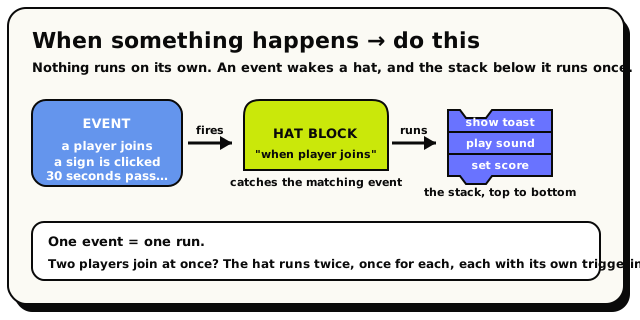 An event fires, its hat catches it, and the stack below runs once: one run per event.
If "hat block," "scope," and "triggering player" are new words, read Events & Triggers first, then come back to this table as a reference. The Glossary has quick definitions too.
How to read the table
- What fires it: the real-world thing that sets the event off.
- Scopes: which behaviors can place the hat. Every hat works in room and object behaviors. (There are no NPC-scoped hats yet, so you react to NPCs from a room or object behavior.) Room Object
- Picks a target?: whether you must drop a specific object, NPC, or area into the hat. These targets must be fixed blocks (you can't compute them), so the room can find your script quickly.
- Triggering player: whether the
 block is available inside this hat.
 - Other context: extra values the event hands you, like the message text or the triggering NPC.
The complete event table
| Hat block | What fires it | Picks a target? | Triggering player? | Other context |
|---|---|---|---|---|
| when room starts | The room finishing loading. Fires on every load, not once forever. | No | No | None |
| when player joins room | Someone enters the room. | No | Yes | None |
| when player leaves room | Someone leaves (they may already be gone, so use their id/snapshot only). | No | Yes | None |
| when object is interacted with | A player clicks/uses that object. | Yes, one object | Yes | None |
| every N seconds | A repeating timer. Minimum 5 seconds in normal rooms. | The interval (a fixed number) | No | None |
| when object state changes | That object switches state (open↔closed, lit↔unlit…). | Yes, one object | No | None |
| when any object is added | Any object is added to the room. Room-wide. | No | No | None |
| when object is deleted | That object is removed. | Yes, one object | Yes | None |
| when object is grabbed | A player picks up that object. | Yes, one object | Yes | None |
| when any object is un-grabbed | Any held object is let go. Room-wide. | No | Yes | None |
| when player says phrase | A chat message matches your phrase. | The phrase + matcher | Yes | message text |
| when player enters area | A player crosses into an area. | Yes, one area | Yes | None |
| when player leaves area | A player crosses out of an area. | Yes, one area | Yes | None |
| when NPC is interacted with | A player clicks/uses that NPC. | Yes, one NPC | Yes | triggering NPC |
| when NPC finishes walking | That NPC reaches the spot it was told to walk to. | Yes, one NPC | No | triggering NPC |
Internally there are 16 event kinds, but one of them ("outfit changed") has no placeable hat block yet, so you can't trigger on it. The 15 above are everything you can actually use.
The events one by one
Room and time
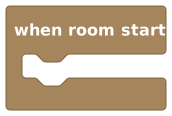 when room starts
when room starts runs as the room loads up. Here's the part that surprises everyone: it fires every time the room loads, not just the very first time. A room unloads when it's empty and loads again when someone returns, so this event can fire over and over across a day.
"When room starts" is not "the first time ever." For true one-time setup, store a room variable like hasInitialized, check it, and set it. Otherwise your setup runs again every reload.
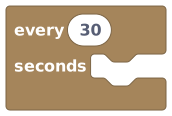 every N seconds, defaults to 30
every N seconds is your clock. The number must be a fixed value you type in (not a variable), and it can't go below 5 seconds in a normal room. Two things to keep in mind: the timer doesn't tick while the room is empty and unloaded, and after a long gap it fires just once on reload, not once for every tick it missed. So read it as "no more often than every N seconds, and only while the room is awake."
Player events
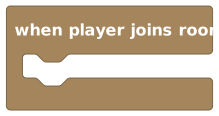 when player joins room
when player joins room and when player leaves room fire as people come and go. Both give you the triggering player, though on leave that player may already be disconnected, so only their stable id and a safe snapshot are reliable.
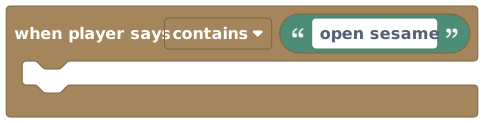 when player says phrase, with a contains/equals/starts with menu
when player says phrase is special: it's the only event that hands you the message text the player typed. It has a small menu with three ways to match:
| Match | Fires when the message… | Use it for |
|---|---|---|
| contains (default) | has your phrase anywhere inside it | broad keywords ("anyone who says 'hello'") |
| equals | is exactly your phrase | passwords ("open sesame" and nothing else) |
| starts with | begins with your phrase | command-style chat ("!start the round") |
Your phrase can be up to 128 characters. There's no fancy pattern matching beyond these three.
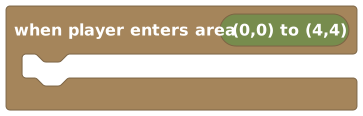 when player enters area
when player enters area and when player leaves area fire when a player crosses the edge of an area you draw. Enter means "was outside, now inside." A player who spawns inside an area counts as entering it. Both give you the triggering player.
Object events
Objects have the most events of all. There's a pattern worth spotting: some events target one specific object (you drop that object into the hat), and some are room-wide (they fire for any object in the room).
 when object is interacted with, with an optional nearby highlight
| Hat | Targets | Gives triggering player? |
|---|---|---|
| when object is interacted with | one object | Yes |
| when object state changes | one object | No |
| when object is deleted | one object | Yes |
| when object is grabbed | one object | Yes |
| when any object is added | any object (room-wide) | No |
| when any object is un-grabbed | any object (room-wide) | Yes |
Two world-building features shape when object is interacted with: a locked object still fires this event on every tap (it just stops flipping its own states), and if the world's proximity interactions setting is on, taps from more than ~5 tiles away don't fire it at all. Details in Object States and World Settings.
Grabbed targets one object, but un-grabbed is room-wide. Deleted targets one object, but added is room-wide. There's a reason for each: you can't point at a specific object that doesn't exist yet (that's added), and once you've let go of something, un-grabbed just watches everything instead. One more to remember: state changes does not give you a triggering player, even though grabbed and un-grabbed do.
The "highlight when nearby" option
The object interact and NPC interact hats have a handy extra: a highlight when nearby checkbox and a hint text box. Turn the checkbox on and the object gets a glowing outline for players standing close, with an optional hint like "Press to open shop" (up to 64 characters).
This is purely cosmetic. It helps players notice the object is clickable, but it does not change when your script runs.
NPC events
 when NPC is interacted with
when NPC is interacted with fires when a player clicks an NPC you choose. It's the only event that gives you both the triggering player and the triggering NPC. Like object-interact, it has the optional nearby highlight (e.g. hint "Press to talk").
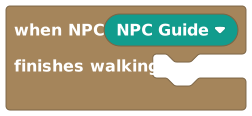 when NPC finishes walking
when NPC finishes walking fires when an NPC you told to walk somewhere reaches its destination. It gives you the triggering NPC, but no triggering player (arriving isn't a player's doing).
Both NPC hats live in room and object behaviors, and you pick which NPC right inside the hat. You can't put a hat inside an NPC-scoped behavior yet.
Which events give you "triggering player"?
This trips people up, so here's the exact list. The block is available only inside these hats:
player joins · player leaves · object interacted with · object grabbed · object un-grabbed · player enters area · player leaves area · player says phrase · NPC interacted with
Not available in: room starts · every N seconds · object state changes · any object added · object deleted · NPC finishes walking
If you place "triggering player" under a hat that doesn't have one, the script won't publish. Reach for all players or a computed group instead.
Targets must be fixed
For events that pick an object, NPC, area, or interval, the target has to be a fixed block you choose, not something the script works out on the fly. This is how the room finds your script fast without checking every behavior. If you try to compute the target, you'll get a "needs a literal" error when you publish.
The exception: inside an object behavior, the object event hats already know which object they mean (it's the object the behavior is attached to), so you don't have to pick it.