FAQ
Getting started
Do I need to know how to code?
No. You never type code in Hideout. You build logic by snapping together visual blocks, like LEGO bricks or puzzle pieces. The shape of each block tells you where it fits, and the editor refuses to let the wrong pieces connect, so it's hard to make a broken mess. Start here →
What's a "behavior"?
A behavior is one small rule, one little program. "Greet players when they join." "Open the door when someone says the password." A room can have many behaviors, all running side by side. You write lots of small behaviors, not one giant script. Learn more →
How do I open the script editor?
In any room you can edit, open the room settings menu and choose Scripting. The editor fills the screen; your avatar stops walking around while it's open.
Where do behaviors run, on my device or the server?
On the server that runs your room, not on your phone or computer. That's why your script keeps working for everyone even after you close the editor and walk away: it's running in the room itself, not on your screen.
Making scripts run
Why isn't my script running?
The three most common reasons, in order:
- It's not published. Editing only saves a private draft. Players see nothing until you hit Publish.
- It's not enabled. A behavior must be both published and enabled. Check for a grey status dot (disabled).
- There's no hat block. A stack of blocks with no event hat on top never runs; it's just "loose."
The Troubleshooting page has the full checklist.
What's the difference between a draft and a published version?
Your draft is your private work-in-progress. It auto-saves as you edit, but it never runs for players. When you Publish, Hideout compiles your draft and makes it live. Until you publish again, the room keeps running the last published version, even while you're mid-edit. Learn more →
What does "Validate" do? Isn't that the same as Publish?
No, and this catches everyone. Validate compiles your draft and shows any problems without going live. It's "check my homework." Publish is what actually makes your changes live for players. Validate first, clear any errors, then Publish.
My script published but nothing happens. What now?
Walk through this:
- Is the behavior enabled? (Grey dot = disabled.)
- Does it start with a hat block (an event)?
- Did the event you chose actually happen? (E.g. "when player joins" won't fire for someone already in the room.)
- Are you using the right event? "When room starts" fires on load, not when a player arrives.
See the Troubleshooting checklist.
Why does "when room starts" keep re-running?
Because it fires on every room load, not once forever. Rooms unload when empty and reload when someone returns. For true one-time setup, store a room variable like hasInitialized, check it at the top, and set it.
Blocks and values
Why won't this block snap in?
The slot doesn't accept that block's type. A hexagon (a yes/no block) won't fit a rounded slot; a text block won't fit a number slot. This is the type system protecting you: fix it now and you've avoided a bug. Learn about types →
What's the grey block already sitting in the slot?
That's a shadow, a default value so you never face an empty hole. Type right over it to change it, or drag a real block on top. An untouched shadow is a real value when the script runs: "wait 1 second" really waits one second.
What does a "Missing object/player/area" block mean?
It's a bright "PICK ONE" placeholder. It appears when a reference hasn't been chosen yet, or when something you pointed at got deleted. A missing block won't let you publish (on purpose) until you choose a real reference.
How do I show a player's name in a message?
Use the  Display Name Of Player block. Don't cast a player to text, because that shows an internal id, not a readable name.
Players, variables, and saving
How do I give each player their own score?
Make a Player variable (it stores a separate value per player) and use the triggering player as its owner. Each player's value is private and starts at the default with no setup needed. Learn more →
Do my variables reset when the room restarts?
Room and player variables do not reset. They persist across runs, reboots, and even re-publishing. If you want a fresh start each round, reset the variable yourself.
Is there a quick "add 1" block for counters?
Not a one-step one. To increase a number, read it, add with a math block, and set it back. (It's two blocks: set score to (score + 1).)
Timers and limits
How often can "every N seconds" fire?
No faster than every 5 seconds in a normal room. Also, timers don't fire while your room is empty/unloaded, and a long gap fires once on reload, not once per missed tick. Don't treat it as a perfect real-world clock.
Will a big loop freeze my room?
No. Every run has a work budget called gas. A runaway loop hits the hard limit and stops itself, so it can never hang your room. But a big loop is still slow and burns gas. Keep loop bodies small and prefer events over looping.
Is there a limit on how many behaviors I can have?
Yes. Up to 50 enabled behaviors per room (and 200 compiled triggers total). That's plenty for almost everything. See all the limits →
Building your world
How many objects can I place?
Up to 8,000 by default. Floors and walls count too, so tiling a big floor eats into the budget fast. A live counter shows your usage while you build, and turns red at the cap. (A higher limit is planned for the future.)
Why can't I build here?
You can only build in a world where you have permission. The easiest place to start is your own apartment, which is yours to build in freely. In someone else's world you'll see a "You can't build here" message unless they've given you access.
What's the difference between a Teleporter and a WorldLink?
A Teleporter moves you within the same world: two teleporters connect when their codes match. A WorldLink sends you to a different world, and needs all three of its IDs filled in (link ID, destination room ID, destination link ID). Mixing these up is the most common building confusion. Learn more →
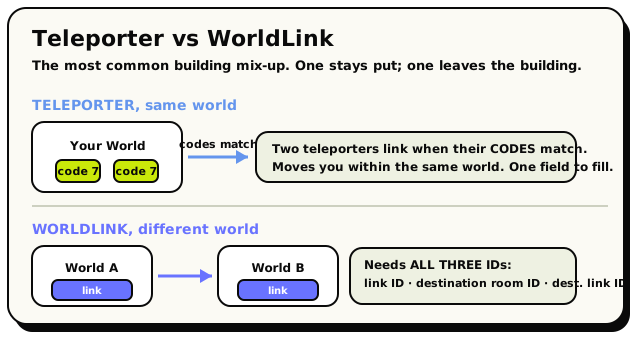 Teleporters link by matching codes inside one world; a WorldLink needs all three IDs to reach another world.
Sharing and safety
Can other people copy my world?
Only if you let them. Building is gated by permissions: people can edit your world only where you've granted access. (Check your world's settings to control who can build.)
Why doesn't my NPC's chat trigger my "when player says phrase" script?
On purpose. The engine filters out NPC actions from player events, so a script that makes its own NPC talk can't accidentally trigger itself forever. NPC chat, movement, and joins won't fire player-says-phrase, area, or join handlers. Learn more →