Glossary
This page is a dictionary, not a tutorial. Each entry is one or two sentences. When a term has a whole page of its own, there's a link to learn more.
Words in bold are the term being defined. If a definition uses another glossary word, you can find that word in its own entry below.
A
Action block: A block that does something: show a toast, set an object's state, teleport a player, play a sound. Action blocks are rectangles that snap into a vertical stack and run top to bottom, like steps in a recipe. See also Stack block.
Area: A rectangular patch of the floor, defined by two opposite corners. You use areas to ask questions like "is this player inside the lobby?" or to fire events when someone steps in or out. Areas are flat (they sit at ground level, z = 0). Learn more.
B
Behavior: One small, self-contained script: one rule, like "Greet players when they join" or "Open the door when someone says the password." A room can hold many behaviors, all running side by side. A behavior is the thing you edit, enable, and publish. Learn more.
Block: A puzzle-piece you snap together to build logic. You never type code in Hideout. You drag blocks instead. Blocks come in four shapes: hats, stacks, values, and booleans.
Boolean: A yes/no (true/false) value. Boolean blocks are drawn as pointy hexagons so you can spot a yes/no question at a glance. They fit into "if" slots and into and/or/not blocks. Yes/No Learn more.
C
Capability: A behind-the-scenes permission a behavior needs to do a certain kind of thing (read player groups, play sounds, control NPCs, and so on). You never set capabilities yourself. They're the reason a block is sometimes greyed out or missing: the behavior doesn't have the permission that block needs.
Cast to text: Turning any value (a number, a player, a position) into readable text so you can show it in a message. The 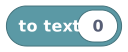 To Text block turns almost anything into words. For a player's name, use the display-name block instead. Learn more.
Compile: When you publish, Hideout's server turns your blocks into a fast internal program (bytecode) and double-checks them for mistakes. If something's wrong, you get a diagnostic instead of a live script.
D
Diagnostic: A message from the compiler about your draft. It's either an error (red, and you must fix it before you can publish) or a warning (amber, worth a look but it won't block you). Diagnostics show up in the Inspector's Diagnostics tab. Click one to jump straight to the block it's about.
Draft: Your private, work-in-progress version of a behavior. It auto-saves as you edit, but drafts never run for players. Only a published version goes live. Learn more.
E
Build Mode: "Build mode." Turn it on to place, move, rotate, and delete objects in your world. Turn it off to walk around and play. Learn more.
Enabled: A simple on/off switch on a behavior. A behavior only runs if it is enabled and published. A disabled behavior is kept but ignored.
Event: Something that happens in your world at a moment in time: a player joins, an object is touched, 30 seconds pass. Scripts only run in response to events. Nothing runs on its own. See every event.
G
Gas: The work budget for one run of a script. Every step costs a little gas. If a run does far too much work (usually a runaway loop) it hits the hard limit of 1,000,000 and stops, so it can never freeze your room. Learn more.
Grid: The invisible graph paper your world is built on. Every position is an address of numbers. (3, 5) means "3 tiles across, 5 tiles down." Learn more.
Group: See Player group.
H
Handle: A little token that points at a real thing in the room right now: a player, an object, an NPC. A handle is a live pointer, not a copy. Think of it like a name tag rather than a photo. If the player leaves, their handle quietly points at nobody, and any action you aim at them does nothing. Most player blocks accept a handle.
Hat block: The block that starts a stack. It sits on top like a hat on a head, listens for one kind of event, and runs the blocks below it when that event fires. Every runnable stack must start with a hat. Event
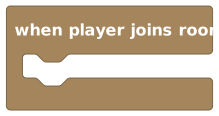 A hat block: 'when player joins room'
HUD: On-screen text and numbers you overlay for players (a score, a timer, a label) that aren't part of the 3D world. Learn more.
I
Instance ID: The unique number that identifies one specific placed object. Two identical chairs have different instance IDs, which is what lets a script say "open this door." Scripts target an object by its instance ID. Learn more.
Integer: A whole number, with no decimal part (like 3, not 3.5). An integer fits anywhere a number is wanted. Whole number
L
List: An ordered collection of values of one type: a list of players, a list of numbers, a list of coordinates. You can add to it, remove from it, loop over it, and check whether it contains something. list Learn more.
Locked object: An object whose states players can't change by tapping it. Interact events still fire on it, and scripts can still set or advance its states; the lock only removes the built-in tap-to-flip. Toggle it with L (or the padlock button) in build mode; the control only appears on objects with tappable states. Learn more.
Loose block: A block (or stack) that isn't attached under a hat. Loose blocks are saved with your draft but never run. Always start a stack with a hat.
M
Music track: One song from your world's public music library. Unlike a one-shot sound effect, a started music track is the room's ongoing soundtrack: it keeps playing after the script run ends, can loop, and players who join later hear it too. Pick one with the music track block and play it with start music.
N
NPC: A non-player character, a little person your scripts can spawn, move, turn, and make talk. "Scripted" (puppet) NPCs are driven by your blocks; AI NPCs think for themselves. Learn more.
Number: Any number, decimals allowed. The everyday math type. A whole-number (integer) counts as a number too. Number
O
Object: Anything placed in your world: furniture, walls, floors, signs, teleporters, props. Objects can have states (open/closed, lit/unlit) that players switch by interacting. Object Learn more.
P
Player: A handle to one human in the room. (Player handles never point at NPCs.) Player Learn more.
Player group: A handle to a list of players: "all players," "players in the lobby," "players sitting at the bar." A group is a snapshot taken the moment you ask, so people who join later aren't in an old group. player group Learn more.
Player variable: A variable with a separate value per player, so everyone gets their own copy (like each student's locker). Needs a player handle as its owner. Great for per-player scores. Learn more.
Proximity interactions: A world setting that makes distance matter: with it on, players must stand within ~5 tiles of an object's edge to interact with it, and out-of-range taps do nothing at all (no state change, no interact event). An Owner override switch lets world admins interact from anywhere. Learn more.
Published: The live, compiled version of a behavior that players actually experience. Publishing makes your draft go live. A never-published behavior shows "Never published." Learn more.
R
Reporter: Another word for a value block: it reports a value when asked, like a question that always comes back with an answer.
Room: Another word for a world in Hideout, the place you build in and play in. Every room has exactly one Script Project. ("Room" and "world" mean the same thing in these docs.)
Room variable: A variable with one shared value for the whole room (like the gym scoreboard: there's one, and everyone sees it). Needs no owner. Learn more.
Rotation: Which way something faces, chosen from four compass directions: north, east, south, west. No diagonals, no angles. Direction Learn more.
Run: One execution of one behavior, started by one event. You can watch recent runs in the Inspector's Runs tab. A run finishes, pauses on a wait, or stops if it runs out of gas.
S
Scope (behavior): Who a behavior belongs to: the whole room, one object, or one npc. Scope decides what "this" means and which events the behavior can react to. (Different from variable scope, below.) Learn more.
Scope (variable): Who shares a value, and what it's keyed by: room or player. This answers "one box, or many boxes?" Learn more.
Shadow block: The soft, greyed-out default value that sits in an empty slot so you never face a scary hole. Type right over it, or drag a real block on top (the shadow politely disappears). An untouched shadow is a real value when the script runs, so "wait 1 second" really waits one second. Learn more.
Share link: A direct door into a specific world, made with the Share button on the world info bar. Whoever opens it lands straight in that world — subject to the world's access policy (the link is a door, not a key). Learn more.
Shape: The outline of a block, which tells you what it does and where it fits. The four shapes are hat, stack, value, and boolean. Colour is a hint; shape is the rule.
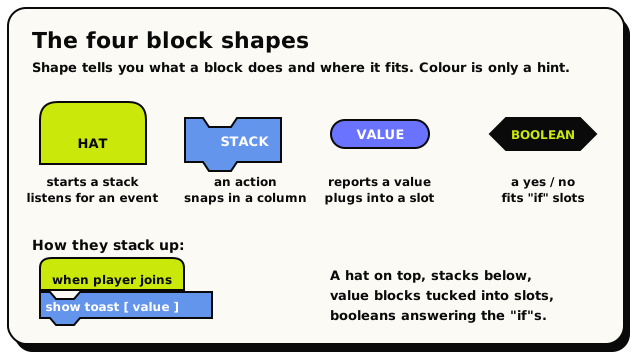 The four block shapes, and how a hat, stacks, and value blocks fit together.
Stack block: A rectangular action block that links into a vertical column with a bump on top and a notch on the bottom, like LEGO bricks. Action
State (object): One of an object's possible looks or modes: a candle that is "lit" or "unlit," a door "open" or "closed." Players switch states by interacting; scripts can set them too. Learn more.
T
Toolbox: The palette of blocks down the left side of the editor, sorted into colourful categories (Triggers, Player Info, Logic, and so on). Drag from here onto the canvas.
Trigger: What a hat block turns into when you publish: a little listener the room sets up for you. It says "watch for this kind of event, but only for this object/area/phrase, and run these blocks when it happens." You build hats; the compiler turns them into triggers.
Triggering player: The player whose action fired the current event (the one who joined, clicked, or said the phrase). Available only inside player-driven events. The workhorse of player scripts.
 The 'triggering player' value block
V
Validate: A button that compiles your draft and shows any problems without going live. Think of it as "check my homework." Validate is not Publish.
Value block: A block with a plug that fits into a socket and hands back a value: a number, some text, a player, a position. Also called a reporter. Value
Variable: A labelled box that remembers a value. Every variable has a fixed type and a scope. Learn more.
Vector2 / Vector3: A position stored as numbers. A vector2 is (x, y), across and down. A vector3 is (x, y, z), across, down, and height. In the UI a vector3 is labelled Coordinate. Position (X, Y, Z) Learn more.
W
Wait: A block that pauses only the current run for some seconds, then picks up where it left off. The room and every other script keep going, so the world never freezes. Learn more.
World: Your place in Hideout, the same thing as a room. You build it in Build Mode and bring it to life with behaviors.
World object limit: The most objects one world can hold: 8,000 by default. Floors and walls count too, so a big tiled floor eats into the budget. A live counter shows your usage while editing. Learn more.