A score counter
Almost every game keeps score. In this recipe you'll give each player their own private number, bump it up by one whenever they do something (click a coin, tag a friend, finish a lap), and pin it to the corner of the screen so it ticks up live. It's the build behind points, coins, kills, laps, gold, anything you count. Along the way you'll learn the two ideas that power half of all scripting: variables and the HUD.
What you'll build: a coin (or any clickable object) that gives the player who clicks it +1 point, with a little scoreboard in the top-right corner that updates the instant the score changes and shows each player their own number.
A block is a puzzle piece you snap together. An event is a "when this happens" block that starts a script. If those words are brand new, warm up with A button that does something first. It's the five-minute version of this page.
Two new ideas
This guide rests on two concepts. Here they are in one breath each.
Variables: a labelled box that remembers
A variable is a labelled box that holds a value and remembers it. You give it a
name (like score), and the box keeps whatever you put in until you change it. Want to
count something? Keep the count in a variable.
The clever part is scope, who owns the box. You'll pick one of two when you make a variable:
| Scope | One box, or many? | Use it for |
|---|---|---|
| Room | One box, shared by everyone | A team score, "party mode on/off", total coins collected by the whole room |
| Player | A separate box per player | Each person's own score, health, level, private to them |
For a personal score, we want Player scope. Think of it like school lockers:
everyone gets the same kind of locker, but what's inside is private to each student.
With one Player variable named score, every player automatically gets their own
copy, and it starts at 0 for everyone, with zero setup.
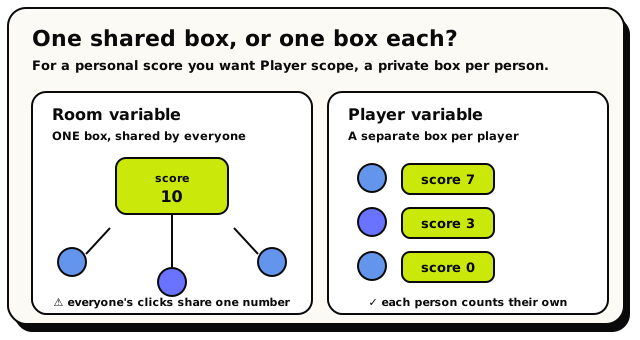 A Room variable is one box everyone shares; a Player variable gives each person their own private box. For a personal score, pick Player.
If you use a Room variable for a personal score, all players share one number, so clicking a coin bumps everybody's score. If your score feels "shared by accident," you almost certainly picked Room when you wanted Player. Read more in Variables.
The HUD: the dashboard on screen
The HUD (heads-up display) is the layer of stuff pinned to a player's screen: the score in the corner, a timer, a health bar. Unlike a toast (which pops up and fades), HUD elements stay put until a script takes them down. The HUD is your dashboard; toasts and confetti are the special effects.
Step 1: Make the score variable
Variables live in the Variables panel, not in the toolbox. Let's create one.
Open the scripting editor and the Variables panel
Hop into your world, enter build mode, and open the scripting editor. From the editor's top bar, open the Variables panel (it slides in from the top-right).
This panel is where you declare the boxes your scripts can use. Anything you add here is available to every script in the room.
Add a Player variable named 'score'
In the Add variable form at the bottom of the panel, set:
- Name:
score - Scope: Player. Its description reads "One value per player." That's exactly what we want.
- Type: Number, because a score is a number.
Then hit Add.
Under the hood: it starts at zero, for freeA brand-new Number variable defaults to 0. Because
scoreis Player-scoped, every player reads0until something writes to their copy, so you never have to "set score to 0 at the start." A player who has never scored sees the default. (Names can be 1 to 64 characters, by the way.)- Name:
That's the box made. Now let's fill it.
Step 2: Add a point when the player acts
We'll use a coin the player clicks. Place any object in your world to be the coin: a real coin, a gem, a rubber duck, whatever reads as "grab me."
Start with 'when object is interacted with'
From the Events category, drag out the when object is interacted with block. It's a Event block, the curved-top piece that starts a script, and it fires when a player clicks the object you plug in.
 Fires when a player clicks the object you plug into it.
Drop your coin object into its object slot so the block watches that one coin.
Grab 'set player variable'
From the Variables category, drag out the set player variable block and snap it under the hat. This is the block that writes a new value into a Player-scoped box.
 Writes a value into one player's copy of a Player variable. Pick the variable from its dropdown.
In its dropdown, choose score, the variable you just made. Notice the block has two empty slots: a player slot (whose box?) and a value slot (what goes in?).
Say whose score: the triggering player
A Player variable needs to know which player's box to write to. That's the player slot. We want the person who clicked, so plug in triggering player from the Players category. It stands for "whoever just did the thing that started this script."
 Stands for the exact player who fired the event. Here, whoever clicked the coin.Gotcha: never forget the player slot
If you leave the player slot empty (or plug in the wrong kind of block), the write is silently dropped: no error, the score just doesn't change. Whenever you set a Player variable, wire triggering player (or the right player) into that slot. This is the number-one reason a score counter "does nothing."
Set the value to 'old score + 1'
Now the value slot: what number to store. We don't have a one-click "add 1" block, so we do the classic move: read the old score, add 1, store the result.
First, from the Math category, drag a math block into the value slot and set its dropdown to + (plus).
 Does + - * / on two numbers. We'll use it to add 1 to the score.
Into the math block's left slot, plug get player variable (also from Variables), set its dropdown to score, and give it a triggering player too. This reads the clicker's current score.
 Reads one player's copy of a Player variable. Here it reads the clicker's current score.
Into the math block's right slot, type 1.
Read together, the value now says: (this player's score) + 1.
Under the hood: why read-add-store, not "change by 1"Hideout has no single "change score by 1" block (yet). So you read the box, add to the value, and write it back. It feels like three steps for one idea, but it makes the math clear, and you can add 5, or
coinsLeft, or anything else just as easily.
Your script now reads, top to bottom:
when object [coin] is interacted with
  ┗ set player variable [triggering player].score
       to (get player variable [triggering player].score) + 1
Every click adds one to that player's score. But nobody can see it yet. Let's fix that.
Step 3: Show the score on the HUD
Here's the trick that makes scoreboards easy: a live HUD number. Instead of
re-drawing the score every time it changes, you bind the HUD to your score variable
once, and it updates itself forever after.
Show a live HUD number, once, when the room starts
From the Events category, drag out when room starts. It fires once when the room boots up. Start a fresh stack with it.
 Runs once when the room starts. The perfect place to set up your HUD.
Under it, snap a show live HUD number block from the Cinematic category (that's where HUD blocks live).
 Pins a number to the screen and binds it to a variable, so it auto-updates when the variable changes.
In its showing field, choose your score variable. Set the rest however you like:
- named:
score(this is the element's name; re-using it later updates this same element instead of stacking a new one). - label:
Score - icon:
star(the default), or pick another from the icon dropdown, likeheart,coin, ortrophy. - as: pick number for a plain count. (
barandvalue / maxare for things that have a maximum, like health.) - at: top right is the default and stays clear of other UI.
- named:
Save and test it
Save your script and leave build mode. You should see Score: 0 in the top-right corner. Walk up to your coin, click it, and watch it tick to 1, 2, 3… instantly, with no extra blocks. That's the magic of a live HUD number.
Because score is a Player variable, the live HUD number shows each player their
own score. Player A sees their 7; player B sees their 3. Same block, different
numbers. Hideout reads the score from whoever is looking at the screen. Even someone
who joins late sees the right number straight away.
What you just made
Three small pieces, one real feature:
- A Player variable
score: a private box per player, starting at 0. - A click handler that does read-add-store to bump the clicker's score by 1.
- A live HUD number bound to
scorethat shows each player their own total and updates the instant it changes.
"Each player has a score. When they click the coin, add one to their score. A live scoreboard in the corner shows each player their own total." If you can say it in a sentence, you understand it.
Make it your own
The recipe is the bones; the toppings are yours:
- Worth more than one. Change the
1in the math block to5,10, or100for a jackpot coin. - Lose points too. Use a separate object, flip the math dropdown to -, and set the value to score minus 1 for a trap that costs the player a point.
- A team score instead. Make a Room variable (one shared box) and use set room variable / get room variable, so everyone adds to one total. Great for "coins collected by the whole room."
- Show it as a bar. If a value has a clear maximum (like health out of 100), set the
HUD style to bar or value / max and fill in a max. A
barneeds a max greater than 0, or it quietly falls back to a plain number. - React when someone hits a target. Add an if block: if score (greater than) 9, fire some confetti. (See Events & triggers.)
Player and Room variables are saved. A score survives the player leaving and coming back, and even survives you re-publishing your scripts. It does not reset on its own, so if you want a fresh start each round, set it back to 0 yourself.
When it doesn't work
| Symptom | Likely cause | Fix |
|---|---|---|
| Score never changes | The player slot on set player variable is empty | Plug in triggering player |
| Everyone shares one score | You used a Room variable, not Player | Re-make score with Player scope |
| HUD shows nothing | The showing field has no variable picked | Choose score in the live HUD block |
| HUD shows but never updates | You used show HUD number (static) instead of show live HUD number | Swap to the live version, which auto-updates |
| Score resets unexpectedly | Something else sets it back to 0 | Search your scripts for another set player variable score |
What's next?
The full story on boxes, scopes, and what each remembers.
HUD & screen effectsEvery HUD and cinematic block: timers, bars, confetti, fades, and more.
Teleporters & areasBuild trigger zones and warp players around your world.
Events & triggersEvery "when this happens" block you can hang a score on.