A leaderboard
A leaderboard turns "I scored some points" into "I beat you." You'll give every player a private score and glue their own number to the corner of their screen, where it updates by itself. Then you'll build a shared top-scores board the whole room can see. It brings together four ideas: player variables (each person's score), lists (the ranked names), loops (to build the board text), and HUD blocks (to pin it on screen). It's the most "real game" thing you can build with these parts.
What you'll build: a personal score that auto-updates on each player's screen, plus a shared "Top players" board listing the leading names.
This is an advanced recipe. Make sure you're comfortable with A button that does something and A shop first. You'll reuse player variables and the read-math-write trick from those. Background reading: Variables and Groups & lists.
The big idea
A leaderboard is really two separate displays:
- Your own score: a private number, shown only to you. Each player sees their number.
- The top board: a shared ranking, the same for everyone, built from a list of names.
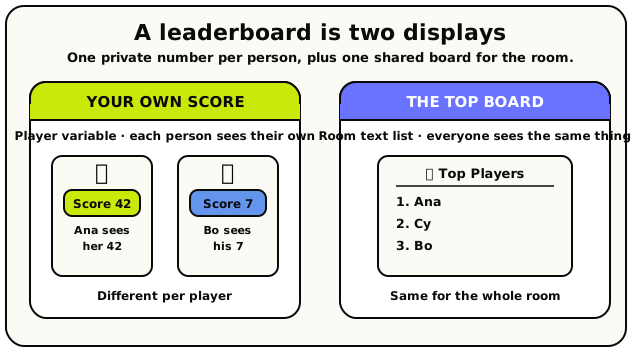 Two displays: a private per-player score on the left, one shared board for the whole room on the right.
We'll build them in that order, because the first is almost free and the second teaches you lists and loops. The mental model:
A player variable is each person's locker (their own score). A list is a clipboard you can pin many things to in order (the ranking). A HUD block is a sticky note on the screen that stays up until you take it down.
Step 0: the pieces you'll need
Open the Variables panel and add two variables.
| Variable | Scope | Type | Why |
|---|---|---|---|
score | Player | Number | Each player's own points. Starts at 0 for everyone. |
topNames | Room | Text list | A shared, ordered list of the leading names. |
score is Player-scoped so everyone has their own private number, like individual
lockers. topNames is Room-scoped so there's one shared ranking the whole room agrees
on, like the scoreboard on the gym wall. Picking the right scope is the whole skill; see
Variables.
You'll also need some way to score points. For this guide, assume you've got a "point button"
(a clickable object). Clicking it adds 1 to the clicker's score, the same read-math-write
pattern from A shop.
Part 1: each player's own live score
This part is short and delightful, because one block does almost all the work.
Add a point when the button is clicked
Start with the when object is interacted with hat pointed at your point button. Inside, do the read-math-write to bump the clicker's score by 1: read player variable
scorefor triggering player, add 1 with a math block, and store it back with set player variable. Stores a value into one player's private copy of a variable.
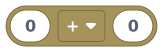 Here, used to add 1 to the current score.
Read together: set
scoreof triggering player to (theirscore+ 1). (If this read-math- write feels new, the shop guide walks it through slowly.)Pin a self-updating score to the screen
Here's the magic. Instead of redrawing the score every time it changes, use a show live HUD number block. You bind it to a variable once, and it follows that variable forever, all on its own.
 Pins a number that tracks a variable automatically. It updates itself whenever the variable changes.
Set it up like this:
- named
score(the HUD element's ID, more below) - label
Score - showing → pick your
scorevariable from the dropdown - as →
number - at →
top_right
The beautiful part: because
scoreis a Player variable, each player sees their own number. One block, personalised scores for the whole room, including people who join later. A sibling HUD block for showing a label + icon, if you want a heading.Under the hood: show it once, never touch it again
A live HUD number re-reads its variable every time the value changes and re-sends itself to the affected players automatically. So you do not re-show it on every point; that would be wasted work. Show it once (say, in a when player joins handler) and let it ride. This is different from the plain show HUD number, which is a one-time snapshot you'd have to re-show yourself. See HUD & cinematics.
Gotcha: the "name" is an ID, not the captionEvery HUD element has a name you choose (here,
score). That name is its identity, not the visible text. The visible caption is the label field. Show another HUD element with the same name and it overwrites the first one in place (great for updates). Use a different name and you get a second element. A typo in the name silently makes a duplicate, and there's a cap of 24 HUD elements per scope, so keep names consistent.- named
That's a complete, personalised, auto-updating scoreboard already. For many games, that's all you need. But let's go further and build a shared top board.
Part 2: a shared "Top players" board
This is where lists and loops come in. The plan: keep a Room list of the leading names, then turn that list into one block of text and pin it on everyone's screen.
Hideout's scripting doesn't have a one-block "sort this list" tool. For a beginner-friendly leaderboard we'll keep it simple: every so often, rebuild the board from whoever's around. A truly sorted top-N is a more advanced project; this version gives you a clean, working board and teaches the loop pattern you'd build on.
Rebuild the board on a timer
Add an every N seconds hat (set to, say, 10 seconds). This refreshes the board regularly without you lifting a finger.
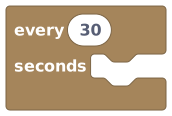 Fires on a repeating timer; here it refreshes the leaderboard.
Remember the rules: the interval must be a literal number 5 seconds or more, and timers only tick while the room is awake. See Timers, loops & waits.
Start the board list fresh, then fill it
Inside the timer, first empty
topNamesso we don't pile up old entries. Use the empty list block, pointed at your Room listtopNames. Then add the names you want on the board.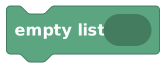 Wipes a list back to empty, so the board rebuilds from scratch each refresh instead of piling up.
For each player you want to list, push their name onto the end of the list with add to end of list.
 Sticks a value onto the back of a list, making it the last item.
The name itself comes from a display name of player block, which turns a player into their name as text.
 Gives you a player's name as text you can show in messages.
For a simple board, loop over everyone and add each name (next step). For a real top-N you'd only add players above a score threshold, but let's get the loop working first.
Loop over the players to fill the list
A for each loop runs its inside blocks once for every item in a list, and a player group counts as a list of players. So loop over all players and, each time, add the current player's name to
topNames.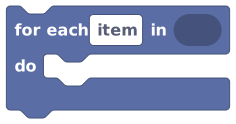 Runs its inner blocks once for every item in a list or group.
The loop hands you the current player through the loop item block: "whoever this pass is about."
 Stands for the current item while a 'for each' loop is running.
So inside the loop: add (display name of (loop item)) to end of list
topNames. After the loop,topNamesholds one name per player in the room. The group of every player in the room. Loop over this.Under the hood: loops are bounded by "gas," not a fixed count
A
for eachruns its body once per item, all inside one script run. Hideout meters work with something called gas (one unit per instruction). A small loop over the players in a room is nothing to worry about. A giant loop with a heavy body burns gas fast and, past a hard limit, the run is stopped to protect the room. Keep loop bodies small. Full detail in Timers, loops & waits.Turn the list into one block of text
A HUD text block shows text, not a list, so we glue the names together. The simplest readable board is "Name1, Name2, Name3." Read items out by position with item at index and join them with join text.
 Reads the item at a given position in a list. The first item is index 0.
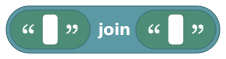 Sticks two pieces of text together, end to end.
To know how many slots exist, length of list tells you the count.
 Tells you how many items are in a list.Gotcha: counting starts at 0
Positions (indexes) start at 0, not 1. A list of 3 names has indexes 0, 1, and 2. So "the first name" is
item at index 0. Ask for an index that doesn't exist and you get nothing (a null) rather than an error, which is why checking the length first is smart. For a fixed "top 3" board you can join index 0, 1, and 2 and accept blanks when fewer players are on.Pin the board on everyone's screen
Finally, show the joined text with a show HUD text block.
Sticks a label onto players' screens and keeps it there until you remove it.- show HUD text to → leave it as all players (so everyone sees the same board, including future joiners)
- named
leaderboard - text → your joined names text
- at →
top_left(or wherever it won't cover other UI)
Because you re-show it with the same name
leaderboardevery 10 seconds, it updates in place: no flicker, no stacking. That's the whole trick."all players" is sticky on purposeWhen you point a HUD block at the literal all players block, the element applies to everyone in the room, now and in the future: late joiners get it too. Point it at some computed group instead and only those specific people see it. For a room-wide board, the plain all players is what you want.
Save and test it
Save, leave build mode, and click your point button a few times. Your personal Score should tick up in the top-right instantly. Within 10 seconds, the leaderboard in the top-left should list the names in the room. Bring a friend in and watch both update.
What you just made
The live personal score:
when player joins room
  ┗ show live HUD number to (all players) named "score" label "Score" showing [score] as number at top_right
The shared board, rebuilt on a timer:
every 10 seconds
  ┗ empty list [topNames]
  ┗ for each player in (all players)
      do ┗ add (display name of (loop item)) to end of list [topNames]
  ┗ show HUD text to (all players) named "leaderboard" text (join names from [topNames]) at top_left
Player variables for private scores, a Room list for the shared ranking, a loop to fill it, and HUD blocks to show both. That's a leaderboard.
Make it your own
- Top 3 only. Instead of looping over everyone, only add to end of list players whose
scoreis above a threshold, or join indexes 0 to 2 for a fixed three-line board. - Numbers on the board. Join each name with their score using to text to convert the
number, e.g.
Name: 12.
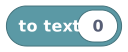 Turns a number (or any value) into text so you can put it in a message.
- A heading. Add a second show HUD text named
leaderboard-titlewith text<Icon name="trophy" /> Top Playerspinned just above the board. - Crown the winner. When a round ends (see A round-based minigame), read the top name and rain confetti on them (see A cutscene).
When it doesn't work
| Symptom | Likely cause | Fix |
|---|---|---|
| Personal score never appears | The live HUD's showing variable isn't picked | Choose score in the "showing" dropdown; an empty pick fails silently |
| Everyone sees the same personal number | You bound the live HUD to a Room variable | Bind it to the Player-scoped score so each person sees their own |
| The board keeps growing / repeats names | You didn't empty the list before refilling | Add an empty list block at the top of the timer, before the loop |
| The board shows blanks | You read an index past the end of the list | Check length of list first, or accept blanks for a fixed-size board |
| A second score widget appeared | The HUD name differs each time (typo) | Keep the name identical so it updates in place; mind the 24-per-scope cap |
What's next?
Give your scores stakes: timed rounds with a start, a countdown, and a winner.
A cutsceneCelebrate the champion with confetti, big text, and a camera move.
Groups & listsEverything about lists and player groups: building, looping, and reading them.
HUD & cinematicsThe full reference for on-screen widgets, anchors, styles, and limits.