Talking NPCs
A world feels alive the moment someone in it talks to you. In this recipe you'll add an NPC (a computer-controlled character) that spawns into your world, turns to face whoever walks up, and runs a proper click-through conversation like a quest-giver in a real game. At the end you'll get a taste of letting the NPC improvise a line with AI. This is the build behind guides, shopkeepers, tutorial helpers, and story characters.
What you'll build: a scripted NPC that appears when the room starts, faces any player who interacts with it, and speaks a short dialog you wrote, then a bonus where it greets players in its own words.
A block is a puzzle piece you snap together. An event is a "when this happens" block that starts a script. If those are new, start with A button that does something.
Two kinds of NPC, pick the right one
An NPC (short for "non-player character") is any character in your world that isn't a real person. Hideout has two completely different kinds, and scripting only drives one:
| Kind | What it is | Who controls it |
|---|---|---|
| AI NPC | A character with a real AI brain. It looks around, remembers, and decides for itself. | Itself. You can't script it. |
| Scripted NPC | A puppet. It has no mind. It only moves, turns, and talks when your blocks tell it to. | You, every action is a block. |
This guide is all about scripted NPCs. Think of a scripted NPC as a stage actor reading your script, versus an improv performer making it up. Predictable, repeatable, free, and perfect for a quest-giver who should always say the right thing.
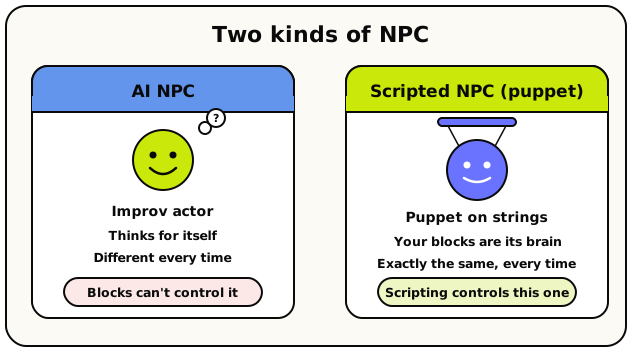 An AI NPC thinks for itself and ignores your blocks. A scripted NPC is a puppet that only does what your blocks tell it. This guide drives the puppet.
On screen, a scripted NPC looks exactly like an AI one, same body, same animations. The difference is entirely behind the scenes: who's pulling the strings.
Step 1: Create your NPC (the cast list)
Before a script can control an NPC, the NPC has to exist. You make it in the NPCs panel inside the scripting editor.
Open the NPCs panel and add one
Enter build mode, open the scripting editor, and open the NPCs panel from the top bar. Under Scripted NPCs, click New NPC. Give it a name (say,
Guide), an optional bio, and dress it up however you like. Save.That's it. Your NPC is now in the room's "cast list." It isn't in the world yet (you'll spawn it with a block), but scripts can now find it by name.
Under the hood: "scripted" means puppetBehind the scenes this gives the NPC a
scriptedbrain: no AI, no auto-spawn, no wandering off. It does nothing at all until a block tells it to. That's what makes its behaviour reliable.
Step 2: Spawn the NPC into the world
A scripted NPC starts off-stage. Spawn is the block that brings its body into the world, and you must spawn it before it can walk, turn, or talk.
Spawn it when the room starts
From the Events category, drag out when room starts. It fires once when the room boots up.
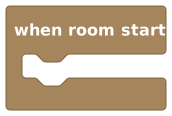 Runs once when the room starts. The natural place to bring your NPC on stage.
Under it, snap a spawn NPC block from the NPCs category.
 Brings the NPC's body into the world at a coordinate, facing a direction.
Choose the NPC and where it appears
In the NPC slot, pick your
Guidefrom the picker. That picker is an NPC value block that points at one specific character in your cast. Points at one specific scripted NPC from your room's cast list.
Then set the location, a coordinate where the NPC should stand. Use the coordinate picker's Point mode to click the exact tile. You can also set a starting facing (north / east / south / west); the default is south, which faces toward the camera.
Spawning twice is safeSpawn is idempotent, a fancy word meaning "safe to run again." If the NPC is already there, spawning just re-places it. So when the room restarts and when room starts fires again, you won't end up with two NPCs.
Every other NPC command (walk, face, say, even the AI one) fails silently if the NPC isn't spawned. If your NPC seems mute or frozen, the usual cause is that it was never spawned. Spawn is the one block that actually creates the body.
Step 3: Face the player who walks up
Now let's make the NPC react when a player interacts with it.
Use 'when NPC is interacted with'
From the Events category, drag out when NPC is interacted with. It fires when a player walks up to a scripted NPC and interacts.
 Fires when a player walks up to and interacts with a scripted NPC.Under the hood: you have to be close
Interacting means walking up to the NPC, not clicking from across the map. The player must be within 8 tiles. Tick highlight when nearby on this block and add a hint like
Talk to the Guideso players know they can interact.Turn the NPC to face the player
Under the hat, snap a turn NPC to face block from the NPCs category. It rotates the NPC without moving it.
 Turns the NPC to a compass direction. Handy for making it face the player.
Pick your
Guideas the NPC, and choose a facing direction. A small, polished touch that makes the NPC feel like it's paying attention to whoever just walked up.
Step 4: Run a click-through dialog
Here's the centrepiece: a cinematic NPC dialog, the big quest-giver panel with the NPC's portrait, a line of text, and "click to continue." It takes over the screen and waits for the player to read and click, just like a real game.
Add the NPC dialog block
Still under the when NPC is interacted with hat, snap an NPC dialog block from the Cinematic category.
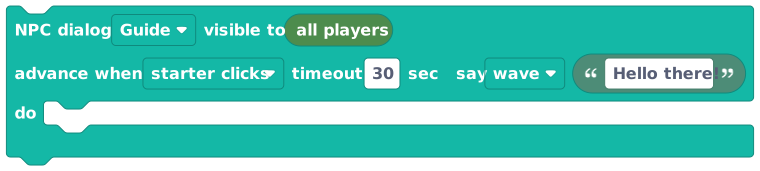 A full-screen, click-through conversation panel with the NPC's portrait. Add lines with its + button.
Set the NPC field to
Guide. Type your first line into the text field, something likeWelcome, traveller! Looking for the secret door?.Use the block's + button to add more lines. Each line is its own step the player clicks through, and each can show a little emote. You can have up to 32 steps, and each line can be up to 280 characters.
Choose who has to click 'next'
The dialog has an advance when dropdown that sets who gets to click through it:
- starter clicks (the default): only the player who triggered it advances. Perfect for a one-on-one chat.
- any viewer clicks: the first person to click moves it along for everyone.
- all viewers click: everyone watching must click before it advances.
For a personal quest chat, the default starter clicks is exactly right.
Under the hood: the dialog pauses the scriptThis is the one cinematic block that stops the script and waits. Nothing stacked after the dialog runs until the player has clicked all the way through it (or a timeout, 30 seconds per step by default, passes). So put follow-up actions, like giving a reward, after the dialog, knowing they run once the conversation finishes.
Save and walk up to your NPC
Save, leave build mode, and walk up to the Guide. Interact with it, the NPC turns to face you and the dialog panel slides up with its portrait and your first line. Click to read each step. You've got a talking quest-giver!
The dialog panel is the cinematic, takes-over-the-screen version. For a quick word balloon over the NPC's head instead (no panel, no pause) use the NPC says block. It speaks an exact line (up to 100 characters) as a chat bubble. Great for ambient chatter; the dialog panel is for story beats.
 A quick speech bubble over the NPC's head. An exact line, no panel, no pause.
Bonus: let the NPC improvise (a taste of AI)
Everything so far has the NPC say exactly what you typed. There's also a block where you write an instruction and the AI writes the line, so the greeting is a little different each time.
Add 'NPC replies with AI to'
From the NPCs category, drag out NPC replies with AI to.
 You give an instruction; a small AI writes one short, in-character line for the NPC to speak.
Pick your
Guide, and in the prompt type an instruction (not the words themselves), likeGreet the player warmly and tease that there's treasure nearby. The AI turns that into a single in-character line, using your NPC's name and bio for flavour.
How NPC says and NPC replies with AI to differ, side by side:
| NPC says | NPC replies with AI to | |
|---|---|---|
| You provide | The exact words | An instruction |
| Who writes the line | You | A small AI |
| Same every time? | Yes | No, improvised |
| Cost / speed | Free, instant | Uses an AI request; arrives a moment later |
| Pauses the script? | No | No (it speaks in the background) |
AI replies have limits: a room can make about 10 per minute, and each NPC can only work on one at a time. Think of them as a flavour topping, not your main dialog. For anything that must be exact (quest steps, lore, jokes) use NPC says or the dialog panel. Save AI for a warm, slightly-different-each-time hello. More in NPCs.
What you just made
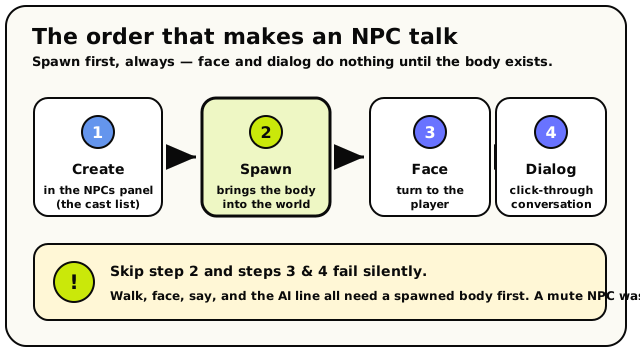 The four moves in order. Spawn is the load-bearing one. Face and dialog quietly do nothing until the NPC's body is actually in the world.
Four moves, one living character:
- Created a scripted NPC in the NPCs panel.
- Spawned it into the world when the room starts.
- Made it face any player who interacts with it.
- Ran a click-through dialog, and saw how to let it improvise with AI.
"When the room starts, spawn the Guide. When a player interacts with it, turn it to face them and run the dialog." If the sentence makes sense, the blocks do too.
When it doesn't work
| Symptom | Likely cause | Fix |
|---|---|---|
| NPC never appears | It was never spawned | Add a spawn NPC under when room starts |
| NPC won't talk / turn | Everything but spawn fails if it isn't spawned | Make sure the spawn ran first |
| Interacting does nothing | You're more than 8 tiles away | Walk right up to the NPC |
| Dialog won't advance | "advance when" is set to all viewers click and someone hasn't | Use starter clicks for a solo chat |
| Block after the dialog runs late | The dialog pauses the script | That's expected; it runs once the dialog finishes |
| AI line doesn't appear | Hit the 10/minute room limit, or one's already in flight | Wait a moment, or use NPC says for guaranteed lines |
What's next?
The full story on scripted vs AI NPCs, walking, emotes, and dialog.
HUD & screen effectsPair your NPC with cutscene effects: letterbox bars, fades, big text.
Teleporters & areasSend the player somewhere new once the conversation ends.
A score counterReward the player after they finish your NPC's quest.