Teleporters & areas
Want a secret door, a launch pad, a "fall in the lava and respawn" trap, or a hub world that warps you to different rooms? They're all the same two ingredients: an area (a rectangle on the floor) and a teleport (instantly move a player somewhere). In this recipe you'll build a trigger pad that warps anyone who steps on it, add a teleporter you click, and learn how to read positions off the grid like a map.
What you'll build: a glowing pad on the floor that teleports a player to a faraway spot the moment they walk onto it, plus a clickable teleporter as a bonus.
A block is a puzzle piece you snap together. An event is a "when this happens" block that starts a script. If those words are new, skim A button that does something first.
The grid in 30 seconds
Hideout worlds sit on a grid, like graph paper. Every spot has an address of numbers:
- x = how far right (east).
- y = how far down (south).
- z = how far up (height). Most ground-level scripting just uses
z = 0.
So a coordinate of (10, 4) means "tile 10 across, 4 down." One unit is one whole
tile.
This trips up everyone once: y gets bigger as you go down the screen, not up. Walking "north" lowers your y; walking "south" raises it. If your teleports keep landing in the wrong direction, this is usually why. Full details in The Grid and Positions.
You almost never type these numbers by hand. The editor has a coordinate picker: a button on coordinate and area blocks that opens your live room so you can click the tile you mean. We'll use it constantly below.
What is an area?
An area is a rectangle on the floor, defined by two opposite corners, like dragging a selection box on graph paper. Hideout figures out the rest.
A few facts worth knowing up front:
- Corner order doesn't matter. "From
(8, 2)to(2, 8)" makes the same rectangle as "from(2, 8)to(8, 2)". The engine sorts the corners for you. - The edges count. A player standing exactly on the boundary is counted as inside.
- Areas are flat. They sit on the ground (
z = 0), so they catch players walking around at ground level.
Build it: a trigger pad that teleports you
The plan in one sentence: when a player enters this area, teleport them over there.
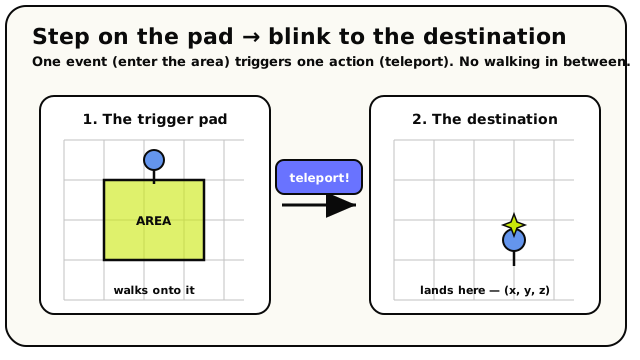 The whole recipe at a glance. A player steps into the area (the event), and the engine instantly blinks them to a destination coordinate (the action).
Open the editor and pick your two spots
Hop into your world, enter build mode, and open the scripting editor. Before you wire anything, decide on two places: the pad (the rectangle players step on) and the destination (where they land). Drop a marker object on each if it helps you remember.
Start with 'when player enters area'
From the Events category, drag out the when player enters area block. It's a Event block that fires the moment a player crosses into the area you give it.
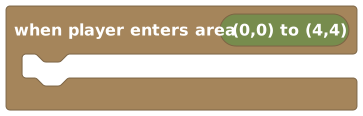 Fires when a player steps into the area you define on it.
Right on the block is a picker button. Click it to open the coordinate picker over your live room, switch it to Area mode, then click and drag a rectangle over the tiles you want as your pad. Hit Use Coordinates and the corners drop straight into the block.
Under the hood: what the area picker fills inThe block holds an area value, which is two corner coordinates. The picker writes both for you. If you ever want to set them by hand, the matching block is the Area block (from the Areas category), which takes a from corner and a to corner.
 An Area value: a rectangle built from two corner coordinates. The area-event block has one built in.
Add the teleport action
From the Actions category, drag out the teleport block and snap it under the hat. This instantly moves a player to a coordinate: no walking, no animation, just blink and they're there.
 Instantly moves one player to a coordinate you choose.
It has two slots: who to teleport, and to where.
Teleport the player who stepped on it
For who, plug in triggering player from the Players category. It stands for the player who just entered the area, whoever stepped on the pad.
 Stands for the player who fired the event. Here, whoever walked into the area.
If you teleported "all players" by mistake, stepping on the pad would yank everyone in the room. Triggering player keeps it personal.
Set the destination coordinate
For to, drag a coordinate block (from the Math category, the
(x, y, z)block) into the slot. A coordinate (x, y, z). Use its picker button to click the destination tile in your room.
Click its picker button, choose a tile in Point mode, and hit Use Coordinates. The x, y, and z fields fill in automatically.
The picker always lands you on the groundThe coordinate picker always sets z = 0 (ground level). If you want to teleport someone up, say onto a ledge, pick the tile first, then type a height into the z field by hand.
Save and walk onto the pad
Save your script, leave build mode, and walk into your area. The instant you cross the edge, blink, you're at the destination. You built a teleporter pad!
Read top to bottom, your script says:
when player enters area [your pad]
  ┗ teleport [triggering player] to [destination coordinate]
One event, one action. That's a working trigger zone.
Variation: a teleporter you click
Prefer a portal you walk up to and press, instead of a floor pad? Swap the event and keep everything else.
Use 'when object is interacted with' instead
Place a portal-looking object (a doorway, a glowing ring, a phone booth). From the Events category, use when object is interacted with and plug your portal object into it.
 Fires when a player clicks the object you plug in, your portal.
Reuse the same teleport
Snap the very same teleport [triggering player] to [coordinate] under it. Done: now clicking the portal warps the clicker. The only thing that changed is what starts the script: a click instead of a footstep.
Make it obvious it's a portalOn the when object is interacted with block, tick highlight when nearby and type a hint like
Enter the portal. Players standing close will see it outlined with your text. (Hints are capped at 64 characters.)
This is the big lesson: the event is interchangeable. Enter-an-area, click-an-object, say-a-phrase: pick whichever trigger fits, and reuse the same teleport underneath.
Make it your own
- A two-way portal. Build a second pad at the destination that teleports back to the first. Now you can hop both directions.
- A respawn trap. Make an area over a pit or lava and, on enter, use respawn (sends the player to the room's spawn point) instead of teleport. Instant "you fell, try again."
- A welcome warp. Trigger off
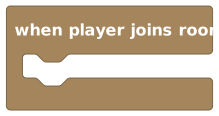 to drop new
arrivals straight into your lobby.
to drop new
arrivals straight into your lobby. - Only let some players through. Add an
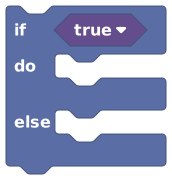 block to
check something (a score, a Discord role) before teleporting. A locked door that only
opens for VIPs.
block to
check something (a score, a Discord role) before teleporting. A locked door that only
opens for VIPs. - Send a whole group. Swap for
 to teleport everyone currently standing in
the zone at once, handy for a "launch" pad.
to teleport everyone currently standing in
the zone at once, handy for a "launch" pad.
 Sends a player back to the room's spawn point. Perfect for traps and 'try again' pads.
"When a player enters the area, teleport that player to the destination." If the spoken sentence makes sense, the blocks will too. Swap the first half ("when a player enters...") for any trigger you like.
When it doesn't work
| Symptom | Likely cause | Fix |
|---|---|---|
| Stepping on the pad does nothing | The area is empty or somewhere else | Re-pick the area with the picker; make sure you're walking into that rectangle |
| Everyone gets teleported, not just you | You used all players in the "who" slot | Plug in triggering player |
| You land in the wrong direction | Down is positive y, so you flipped north/south | Re-pick the destination tile with the picker |
| You land at the floor when you wanted a ledge | The picker always returns z = 0 | Type the height into the z field by hand |
| It fires over and over | Your destination is inside the trigger area | Move the landing spot outside the area so re-entering it doesn't loop |