A round-based minigame
This is where the building blocks start to feel like a real game. You'll wire up a short, timed round of tag. The room kicks off a round, picks one random player to be "it," shows everyone a big 3-2-1 countdown, lets the chaos run, then ends the round and announces the result. It pulls four ideas together at once (groups, timers, variables, and rounds), and once you've built it, you can reskin it into king-of-the-hill, a race, a quiz, almost anything.
What you'll build: a round that starts on a timer, picks a random "it" player, counts down, runs for a fixed time, then ends and tells everyone it's over.
A block is a puzzle piece you snap together. An event is a "when this happens" block that starts a script. A variable is a labelled box that remembers a value. If those words are new, do Hello, World and A button that does something first they take five minutes each and everything here builds on them.
The big idea
A "round" sounds fancy, but it's really just a true/false flag plus a timer:
A round is a switch. Flip it on to start. Flip it off to stop. While it's on, the game is live; while it's off, nothing's happening.
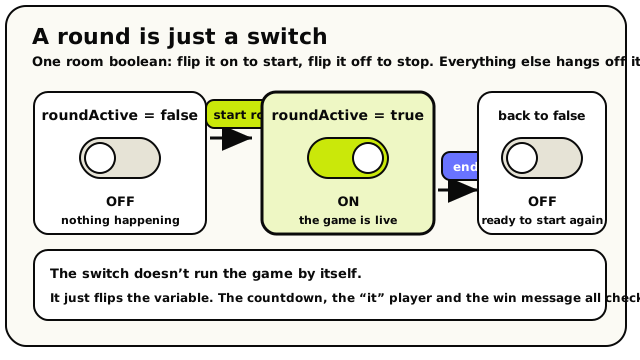 The whole round is one room boolean. Start round flips it on, end round flips it off, and nothing else happens automatically. The rest of your blocks read that switch.
Everything else (the countdown, the "it" player, the win message) hangs off that one switch. So our recipe is:
- Start the round (flip the switch on).
- Pick who's "it" from everyone in the room.
- Count down 3-2-1 so players know it's starting.
- Wait for the round to play out.
- End the round (flip the switch off) and announce it.
Step 0: the pieces you'll need
Before any blocks, set up one variable in the Variables panel (the panel you open from the script workspace).
| Variable | Scope | Type | Why |
|---|---|---|---|
roundActive | Room | Boolean | The on/off switch for the whole round. One shared box for the room. |
That's the only variable this guide needs. A boolean is just a true/false flag, perfect for "is a round happening right now?"
A Room variable is one shared box the whole room can see, like the scoreboard on a gym wall. A round is a room-wide thing (either there's a round on for everybody, or there isn't), so Room scope is exactly right. If you used a Player variable instead, every player would have their own private round switch, which makes no sense here. More on this in Variables.
Build it
Start the round on a clock
We want a fresh round to begin every so often. Grab the every N seconds event from the Events category. It's a Event block that fires on a repeating timer.
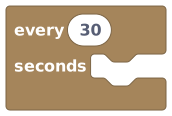 An event hat that fires over and over on a timer you set.
Set it to something like 30 seconds. That's how often a new round kicks off.
Gotcha: 5 seconds is the floorTwo rules for the interval:
- It must be at least 5 seconds. Anything below 5 won't save.
- It has to be a plain number you type in. You can't feed it a variable.
One more thing to know: timers only tick while the room is awake. An empty room goes to sleep and runs no timers. If the room sleeps through several intervals, the timer fires just once when it wakes back up, not once for each tick it missed. See Timers, loops & waits.
Flip the round switch on
Under the hat, snap in the start round block from the Groups category. It does one tidy thing: it sets a room boolean to
true. Marks a round as active by flipping a chosen room true/false variable to true.
The block has a dropdown on it, pick your
roundActivevariable from that list. You're choosing the variable in the block, not plugging another block in.Under the hood: "start round" is just a friendly switchThe start round block literally sets your room boolean to
true, and nothing more. It does not start any game logic by itself, you decide what "round is active" means by checking that variable elsewhere. Think of it as flipping a light switch: the switch doesn't clean the room, it just turns the light on. The variable must be a Room-scoped boolean, or the script won't compile.Pick who's 'it'
Now choose a random victim. From the Groups category, the all players block hands you a group: a clipboard with every player in the room clipped to it.
 A group containing every (human) player currently in the room.
Feed that group into a random player from group block, which picks exactly one player out of the group at random.
 Reaches into a group and pulls out one random player.
Store that chosen player so we can use them later. Make a second variable for this:
Variable Scope Type itPlayerRoom Player Use a set room variable block to save the random player into
itPlayer. Stores a value into a room variable everyone shares.
Read together, this step says: set room variable
itPlayerto (random player from (all players)).Gotcha: the group might be emptyIf the room is empty, "random player from group" gives you back nobody (a "null" player, a placeholder that means "no one"). Any block you then point at that nobody just quietly does nothing. That's not an error; it's the engine being polite. In a busy room it's fine, but to be safe you can check the player count first (the next step shows how).
Picking is also with replacement: the same player can be "it" two rounds in a row, because the block doesn't remember who it picked before.
Only run a round if enough people are here
A game of tag with one player is sad. Let's guard the round behind a head-count. Wrap your round logic in an if / else block from the Conditions category.
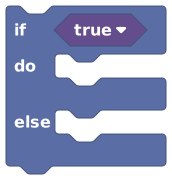 Runs one set of blocks when a question is true, and optionally another when it's false.
For the question, count the players and compare. The count players in block turns a group into a number.
 Tells you how many players are in a group, as a plain number.
Then a compare block checks that number against 2.
 Compares two values (bigger, smaller, equal, not equal) and answers true or false.
Set the comparison to greater-than-or-equal and the right-hand side to
2. Read together: if (count players in (all players)) ≥ 2, then run the round. Put your start round, the "pick who's it," and the rest inside thedoslot.Build the head-count once, reuse the ideaThis "count a group, compare to a number, branch" shape is the heart of almost every multiplayer rule: "if 4+ players in the lobby, begin," "if 0 players on the red team, blue wins." Learn it once and you'll use it forever. See Groups & lists.
Show a dramatic countdown
Players need a heads-up before the round starts. Drop in show countdown from the Actions category. It paints a big 3… 2… 1… on screen.
 Shows a big 3-2-1 countdown on the screens of the players you choose.
It comes pre-filled to show all players a "Get ready" label counting down from 3. Leave that as-is for now, or change the label to something like
Tag starts in....Gotcha: the countdown does NOT pause your scriptThis is the single most common surprise. Show countdown starts the countdown and then your next block runs right away: it does not wait for the count to reach zero. So if you want something to happen when the count ends, add your own wait block right after it, set to the same number of seconds. We do exactly that in the next step. (The countdown must be between 1 and 30 seconds, and the label is cut off at 80 characters.)
Wait for the countdown, then let the round run
Add a wait seconds block from the Timers category. Set it to 3 to match the countdown. This holds the script right here until the "GO" moment.
 Pauses this one script for a number of seconds, then carries on from the same spot.
Then add a second wait for the round length itself, say 20 seconds. That's how long players have to play tag before the round ends.
Under the hood: "wait" doesn't freeze the worldWhen your script hits a wait, only this one run pauses. The room, every other player, and every other script keep going perfectly normally. The engine just bookmarks your recipe ("come back in 20 seconds") and walks away to do other things. When the time's up, it picks your script back up at the exact next block. It's a kitchen timer, not a freeze button. Read more in Timers, loops & waits.
End the round and announce it
When the wait finishes, the round is over. Snap in the end round block (also in Groups) and pick your
roundActivevariable from its dropdown this flips the switch back tofalse. Marks a round as finished by flipping its room boolean back to false.
Then tell everyone with a show toast, a quick message that pops up and fades.
 Pops a short message on a player's screen, then fades it away.
Point it at
and write something like
Round over! Thanks for playing.Like "start round," end round only changes the variable; it doesn't clean anything up. Any resetting (clearing scores, moving players home) is yours to add here.Save and test it
Save the script, leave build mode, and wait for the timer to fire (or grab a friend so you've got two players). You should see the countdown, then a play window, then the "round over" toast. Congratulations, you built a real, repeating minigame loop!
What you just made
Read top to bottom, your script says:
every 30 seconds
  ┗ if (count players in (all players)) ≥ 2
      ┗ start round [roundActive]
      ┗ set room variable [itPlayer] to (random player from (all players))
      ┗ show countdown to (all players) "Get ready" 3
      ┗ wait 3 seconds
      ┗ wait 20 seconds
      ┗ end round [roundActive]
      ┗ show toast to (all players) "Round over! Thanks for playing."
One timer, one head-count guard, and a tidy start-countdown-play-end sequence. That's the skeleton of every round-based game in Hideout.
Make it actually a game of tag
Right now we pick an "it" player but don't do anything with them. Here's where the real game lives, and it's all stuff you already know how to wire:
- Tell the "it" player they're it. Add a show toast pointed at your
itPlayervariable (read it back with a block):
You're IT! Go tag someone!. - Score the tags. Give every player a Player-scoped number variable called
tags. When someone gets tagged, add 1 to the tagger'stags. (There's no one-step "+1" block, so you read the value, add with a math block, and set it back, see Variables.)
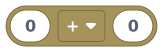 Math on two numbers: add, subtract, multiply, divide, remainder.
- Show a live score. A show live HUD number pinned to each player's
tagskeeps a running scoreboard on screen with zero extra effort; it follows the variable on its own. We cover this pattern fully in A leaderboard. - Confetti for the winner. When the round ends, rain confetti on the player with the most tags. (See A cutscene for the celebratory effects.)
"Every 30 seconds, if there are at least two players, start a round, pick someone to be it, count down, let them play, then end the round and tell everyone." If you can say what your script does in one breath, you understand it, and that habit will carry you a long way.
When it doesn't work
| Symptom | Likely cause | Fix |
|---|---|---|
| Nothing ever happens | Interval below 5s, or the room is empty/asleep | Set the timer to 5+ seconds; remember timers only run while the room is awake |
| "start round" won't let you pick a variable | The variable isn't a Room boolean | In the Variables panel, make sure roundActive is scope Room, type Boolean |
| The "it" player is sometimes nobody | The room was empty when it picked | Keep the head-count guard (count ≥ 2) so empty rooms skip the round |
| The "round over" toast fires instantly | You forgot the wait blocks | The countdown and the play window are wait blocks, without them, everything runs in one tick |
| Round never seems to "end" | You never flipped the switch off | Make sure end round runs after the play wait and points at the same variable |
What's next?
Track and rank scores across players, then show the top names on screen.
A cutsceneGive your round a cinematic intro or a confetti-and-camera victory moment.
Groups & listsThe full story on player groups, picking, counting, and looping over crowds.
Timers, loops & waitsHow timers, waits, and the event-driven engine really work under the hood.