A shop
A shop is the moment your world gets an economy. Click the vendor, check if you can afford it, take the coins, hand over the prize, and pop a message either way. Under the hood it's one tidy decision: "do they have enough? Yes, sell. No, say no." You'll use three ideas: variables (the player's coins), conditions (the can-they-afford-it check), and interact events (the click). The same pattern powers vending machines, unlock doors, upgrade stations, and tip jars.
What you'll build: a clickable vendor that charges a player some coins and rewards them, but only if they can afford it, with a friendly toast either way.
This guide assumes you've done A button that does something. The click-to-do-something pattern is the foundation here. If "variable" and "event" are still fuzzy, skim Variables and Events & triggers first.
The big idea
Every shop in the world is the same one-sentence decision:
When a player clicks the vendor, if they have enough coins, then take the coins and give the item; else tell them they're short.
That "if, then, else" is the whole game. The trick is knowing where the coins live and how to change them. Let's set that up.
Step 0: the pieces you'll need
You need somewhere to store each player's money. Open the Variables panel and add one variable.
| Variable | Scope | Type | Why |
|---|---|---|---|
coins | Player | Number | Each player carries their own wallet. |
A Player variable is a separate box per person, like every student having their own
locker. Player A's coins is invisible to player B. That's exactly what money should be:
private and per-person. A Room variable would give the whole room one shared wallet,
which would be very confusing. A Player number variable starts at 0 for
everyone automatically, with no setup. More in Variables.
You'll also want a way to earn coins so there's something to spend. For testing, you can give yourself a pile with the Variables panel's "Set live value" tool, or add a second clickable "free coin" object. We'll focus on the buying side.
You'll also need two objects placed in build mode: one to be the vendor (a market stall, a robot, a treasure chest, anything clickable) and one to be the reward the player gets. We'll keep the reward simple: a toast that says they got it.
Build it
React to the vendor being clicked
Grab the when object is interacted with event from the Events category, the same hat from the button guide. It fires when a player clicks the object you plug in.
 Fires when a player clicks or taps the specific object you choose.
Drop your vendor object into its slot.
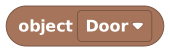 Points at one specific object in your world.Make it obviously shoppable
On this event block there's a highlight when nearby checkbox and a hint field. Tick it and type something like
Buy a sword (10 coins)so players see a glowing outline and the price when they walk up. The hint is capped at 64 characters, so keep it punchy.Read the clicker's wallet
We need this player's coins, the one who clicked. The triggering player block stands for "whoever fired this event."
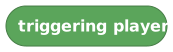 Stands for the exact player who fired the event. Here, whoever clicked the vendor.
Now read their wallet with a player variable block, which fetches one specific player's private copy of a variable.
 Reads one player's own private copy of a player variable.
Plug triggering player into its
PLAYERslot and pickcoinsfrom its dropdown. Read together, this means the clicker's coins.Gotcha: a player variable always needs an ownerA Player variable is per-person, so the block must know which person. That's the
PLAYERslot. Forget to fill it and the read returns the default (0), so your shop will think everyone's broke. Almost always, the owner you want is triggering player.Ask: can they afford it?
Add an if / else block from the Conditions category. This is the fork in the road: one path if they can pay, another if they can't.
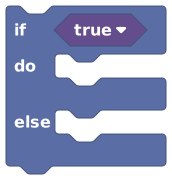 Runs one set of blocks if the question is true, and another if it's false.
For the question, use a compare block to check their coins against the price.
 Compares two values and answers true or false.
Set it to greater-than-or-equal (the
≥sign, meaning "at least"). Put the price on the right (say10) and plug your "player variablecoins" into the left side. Now it reads: if the clicker has at least 10 coins. Put the "sell it" blocks in thedoslot and the "sorry" message in theelseslot.Charge them (when they CAN afford it)
Inside the
doslot, we subtract the price from their wallet. There's no one-step "spend 10" block, so we do the classic three-step move: read the value, do the math, write it back.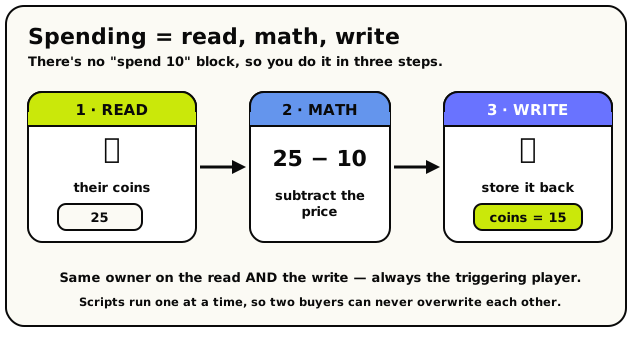 Charging a player is always three steps: read their coins, subtract the price, then write the result back.
Use a set player variable block to overwrite
coinswith a smaller number. Stores a value into one specific player's private copy of a variable.
For the new value, a math block does the subtraction.
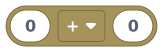 Add, subtract, multiply, divide, or remainder two numbers.
Set the math op to subtract, put "player variable
coinsof triggering player" on the left and10on the right. So the whole line reads: setcoinsof triggering player to (their coins minus 10). Remember to set the owner slot on the set block to triggering player too, or the charge won't stick.Under the hood: why read-math-write is safe hereYou might worry: what if two players click at the exact same instant? Don't. In Hideout, the scripts in one room run one at a time, never two at once. So two purchases can't overwrite each other's wallet. There's a second safety net too: a script's variable changes only "stick" once the whole script finishes. If a script crashes halfway, the half-done change is thrown away. So your read-math-write is a clean, all-or-nothing charge.
Hand over the goods
Still in the
doslot, under the charge, give the reward. For our simple version that's a happy show toast.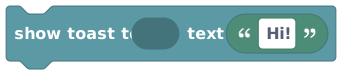 Pops a short message on the player's screen, then fades it away.
Point it at triggering player and write
Sold! One shiny sword for you.In a real shop this is where you'd also unlock a door, spawn an item, set an object state, or bump another variable like an inventory count, whatever "owning the thing" means in your world.Say no nicely (when they CAN'T afford it)
In the else slot, add a second show toast for the broke case. Point it at triggering player and write something kind like
You need 10 coins. Come back when you're richer!.Clear feedback is what makes a shop feel good. A player who clicks and sees nothing assumes it's broken. A player who sees "you need 10 coins" knows exactly what to do.
Want a louder "no"?For a bigger moment (say, a failed boss-key purchase) swap the toast for a notify block, which is a weightier on-screen alert.
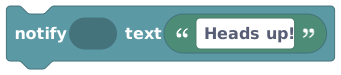 Like a toast, but for the moments that deserve more weight.
Save and test it
Save the script and leave build mode. First, give yourself some coins (use the Variables panel's "Set live value" on your
coins, or add a temporary "free coins" button). Then click the vendor:- With enough coins: you should see "Sold!" and watch your coin count drop.
- With too few: you should see the "come back richer" message and no charge.
If either path misbehaves, check When it doesn't work below.
What you just made
Read top to bottom, your script says:
when object [vendor] is interacted with
  ┗ if (player variable [coins] of (triggering player)) ≥ 10
      do
        ┗ set player variable [coins] of (triggering player) to ((coins) − 10)
        ┗ show toast to (triggering player) "Sold! One shiny sword for you."
      else
        ┗ show toast to (triggering player) "You need 10 coins. Come back when you're richer!"
One click, one check, two outcomes. That's a working shop, and the exact shape of every "can you afford / are you allowed / do you have the key" gate you'll ever build.
Make it your own
- Sell different things. Copy this onto a second vendor object with a different price and reward. Each vendor is its own little script.
- A "you're maxed out" check. Before selling, also check they don't already own the item
(a boolean Player variable like
hasSword). Nest another if inside, or combine checks; see Values & types. - Stock that runs out. Add a Room number variable
stockand start it at, say,10. Each sale subtracts 1; when it hits 0, sell nothing and toast "Sold out!". A room variable is one shared count, so it's perfect for a single shop's stockroom. - Earn coins elsewhere. Pair this with a coin pickup: when object interacted with (a
coin) → add 1 to the clicker's
coins. Now you've got a full loop: earn here, spend there. - A live wallet display. Pin the player's coins on screen with a
 so they always see their balance. The leaderboard guide walks through HUD numbers in detail.
The number-one shop bug: you read coins for the triggering player (correct) but forget to
set the owner on the set player variable block, so the charge silently doesn't happen,
or worse, you set it for the wrong player. Whenever you touch a Player variable, the owner
slot must hold the right player. For a click, that's triggering player every time.
When it doesn't work
| Symptom | Likely cause | Fix |
|---|---|---|
| Clicking the vendor does nothing | The object slot is empty or points at the wrong object | Plug your vendor into the when object is interacted with hat |
| Everyone is "broke" even with coins | The read block's PLAYER owner slot is empty | Plug triggering player into the player variable read |
| Coins don't go down after a sale | The set player variable owner slot is empty, or you didn't subtract | Set owner to triggering player; use a subtract math block |
| It charges but gives nothing (or vice versa) | A reward/charge block is in the wrong slot | Charge and reward go in do; the "sorry" toast goes in else |
| The price check is backwards | Wrong comparison or sides swapped | Use ≥, coins on the left, price on the right |
What's next?
Now that players earn and spend, rank them: top scores on screen for everyone.
A round-based minigameTurn coins into a competition with timed rounds and a winner.
VariablesThe full guide to scopes: room and player boxes, and when to use each.
Values & typesHow conditions, comparisons, and true/false logic fit together.